logo-darklogo-darklogo-darklogo-dark
  • Tool Categories
    • 🎨Art & Creative Design505
    • 🏢Business Management644
    • 💻Coding & Development515
    • 👮Detection83
    • 🧠General Use727
    • 🏥Health & Wellness55
    • 📷Image & Photo Analysis100
    • 🖼️Image Generation & Editing618
    • 📐Interior & Architectural Design37
    • 🎓Learning & Education483
    • ⚖️Legal & Finance90
    • 🎭Lifestyle & Entertainment236
    • 📢Marketing & Advertising627
    • 🎧Music & Audio138
    • 👔Office & Workplace1,014
    • 🔬Research & Data Analysis372
    • 👥Social Media245
    • 🎥Video Generation & Editing426
    • 👧🏻Virtual Companion135
    • 🎤Voice Generation & Editing381
    • ✍️Writing & Editing808
    • All Categories
    • AI Use Cases
  • News
  • Events
    • Academic Conferences
    • Developer Conferences
    • Expos / Trade Shows
    • Industry Summits
    • Workshops / Training
    • All Events
    • Past Events
  • Saved Tools
  • Suggest a Tool
✕
Home › Music & Audio › Vocal Removal› Remusic
Remusic

Remusic

An AI-powered platform designed to revolutionize music creation and learning

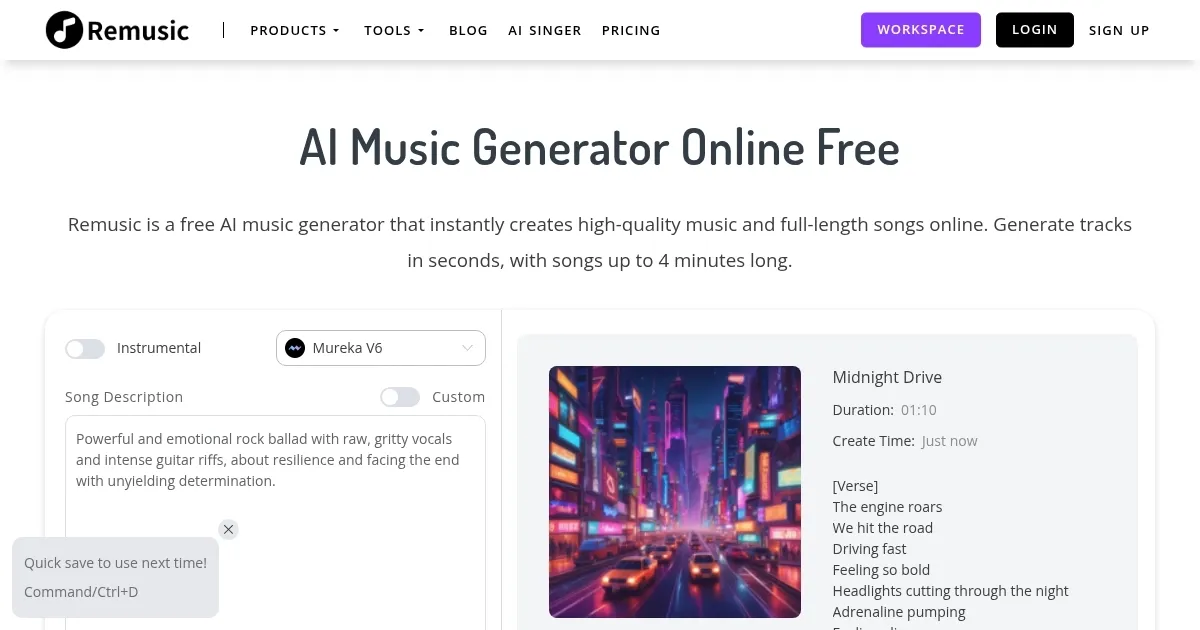
Remusic is an AI-powered platform designed to revolutionize music creation and learning. It offers a suite of tools that enable users to generate unique music tracks, compose personalized lyrics, and create custom song covers. By leveraging advanced AI tech, it makes music creation accessible to everyone, regardless of their musical background.

The platform’s AI Music Generator allows users to produce original compositions across different genres and styles by simply inputting their desired parameters. In addition, the AI Lyrics Generator crafts lyrics that align with the user’s musical vision — ensuring a cohesive and personalized output. Also, for those interested in reimagining existing songs – the AI Song Cover Generator provides fresh interpretations, adding a new dimension to familiar tracks.

Aside from creation, Remusic offers tools to enhance musical skills and understanding. For instance, the AI Vocal Remover isolates vocals or instrumentals from any track, facilitating remixing or practice sessions. Then there’s the AI Sheet Music Generator that converts compositions into professional-grade sheet music — aiding musicians in learning and performance. Furthermore, the AI Music Analyzer provides detailed insights into music composition, structure, and patterns.

As of November 2024, Remusic promised to introduce AI-generated music videos in the future — providing users with the ability to create complete audiovisual experiences.

Ultimately, by integrating all these diverse tools and features – the tool positions itself as a comprehensive platform for musicians seeking to explore the possibilities of AI in music creation and learning.

Visit Remusic ↗
Categories
🎧 Music
🔈 Vocal Removal 🎚️ Audio Editing 🎸 Instrumental Generation 🎶 Music Generation 🎛️ Audio Enhancing

Homepage Screenshot 📸

Remusic screenshot

Video Overview 🎬

Remusic - Video Overview

What are the key features? ✨

  • AI Music Generator: Remusic enables users to create unique music tracks instantly, regardless of their musical background.
  • AI Lyrics Generator: The platform offers an AI-driven tool that crafts personalized song lyrics.
  • AI Song Cover Generator: Remusic provides the ability to create AI-generated covers of existing songs, offering interpretations and innovative twists on favorite tracks.
  • AI Vocal Remover: Users can isolate vocals or instrumentals from any track with precision, facilitating remixing or enhancing projects.
  • AI Sheet Music Generator: The platform can automatically convert music into professional-grade sheet music, aiding musicians in sharing and collaborating on compositions.

Who is it for? 🤔

Remusic targets a diverse audience, including aspiring songwriters, music students, content creators, and professional musicians. Its user-friendly AI tools make music creation accessible to beginners, while offering advanced features that appeal to seasoned artists. In addition, businesses seeking custom background music for various media can benefit from Remusic's tailored compositions.

Examples of what you can use it for 💡

  • Aspiring songwriters can use Remusic to generate original melodies and lyrics
  • Music students can leverage Remusic to practice composition and arrangement
  • Influencers and content creators can utilize Remusic to produce unique music tracks and accompanying music videos for their social media platforms
  • Established musicians and producers can use Remusic to remix existing songs by isolating vocals and creating new arrangements
  • Businesses can enhance their content with custom-made music for films, vlogs, commercials, podcasts, and gaming soundtracks

Pros & Cons ⚖️

  • Music generation made easy with AI creating unique tracks and lyrics
  • Use generated music without copyright issues
  • Easy for non-musicians to create music
  • Possibly missing human emotional depth

FAQs 💬

What exactly can I create with Remusic?
You can generate full songs from text prompts, create AI covers with custom voices, remove vocals or isolate instruments, produce lyrics, sheet music, sound effects, karaoke tracks, and even music from images. It's a broad toolkit for music creation and editing.
Do I need musical experience or special software to use it?
No, the platform works entirely online in your browser with no downloads required. It's designed for beginners and pros alike, using simple text descriptions instead of technical music terms.
How good is the quality of the generated music?
Quality is generally high for an AI tool, with clear sound, decent structure, and natural-feeling elements, especially after recent updates. Results shine for many genres, though complex or very niche styles might need prompt tweaking for best outcomes.
Can I customize AI-generated songs or covers?
Yes, you get options like choosing from thousands of voices, cloning your own voice for covers, or refining prompts to adjust mood, genre, instruments, and more.
Is the vocal remover accurate for separating instruments?
It performs well at isolating vocals, bass, drums, guitar, piano, and other elements quickly. Accuracy is strong for most tracks, though very layered or effected songs can sometimes leave minor artifacts.
Does Remusic support generating music in different genres?
Absolutely, it handles a wide range including pop, rap, electronic, acoustic, and more. The AI captures genre essence effectively when you describe the style clearly in your prompt.
How fast is the generation process?
Most tracks generate in seconds to a couple of minutes, depending on length and complexity. Recent improvements have made it noticeably quicker.
Can I use the output for videos, social media, or commercial projects?
Yes, generated music is typically royalty-free for personal and many commercial uses (always check current terms), making it great for content creators on YouTube, TikTok, or other platforms.
What makes Remusic different from other AI music tools?
It combines multiple tools (generation, separation, analysis, covers, sheet music) in one free-to-start platform, with strong focus on ease, voice options, and practical creator features like karaoke or image-to-music.
Is there a free way to try it before committing?
Definitely, you get daily free generations to test the core features, no signup needed for many tools, so you can experiment right away.

Ready to try Remusic?

An AI-powered platform designed to revolutionize music creation and learning

Visit Remusic ↗

Remusic alternatives 🔗

  1. Vocal Remover Vocal Remover Separates vocals from instrumentals in songs using AI
  2. Media.io Media.io An online platform offering AI-powered video, audio, and image editing tools
  3. Moises Moises Separates vocals and instruments from songs using AI for practice and production.
  4. AudioCleaner AudioCleaner Removes background noise and enhances audio clarity with AI
  5. LALAL.AI LALAL.AI Splits audio into vocals, instruments, and stems with AI precision
  6. FineShare FineShare A set of AI tools that lets you create videos, record your voice, and more
Share
Remusic screenshot enlarged
Promote Remusic
light badge
Copy Embed Code
dark badge
Copy Embed Code
neutral badge
Copy Embed Code
Best AI Tools

Discover the best AI tools for any use case

Explore
  • Tool Categories
  • AI Use Cases
  • AI Events
  • AI News
  • Saved Tools
Company
  • About Us
  • Contact Us
  • Media & Partnerships
  • Suggest a Tool
Legal
  • Privacy Policy
  • Terms of Service
Copyright © 2026 Best AI Tools 415 Mission Street, 37th Floor, San Francisco, CA 94105