logo-darklogo-darklogo-darklogo-dark
  • Tool Categories
    • ๐ŸŽจArt & Creative Design505
    • ๐ŸขBusiness Management644
    • ๐Ÿ’ปCoding & Development515
    • ๐Ÿ‘ฎDetection83
    • ๐Ÿง General Use727
    • ๐ŸฅHealth & Wellness55
    • ๐Ÿ“ทImage & Photo Analysis100
    • ๐Ÿ–ผ๏ธImage Generation & Editing618
    • ๐Ÿ“Interior & Architectural Design37
    • ๐ŸŽ“Learning & Education483
    • โš–๏ธLegal & Finance90
    • ๐ŸŽญLifestyle & Entertainment236
    • ๐Ÿ“ขMarketing & Advertising627
    • ๐ŸŽงMusic & Audio138
    • ๐Ÿ‘”Office & Workplace1,014
    • ๐Ÿ”ฌResearch & Data Analysis372
    • ๐Ÿ‘ฅSocial Media245
    • ๐ŸŽฅVideo Generation & Editing426
    • ๐Ÿ‘ง๐ŸปVirtual Companion135
    • ๐ŸŽคVoice Generation & Editing381
    • โœ๏ธWriting & Editing808
    • All Categories
    • AI Use Cases
  • News
  • Events
    • Academic Conferences
    • Developer Conferences
    • Expos / Trade Shows
    • Industry Summits
    • Workshops / Training
    • All Events
    • Past Events
  • Saved Tools
  • Suggest a Tool
โœ•
Home › Learning & Education › Homework Helper› Shepherd Study
Shepherd Study

Shepherd Study

Streamlines studying with AI-driven plans, notes, and tutoring

Shepherd Study is an AI-powered educational platform designed to streamline the learning process for students by integrating note-taking, personalized study plans, tutoring, and peer collaboration into a single app. Available on mobile and desktop, it offers tools like a Notion-style note editor, interactive flashcards, and a Doc-Chat feature for querying uploaded documents. The platform uses AI to generate tailored study schedules and materials based on uploaded syllabi or curricula, aiming to reduce the need for multiple study apps. It also supports institutional customization, allowing schools to monitor usage and ensure academic integrity.

Key features include the ability to upload course materials, which the AI processes to create study plans, quizzes, and flashcards. The Doc-Chat tool provides instant explanations for complex topics within PDFs, while the tutoring feature connects students with affordable human tutors. Peer collaboration tools enable group study sessions, and analytics provide insights into progress. The app’s free plan offers basic functionality, with paid plans unlocking advanced features like enhanced tutoring access, which is competitively priced compared to Chegg.

Shepherd Study excels in consolidating study tools, making it ideal for students managing multiple courses. The Notion-like editor is intuitive for organizing notes, and the AI’s personalization is effective for creating targeted study plans. However, the platform can experience lag when processing large documents, and the interface may initially confuse less tech-savvy users. Some users report occasional inaccuracies in AI-generated content, requiring manual verification.

Compared to competitors like Quizlet, which focuses on flashcards, or Studyable, which emphasizes community-driven study materials, Shepherd Study offers a broader, more integrated approach. Lumio provides similar interactive features but is more teacher-focused, while Shepherd caters directly to students. The platform’s institutional integration sets it apart, offering schools tools to manage AI usage effectively.

Students should start by testing the free plan to explore core features like the study plan generator. Upload a single course document to gauge the AI’s accuracy, and use the flashcard tool for quick review sessions. Regularly check AI-generated content for accuracy, especially for complex subjects, to ensure reliable study materials.

Visit Shepherd Study ↗
Categories
๐ŸŽ“ Education
โœ๏ธ Homework Helper ๐Ÿ“บ Tutorial โ“ Answer ๐Ÿ‘ฉโ€๐Ÿซ Teacher ๐Ÿƒ Flashcard Generation ๐Ÿ“ Quiz Generation ๐Ÿ“ฐ Article Summarization ๐Ÿ“– Knowledge Base
๐Ÿ‘” Work
๐Ÿ—’๏ธ Note Taking

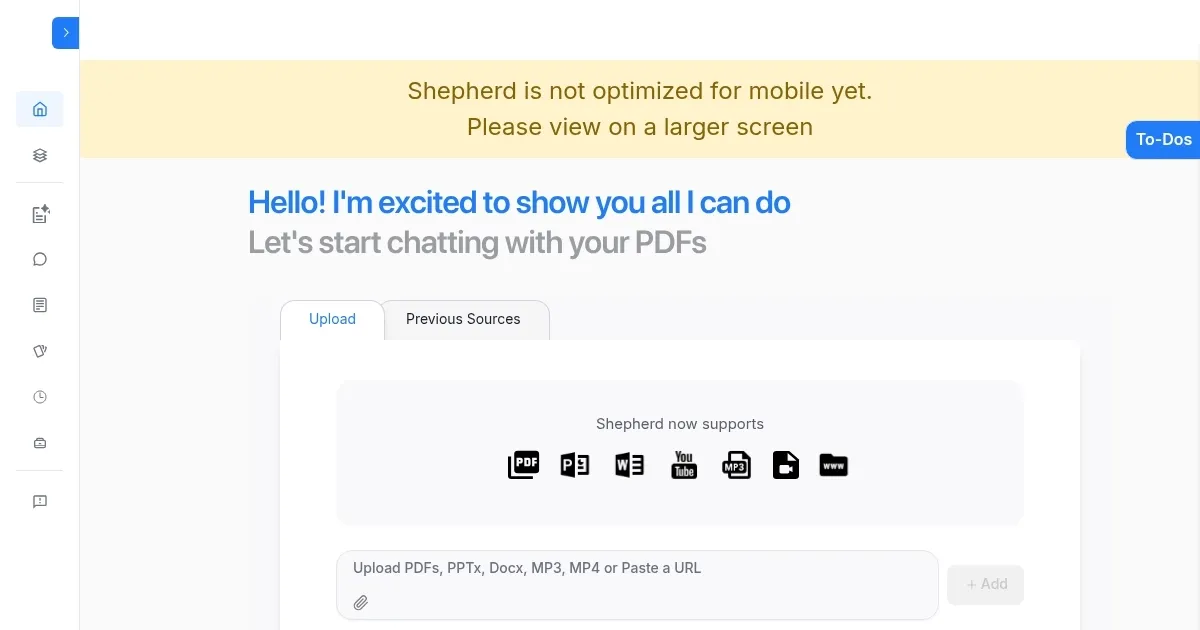
Homepage Screenshot 📸

Shepherd Study screenshot

Video Overview 🎬

Shepherd Study - Video Overview

What are the key features? ✨

  • Personalized Study Plans: AI generates tailored schedules from uploaded syllabi.
  • Notion-Style Note Editor: Organizes thoughts in an intuitive, structured format.
  • Doc-Chat: Provides instant explanations for queries within uploaded PDFs.
  • Interactive Flashcards: Adapts to user performance for effective memorization.
  • Peer Collaboration: Enables group study sessions within the app.

Who is it for? 🤔

Shepherd Study is ideal for high school and college students who juggle multiple courses and need a centralized platform to manage their study workflow. Itโ€™s especially useful for those who prefer structured learning, benefit from AI-driven personalization, or seek affordable tutoring options. The app also appeals to tech-savvy students comfortable with digital tools and institutions looking to integrate AI safely into education.

Examples of what you can use it for 💡

  • College Student: Uses Shepherd to create a study plan for a biology course, generating flashcards for key terms.
  • High School Student: Queries a history PDF via Doc-Chat to clarify complex topics before a test.
  • Study Group Leader: Organizes peer collaboration sessions to review calculus concepts together.
  • Busy Student: Relies on AI reminders to stay on track with exam preparation.
  • Institution Admin: Customizes AI prompts to align with school curricula and monitor usage.

Pros & Cons ⚖️

  • Consolidates multiple study tools
  • Intuitive note-taking editor
  • Adaptive flashcards
  • Occasional lag with large PDFs
  • Tutoring response times vary

FAQs 💬

What is Shepherd Study?
Shepherd Study is an AI-powered app that combines note-taking, study plans, tutoring, and peer collaboration for students.
Is there a free version of Shepherd Study?
Yes, a free plan offers basic features, with paid plans unlocking advanced tools like enhanced tutoring.
Can I upload my own study materials?
Yes, you can upload syllabi, PDFs, and notes to generate personalized study plans and quizzes.
Does Shepherd Study work on mobile devices?
Yes, itโ€™s available on iOS, Android, and desktop for flexible studying.
How does the Doc-Chat feature work?
Doc-Chat lets you ask questions about uploaded PDFs, providing instant AI-generated explanations.
Is Shepherd Study suitable for high school students?
Yes, itโ€™s designed for both high school and college students, with tools tailored to various subjects.
Can schools customize Shepherd Study?
Yes, institutions can customize AI prompts and monitor usage for academic integrity.
How does Shepherd compare to Quizlet?
Shepherd offers a broader range of tools, including tutoring and peer collaboration, while Quizlet focuses on flashcards.
Are the AI-generated study materials accurate?
Most materials are accurate, but users should verify complex topics for reliability.
Does Shepherd Study support group study?
Yes, peer collaboration tools allow students to organize group study sessions within the app.

Ready to try Shepherd Study?

Streamlines studying with AI-driven plans, notes, and tutoring

Visit Shepherd Study ↗

Shepherd Study alternatives 🔗

  1. ChatGPT ChatGPT All-round AI assistant generating human-like responses to user queries and tasks
  2. Britannica Chatbot Britannica Chatbot A digital librarian drawing from over 130,000 meticulously fact-checked articles
  3. Gauth Gauth A useful mobile app designed to assist students in solving complex math problems
  4. Scribbr Scribbr Rewrites text using AI to maintain meaning with new wording
  5. Brainly Brainly Provides instant homework help and AI-powered tutoring for students
  6. AI Homework Help AI Homework Help Supercharge your study doc with instant answers and explanations and recommended resources
Share
Shepherd Study screenshot enlarged
Promote Shepherd Study
light badge
Copy Embed Code
dark badge
Copy Embed Code
neutral badge
Copy Embed Code
Best AI Tools

Discover the best AI tools for any use case

Explore
  • Tool Categories
  • AI Use Cases
  • AI Events
  • AI News
  • Saved Tools
Company
  • About Us
  • Contact Us
  • Media & Partnerships
  • Suggest a Tool
Legal
  • Privacy Policy
  • Terms of Service
Copyright © 2026 Best AI Tools 415 Mission Street, 37th Floor, San Francisco, CA 94105