Skip to content
logo-darklogo-darklogo-darklogo-dark
  • Tool Categories
    • 🎨Art & Creative Design505
    • 🏢Business Management644
    • 💻Coding & Development514
    • 👮Detection83
    • 🧠General Use728
    • 🏥Health & Wellness55
    • 📷Image & Photo Analysis100
    • 🖼️Image Generation & Editing618
    • 📐Interior & Architectural Design37
    • 🎓Learning & Education483
    • ⚖️Legal & Finance90
    • 🎭Lifestyle & Entertainment236
    • 📢Marketing & Advertising627
    • 🎧Music & Audio138
    • 👔Office & Workplace1,014
    • 🔬Research & Data Analysis373
    • 👥Social Media245
    • 🎥Video Generation & Editing426
    • 👧🏻Virtual Companion135
    • 🎤Voice Generation & Editing381
    • ✍️Writing & Editing808
    • All Categories
    • AI Use Cases
  • News
  • Events
    • Academic Conferences
    • Developer Conferences
    • Expos / Trade Shows
    • Industry Summits
    • Workshops / Training
    • All Events
    • Past Events
  • Saved Tools
  • Suggest a Tool
    ✕
    Home › Coding & Development › Website Building› Webstudio AI
    Webstudio AI

    Webstudio AI

    Combining AI with a visual website builder to allow users to create websites more efficiently

    Webstudio AI is a fancy platform that combines AI with a visual website builder, allowing users to create websites more efficiently. In that sense, it streamlines the design process, enabling users to focus on creativity while automating repetitive tasks.

    Webstudio AI supports voice prompts, allowing users to interact with the AI using voice commands — making the design process even more intuitive and accessible. This feature enhances user experience by reducing the reliance on typing and allowing for a more conversational approach to website building.

    In addition, Webstudio AI offers advanced copywriting capabilities with the AI assisting in generating text for entire pages or specific sections. This can work instead of placeholder text like Lorem Ipsum and can accelerate content creation.

    Like that’s not enough, Webstudio AI automates the insertion of images by sourcing relevant visuals from Unsplash, based on the website’s content. This feature ensures that imagery complements the text, enhancing the site’s visual appeal.

    Lastly, we should mention that users can instruct the AI to update text, CSS, HTML, or images — providing flexibility and control over the design process.

    Visit Webstudio AI ↗
    Categories
    💻 Coding
    🏗️ Website Building 🚀 Landing Page Building 📱 App Building ⌨️ Code Generation ✨ Vibe Coding
    🎨 Art
    🖼️ Design Generation

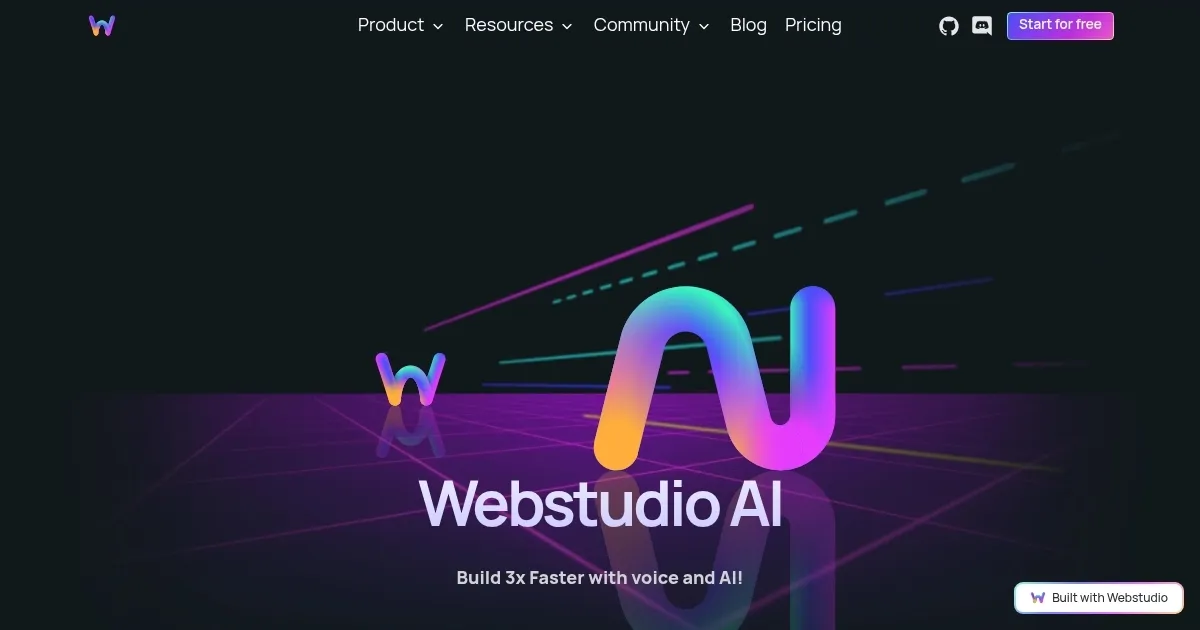
    Homepage Screenshot 📸

    Webstudio AI screenshot

    Video Overview 🎬

    Webstudio AI - Video Overview

    What are the key features? ✨

    • Voice-activated development: Enables users to build websites using natural language voice commands, enhancing accessibility and streamlining the design process.
    • AI-powered copywriting: Webstudio AI assists in generating and refining textual content for web pages to ensure coherence and engagement.
    • Automated section layouts: It can create optimized website sections based on user input, facilitating efficient design and content organization.
    • Intelligent image integration: The tool can automatically select and insert relevant images from Unsplash to complement content.
    • Conversational editing: Webstudio AI allows users to modify text, CSS, HTML, or images with conversational prompts, simplifying the editing process.

    Who is it for? 🤔

    Webstudio AI is made for designers, developers, content creators, and individuals seeking an intuitive platform for website creation. Its voice-enabled features make it particularly beneficial for users looking for a hands-free, efficient web development experience. By simplifying complex coding tasks into voice-driven actions, Webstudio AI appeals to both novices and professionals looking to streamline their workflow.

    Examples of what you can use it for 💡

    • Develop website mockups by describing desired features and layouts verbally
    • Produce and integrate text and images for blogs, portfolios, or marketing sites
    • Create and edit websites with your voice
    • Learn web development concepts through hands-on, voice-guided exercises
    • Establish an online presence without the need for extensive technical knowledge

    Pros & Cons ⚖️

    • Speeds up website design process
    • Easy to use for non-coders
    • Pre-designed templates make it even easier to starts
    • AI might limit unique design elements

    Ready to try Webstudio AI?

    Combining AI with a visual website builder to allow users to create websites more efficiently

    Visit Webstudio AI ↗

    Webstudio AI alternatives 🔗

    1. Lovable Lovable Builds apps and websites via AI chat prompts.
    2. Framer Framer An AI-powered, zero-code website builder with a built-in copywriter
    3. Landingsite.ai Landingsite.ai An AI-powered website builder that simplifies the process of creating professional websites
    4. CodeDesign CodeDesign Generates professional websites from text prompts, with editing, hosting, and code export options
    5. Mobirise AI Website Builder Mobirise AI Website Builder An online tool that leverages AI to automate the creation of websites
    6. STUDIO AI STUDIO AI Turns design ideas into live responsive websites with intuitive editing and smart suggestions
    Share
    Webstudio AI screenshot enlarged
    Best AI Tools

    Discover the best AI tools for any use case

    Explore
    • Tool Categories
    • AI Use Cases
    • AI Events
    • AI News
    • Saved Tools
    Company
    • About Us
    • Contact Us
    • Media & Partnerships
    • Suggest a Tool
    Legal
    • Privacy Policy
    • Terms of Service
    Copyright © 2026 Best AI Tools 415 Mission Street, 37th Floor, San Francisco, CA 94105