logo-darklogo-darklogo-darklogo-dark
  • Tool Categories
    • ๐ŸŽจArt & Creative Design505
    • ๐ŸขBusiness Management644
    • ๐Ÿ’ปCoding & Development515
    • ๐Ÿ‘ฎDetection83
    • ๐Ÿง General Use727
    • ๐ŸฅHealth & Wellness55
    • ๐Ÿ“ทImage & Photo Analysis100
    • ๐Ÿ–ผ๏ธImage Generation & Editing618
    • ๐Ÿ“Interior & Architectural Design37
    • ๐ŸŽ“Learning & Education483
    • โš–๏ธLegal & Finance90
    • ๐ŸŽญLifestyle & Entertainment236
    • ๐Ÿ“ขMarketing & Advertising627
    • ๐ŸŽงMusic & Audio138
    • ๐Ÿ‘”Office & Workplace1,014
    • ๐Ÿ”ฌResearch & Data Analysis372
    • ๐Ÿ‘ฅSocial Media245
    • ๐ŸŽฅVideo Generation & Editing426
    • ๐Ÿ‘ง๐ŸปVirtual Companion135
    • ๐ŸŽคVoice Generation & Editing381
    • โœ๏ธWriting & Editing808
    • All Categories
    • AI Use Cases
  • News
  • Events
    • Academic Conferences
    • Developer Conferences
    • Expos / Trade Shows
    • Industry Summits
    • Workshops / Training
    • All Events
    • Past Events
  • Saved Tools
  • Suggest a Tool
โœ•
Home › Coding & Development › Website Building› Windframe
Windframe

Windframe

Builds Tailwind CSS websites using a no-code drag-and-drop interface

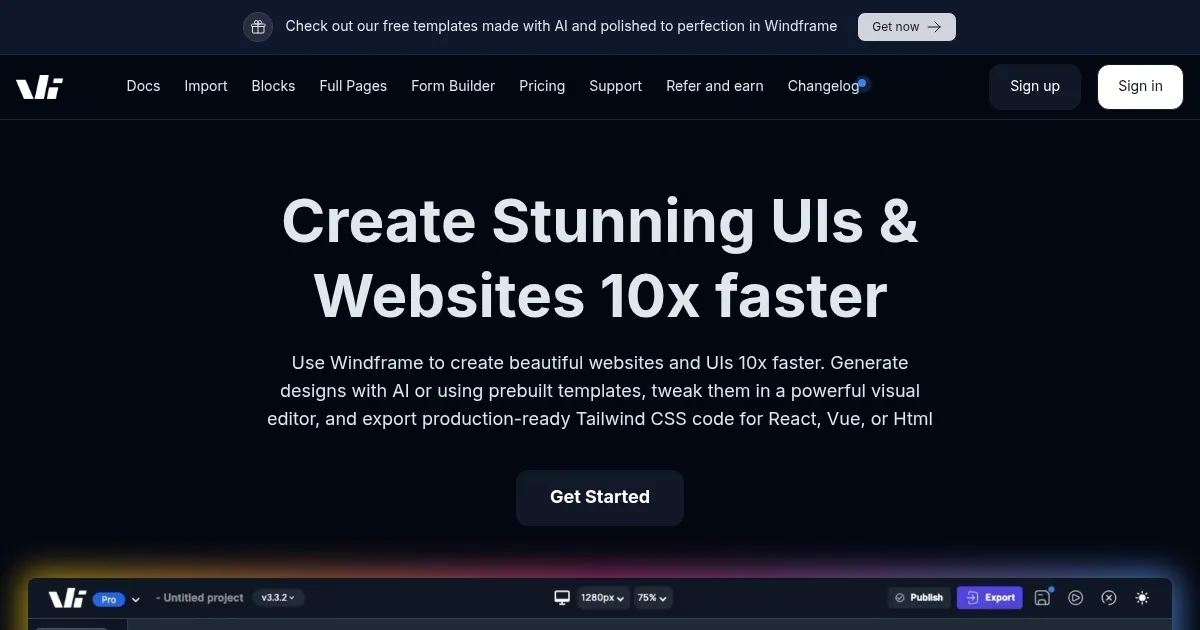
Windframe is a no-code visual builder for creating Tailwind CSS websites, offering a drag-and-drop interface and over 1000 customizable templates. Users can start from scratch or select a prebuilt template, adjusting elements like margins, fonts, and colors through an intuitive editor. The segmented classes view organizes Tailwind classes by screen size, simplifying responsive design. Real-time previews show how designs render across devices, and users can export projects to HTML, React, or Vue with clean, structured code. The platform supports real-time collaboration, allowing team members to edit projects simultaneously.

Key features include AI-generated templates, which create UI options based on text prompts, and image-to-code generation, which converts uploaded designs into Tailwind CSS. Version history lets users save and revert changes, while integrations with GitHub and Vercel streamline deployment. The form builder enables quick creation of customizable forms, and the template library is regularly updated with new designs. Windframe is subscription-based, with a free trial available, and its pricing is competitive with tools like Webflow and Framer.

Limitations include its exclusive focus on Tailwind CSS, which may not suit users working with other frameworks. The interface can be complex for beginners, requiring time to master. AI-generated outputs may need manual adjustments for complex designs, and full access requires a paid subscription. Compared to competitors, Windframe excels in Tailwind-specific workflows but lacks the broader flexibility of platforms like Wix.

Windframe is ideal for rapid prototyping and building responsive websites. Its AI tools and export options make it valuable for developers and designers. For best results, start with a free trial to explore templates and test integrations with your existing workflow.

Visit Windframe ↗
Categories
๐Ÿ’ป Coding
๐Ÿ—๏ธ Website Building ๐Ÿš€ Landing Page Building โŒจ๏ธ Code Generation ๐Ÿ“ฑ App Building
๐ŸŽจ Art
๐Ÿ“ฑ UX Design ๐Ÿ–ผ๏ธ Design Generation

Homepage Screenshot 📸

Windframe screenshot

What are the key features? ✨

  • Drag-and-Drop Builder: Enables visual creation of Tailwind CSS websites without coding.
  • AI-Generated Templates: Creates UI templates based on user-described prompts.
  • Image-to-Code Generation: Converts uploaded images into Tailwind CSS code.
  • Real-Time Collaboration: Allows multiple users to edit projects simultaneously.
  • Version History: Saves project states for easy reversion and experimentation.

Who is it for? 🤔

Windframe is a go-to tool for web developers, designers, freelancers, and small teams who rely on Tailwind CSS and need to build responsive websites quickly. Itโ€™s especially useful for those with limited front-end coding skills, like backend developers prototyping UIs, or startups aiming to ship polished web pages fast. The toolโ€™s no-code interface and AI features make it accessible to non-technical users, while its export options cater to developers integrating designs into larger projects.

Examples of what you can use it for 💡

  • Freelancer: Builds client landing pages quickly using customizable templates.
  • Startup Founder: Prototypes product pages without hiring a front-end developer.
  • Backend Developer: Creates UI mockups to integrate with React applications.
  • Design Team: Collaborates in real time to refine website designs.
  • Small Business Owner: Designs a professional website without coding expertise.

Pros & Cons ⚖️

  • Fast website prototyping
  • Clean code export
  • Extensive template library
  • Tailwind CSS focus only
  • AI output may need tweaks

FAQs 💬

What is Windframe?
Windframe is a no-code visual builder for creating Tailwind CSS websites.
Can I use Windframe without coding skills?
Yes, its drag-and-drop interface requires no coding knowledge.
Does Windframe support other CSS frameworks?
No, itโ€™s designed specifically for Tailwind CSS.
Can I export my designs to code?
Yes, designs can be exported to HTML, React, or Vue formats.
Is there a free trial available?
Yes, Windframe offers a free trial to test its features.
Can multiple users work on a project?
Yes, real-time collaboration allows team editing.
Does Windframe integrate with other tools?
Yes, it integrates with GitHub, Vercel, and more.
Are templates customizable?
Yes, over 1000 templates can be fully customized.
How does the AI feature work?
AI generates templates or converts images to Tailwind CSS code.
Is Windframe suitable for large projects?
Itโ€™s best for rapid prototyping but supports complex designs.

Ready to try Windframe?

Builds Tailwind CSS websites using a no-code drag-and-drop interface

Visit Windframe ↗
Windframe alternatives 🔗

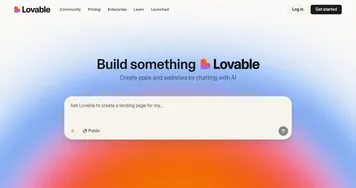
  1. Lovable Lovable Builds apps and websites via AI chat prompts.
  2. Replit AI Replit AI Transforms natural language prompts into fully deployable apps using AI agents
  3. v0.dev v0.dev Generates React UI components from text prompts using AI
  4. Hostinger AI Website Builder Hostinger AI Website Builder An AI-powered website builder that lets you launch a brand new website in under one hour
  5. Gamma Gamma An AI tool for creating presentations, documents, or webpages.
  6. Beacons.ai Beacons.ai An AI platform that helps creators manage their online presence and monetize their content
Share
Windframe screenshot enlarged
Promote Windframe
light badge
Copy Embed Code
dark badge
Copy Embed Code
neutral badge
Copy Embed Code
Best AI Tools

Discover the best AI tools for any use case

Explore
  • Tool Categories
  • AI Use Cases
  • AI Events
  • AI News
  • Saved Tools
Company
  • About Us
  • Contact Us
  • Media & Partnerships
  • Suggest a Tool
Legal
  • Privacy Policy
  • Terms of Service
Copyright © 2026 Best AI Tools 415 Mission Street, 37th Floor, San Francisco, CA 94105