logo-darklogo-darklogo-darklogo-dark
  • Home
  • Browse
    • Assistant
    • Coding
    • Image
    • Productivity
    • Video
    • Voice
    • Writing
    • All Categories
    • AI Use Cases
  • Events
  • My Favorites
  • Suggest a Tool
✕
Home › Voice Generation & Editing›
Published by Dusan Belic on August 30, 2023

Woord

Woord
Woord Homepage
Categories Voice Generation & Editing

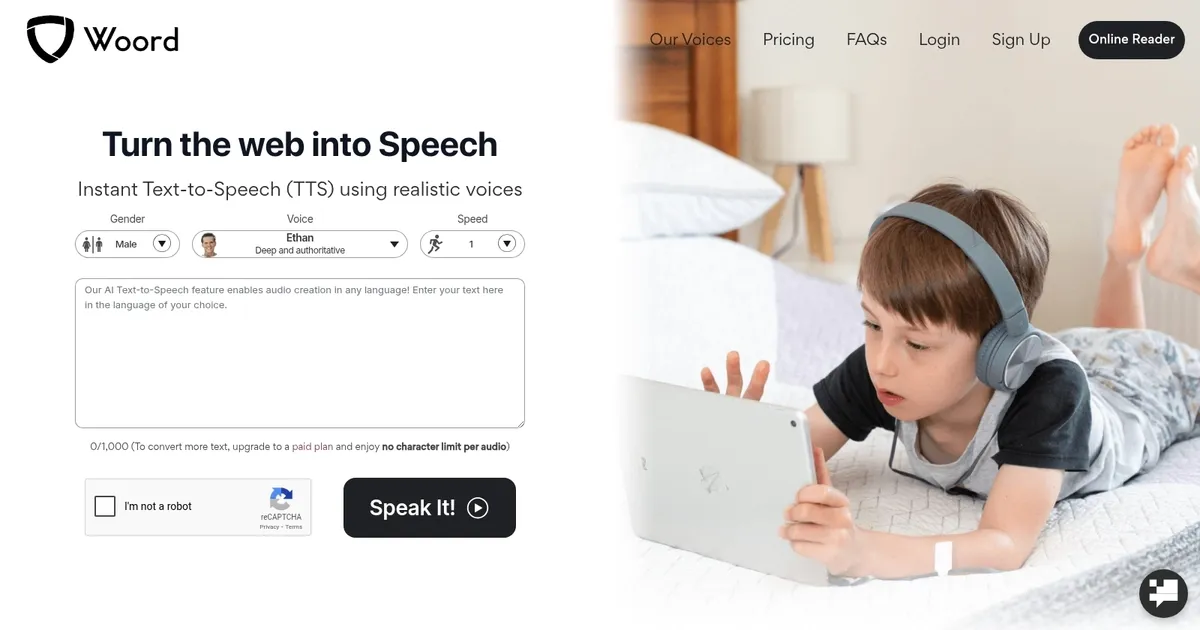
Woord - screenshot

Converts text to natural-sounding speech using realistic AI voices in multiple languages

Woord

Woord is a Text-to-Speech (TTS) online service that uses AI to convert written text into natural-sounding speech. It supports over 100 voices across 34 different languages, including regional variations like Canadian French or Brazilian Portuguese.

Users can input their articles or text, select from a variety of custom voices differing by language, gender, and accent, and then download or play the generated audio.

In that sense, the service caters to a range of needs, from creating audiobooks and e-learning materials to enhancing web accessibility for visually impaired users.

Woord offers both personal and commercial use plans, with features that include unlimited audio conversions, MP3 downloads, and audio hosting with HTML embed audio player options.

The platform is also flexible, providing tools such as OCR for reading from images and scanned PDFs, an SSML editor for detailed voice customization, and API access for integrating its capabilities into various applications. In addition, it enables users to accumulate unused audio credits from month to month — ensuring they get the most out of their subscription plans.

All in all, if you need to convert text to audio – you may want to try out Woord.

Woord Homepage
Categories Voice Generation & Editing

What are the key features? ⭐

  • Realistic AI Voices: Delivers human-like speech with natural intonation across 100+ options.
  • Multi-Language Support: Covers 34 languages including regional accents and dialects.
  • SSML Editor: Enables advanced customization like pauses, emphasis, and speed control.
  • Unlimited Conversions: Paid plans allow unlimited audio creation within character quotas.
  • API Access: Integrates text-to-speech into apps, websites, or devices seamlessly.

Who is it for? 🤔

Woord proves especially helpful for content creators needing quick voiceovers, educators building accessible lessons, developers integrating speech into apps, visually impaired individuals consuming digital text, podcasters producing episodes, and businesses requiring audio for announcements or e-learning without hiring narrators.

Examples of what you can use it for 💭

  • Content Creator: Generates audio versions of blog posts or scripts for videos and podcasts.
  • Educator: Creates narrated lessons or e-books to support diverse learning needs.
  • Visually Impaired User: Listens to articles, documents, or web content effortlessly.
  • Developer: Builds voice features into apps or IoT devices via API integration.
  • Business Professional: Produces audio announcements or training materials efficiently.

Pros & Cons ⚖️

  • Natural voice quality
  • Broad language support
  • Easy to use interface
  • Affordable entry plans
  • Per-file character cap
  • Quota on lower tiers

FAQs 💬

What is Woord mainly used for?
Woord converts text into natural-sounding speech for accessibility, content creation, education, and app integration.
How many languages does Woord support?
It supports over 34 languages with various regional accents and dialects.
Is there a free trial available?
Yes, a 7-day free trial lets you test the core features.
Can I use generated audio commercially?
Yes, you own the output fully and can redistribute it, including embeds.
What is the per-audio limit?
Each file caps at 10,000 characters, though you can split longer texts.
Does Woord have an API?
Yes, API access comes with paid plans for custom integrations.
How does Woord compare to ElevenLabs?
Woord offers great value and language variety, while ElevenLabs excels in advanced realism and cloning.
Can I adjust voice speed?
Yes, speed ranges from 0.25x to 4.0x with fine control.
Is SSML supported?
Yes, an SSML editor allows detailed speech customization.
Who benefits most from Woord?
Educators, creators, developers, and users needing accessible audio content find it particularly useful.
Visit Woord

Related tools ↙️

  1. PodLM PodLM Transforms URLs, texts, and documents into professional podcasts using AI
  2. Vogent Vogent Builds intelligent voice AI agents for automating phone calls and conversations
  3. Millis AI Millis AI Builds advanced voice agents with ultra-low latency for natural conversations
  4. Voicv Voicv Clones voices using AI to create digital replicas for text-to-speech in multiple languages
  5. Verbatik Verbatik Converts text into natural-sounding speech and clones voices across numerous languages and accents
  6. Air.ai Air.ai Conducts human-like phone conversations for sales and customer service automation
Last update: February 28, 2026
Share
Promote Woord
light badge
Copy Embed Code
dark badge
Copy Embed Code
neutral badge
Copy Embed Code
About Us | Contact Us | Suggest an AI Tool | Privacy Policy | Terms of Service

Copyright © 2026 Best AI Tools
415 Mission Street, 37th Floor, San Francisco, CA 94105