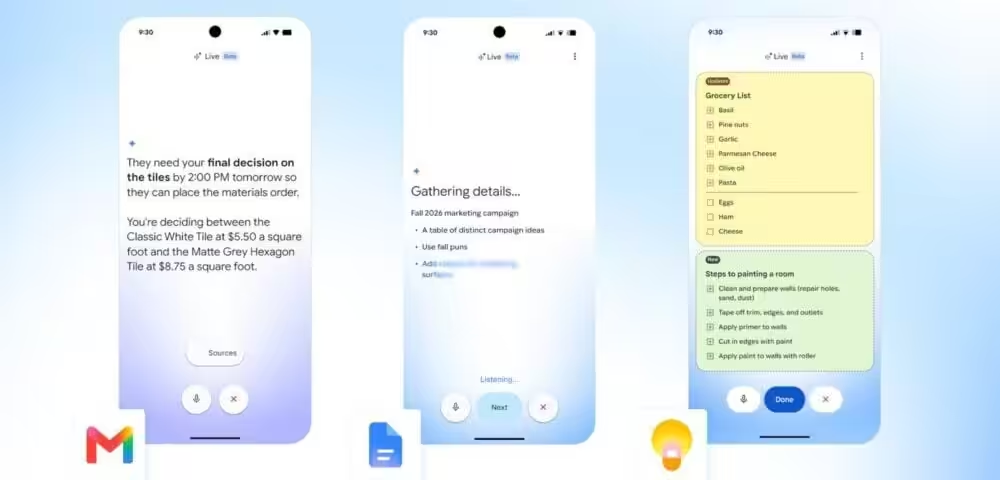
Google has quietly made one of its more practical AI moves of the year. As reported by Engadget, Gmail Live, Docs Live, and Keep Live have all exited beta and are now generally available to paying Google AI subscribers. No more waitlists. If you’re on a Plus, Pro, or Ultra plan, you can use voice to talk to your inbox, your documents, and your notes app right now.
The pitch is simple: instead of typing search queries or prompts, you speak. Gmail Live lets you ask natural-language questions like “When is my kid’s next school event?” and then follow up with “Does he need to bring anything?” without starting over. You can interrupt mid-sentence, change the subject entirely, and the system keeps up. A transcript displays on screen, with links back to the source emails. It works on both Android and iOS for Plus, Pro, and Ultra subscribers.
Docs Live is more ambitious. It helps you structure and draft documents based on what you say, and if you grant it access to Drive, Chat, Gmail, and the web, it pulls from all of those to build a draft for you. That’s a meaningful workflow shortcut for anyone who spends time writing reports, proposals, or even long emails. It’s available on Android and iOS, but only for Pro and Ultra subscribers, so Plus users are locked out here.
Keep Live is the simplest of the three. Speak out loud, and it writes your list or note. It’s smart enough to infer structure without explicit instructions, so saying “ingredients for pesto pasta” gets you a categorized grocery list rather than a raw block of text. For now, Keep Live is Android only, which feels like an arbitrary limitation that will probably disappear in a few months.
So why does this matter beyond the feature checklist? Google is methodically bringing Gemini Live’s conversational voice model into the apps where people actually spend their time. Competitors like Microsoft have pushed Copilot into Word and Outlook, and Apple is threading its own assistant deeper into native apps. Google is following a similar strategy, but with a subscription gate that monetizes the behavior directly. The risk is that voice AI in productivity apps still feels like a novelty to most users. The upside is that when it works, it genuinely cuts steps out of real workflows. These features include:
- Gmail Live: voice search and follow-up questions across your inbox, Android and iOS, all paid tiers
- Docs Live: voice-assisted drafting with access to Drive, Chat, Gmail, and the web, Android and iOS, Pro and Ultra only
- Keep Live: voice-to-list note-taking with contextual inference, Android only, Pro and Ultra only
The subscriber-only model is a clear signal that Google views these capabilities as a retention and upgrade driver, not a free feature for everyone. That’s a reasonable business decision, but it also means casual Google users won’t see any of this unless they’re already paying. For developers and founders evaluating productivity AI stacks, this is worth watching. Google’s deep integration across its own apps gives it an advantage that third-party AI tools simply can’t replicate.