Skip to content
logo-darklogo-darklogo-darklogo-dark
  • Tool Categories
    • 🎨Art & Creative Design505
    • 🏢Business Management644
    • 💻Coding & Development514
    • 👮Detection83
    • 🧠General Use728
    • 🏥Health & Wellness55
    • 📷Image & Photo Analysis100
    • 🖼️Image Generation & Editing618
    • 📐Interior & Architectural Design37
    • 🎓Learning & Education483
    • ⚖️Legal & Finance90
    • 🎭Lifestyle & Entertainment236
    • 📢Marketing & Advertising627
    • 🎧Music & Audio138
    • 👔Office & Workplace1,014
    • 🔬Research & Data Analysis373
    • 👥Social Media245
    • 🎥Video Generation & Editing426
    • 👧🏻Virtual Companion135
    • 🎤Voice Generation & Editing381
    • ✍️Writing & Editing808
    • All Categories
    • AI Use Cases
  • News
  • Events
    • Academic Conferences
    • Developer Conferences
    • Expos / Trade Shows
    • Industry Summits
    • Workshops / Training
    • All Events
    • Past Events
  • Saved Tools
  • Suggest a Tool
    ✕
    Home › Art & Creative Design › Art Generation› Artguru
    Artguru

    Artguru

    Transforms text or photos into unique AI-generated artwork in seconds

    Artguru AI is a neat tool that can generate images from text or photos, transform images into various artistic styles, and create AI avatars. The Text-to-Image feature converts text prompts into images in seconds, supporting styles like anime, cyberpunk, and oil painting. The Photo-to-Art tool transforms uploaded images into artistic renditions, offering over 10 styles, including watercolor and cartoon. The Face Swap feature enables realistic face replacements in photos or videos. The Image Upscaler enhances low-resolution images for sharper quality. Finally, the AI Girl Generator creates character images from text or photo inputs.

    The platform’s freemium model provides daily credits for free use, with premium plans offering faster processing, higher resolutions, and commercial usage rights. Competitors like MidJourney offer more advanced customization, while DALL-E excels in photorealism. Artguru’s interface is user-friendly, cloud-based, and accessible on any device. Users can generate up to four images simultaneously with batch generation.

    Users appreciate the intuitive interface and variety of styles. Free daily credits allow exploration without cost. The platform supports multiple aspect ratios and customizable settings. However, the free plan limits the number of creations, and complex prompts may produce inconsistent results. Some users report occasional quality variations in batch outputs. The tool requires a stable internet connection.

    Start with simple prompts and explore preset styles like cartoon or 3D and take it from there. You can also use reference images for precise results. Pretty cool.

    Visit Artguru ↗
    Categories
    🎨 Art
    🎨 Art Generation 🌸 Anime Generation
    🖼️ Image
    🖼️ Image Generation 🪄 Text to Image 🧑‍🎤 Avatar Generation 🎭 Face Swap 📸 Headshot Generation 👤 Profile Picture Generation

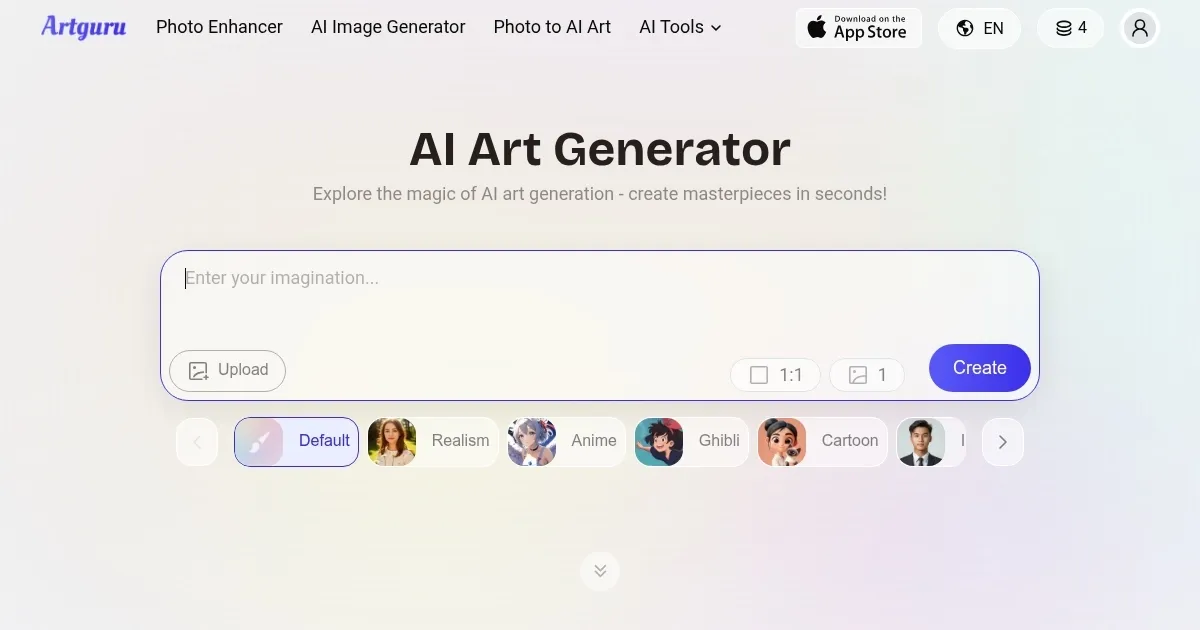
    Homepage Screenshot 📸

    Artguru screenshot

    What are the key features? ✨

    • Text-to-Image Creation: Generates images from text prompts in seconds.
    • Photo-to-Art Transformation: Converts photos into styles like anime or oil painting.
    • Face Swap: Swaps faces in photos or videos with realistic results.
    • Image Upscaler: Enhances low-resolution images to high quality.
    • AI Girl Generator: Creates unique character images from text or photos.

    Who is it for? 🤔

    Artguru AI is ideal for digital artists, content creators, social media managers, and hobbyists seeking to create unique artwork without advanced skills. Its intuitive interface suits beginners, while its diverse styles and customization options appeal to professionals like game designers and marketers needing quick, high-quality visuals.

    Examples of what you can use it for 💡

    • Graphic Designer: Creates concept art for projects using Text-to-Image.
    • Social Media Manager: Generates eye-catching visuals for posts.
    • Game Developer: Designs character avatars with AI Girl Generator.
    • Photographer: Enhances low-res photos with Image Upscaler.
    • Hobbyist: Transforms selfies into cartoon or painting styles for fun.

    Pros & Cons ⚖️

    • Free daily credits for testing.
    • A range of artistic styles.
    • High-quality image upscaling.
    • Batch output inconsistency.

    FAQs 💬

    What is Artguru AI?
    Artguru AI is a tool that creates images from text or photos using AI.
    Is Artguru free to use?
    Yes, it offers a free plan with daily credits; premium plans unlock more features.
    What styles can I create?
    Styles include anime, cyberpunk, oil painting, watercolor, cartoon, and more.
    Do I need design skills?
    No, the interface is user-friendly for all skill levels.
    Can I use it on my phone?
    Yes, it’s available on iOS and Android apps or via browser.
    What are the image limits?
    Free plan has daily limits; subscriptions allow more creations.
    Can I sell my art?
    Subscribers can use images commercially; free users are limited to personal use.
    Is my data safe?
    Yes, Artguru implements security measures; check their privacy policy.
    How do I contact support?
    Email support@artguru.ai for assistance.
    Can I customize images?
    Yes, adjust prompts, styles, and settings for tailored results.

    Ready to try Artguru?

    Transforms text or photos into unique AI-generated artwork in seconds

    Visit Artguru ↗
    Artguru alternatives 🔗

    1. SeaArt SeaArt An AI-driven art creation platform with features including various styles, face swaps, and image upscaling.
    2. OpenArt OpenArt A versatile AI-powered platform for generating and enhancing images and art.
    3. A1.art A1.art An AI platform that allows users to create and customize various digital artwork effortlessly
    4. PicLumen PicLumen An image generator transforms text prompts into stunning visuals with minimal effort
    5. Imagine Imagine Enter a prompt, choose a style, and watch an AI art generator bring your ideas to life
    6. getimg.ai getimg.ai Create amazing art, images and photos with the power of AI
    Share
    Artguru screenshot enlarged
    Best AI Tools

    Discover the best AI tools for any use case

    Explore
    • Tool Categories
    • AI Use Cases
    • AI Events
    • AI News
    • Saved Tools
    Company
    • About Us
    • Contact Us
    • Media & Partnerships
    • Suggest a Tool
    Legal
    • Privacy Policy
    • Terms of Service
    Copyright © 2026 Best AI Tools 415 Mission Street, 37th Floor, San Francisco, CA 94105