Skip to content
logo-darklogo-darklogo-darklogo-dark
  • Tool Categories
    • 🎨Art & Creative Design505
    • 🏢Business Management644
    • 💻Coding & Development514
    • 👮Detection83
    • 🧠General Use728
    • 🏥Health & Wellness55
    • 📷Image & Photo Analysis100
    • 🖼️Image Generation & Editing618
    • 📐Interior & Architectural Design37
    • 🎓Learning & Education483
    • ⚖️Legal & Finance90
    • 🎭Lifestyle & Entertainment236
    • 📢Marketing & Advertising627
    • 🎧Music & Audio138
    • 👔Office & Workplace1,014
    • 🔬Research & Data Analysis373
    • 👥Social Media245
    • 🎥Video Generation & Editing426
    • 👧🏻Virtual Companion135
    • 🎤Voice Generation & Editing381
    • ✍️Writing & Editing808
    • All Categories
    • AI Use Cases
  • News
  • Events
    • Academic Conferences
    • Developer Conferences
    • Expos / Trade Shows
    • Industry Summits
    • Workshops / Training
    • All Events
    • Past Events
  • Saved Tools
  • Suggest a Tool
    ✕
    Home › Coding & Development › Website Building› Breakdance AI
    Breakdance AI

    Breakdance AI

    Generates tailored website content with one click, streamlining WordPress design

    Breakdance AI is a neat service that feels like having a clever intern who writes decent copy at the snap of your fingers. As someone who’s dabbled in WordPress design, I loaded up Breakdance AI on a test site, armed with an OpenAI API key and a half-built landing page. The goal? Populate a hero section and a product grid with text that didn’t sound like it came from a robot. The experience was mostly smooth, with a few quirks that kept things interesting, but it’s hard not to be charmed by how quickly it gets the job done.

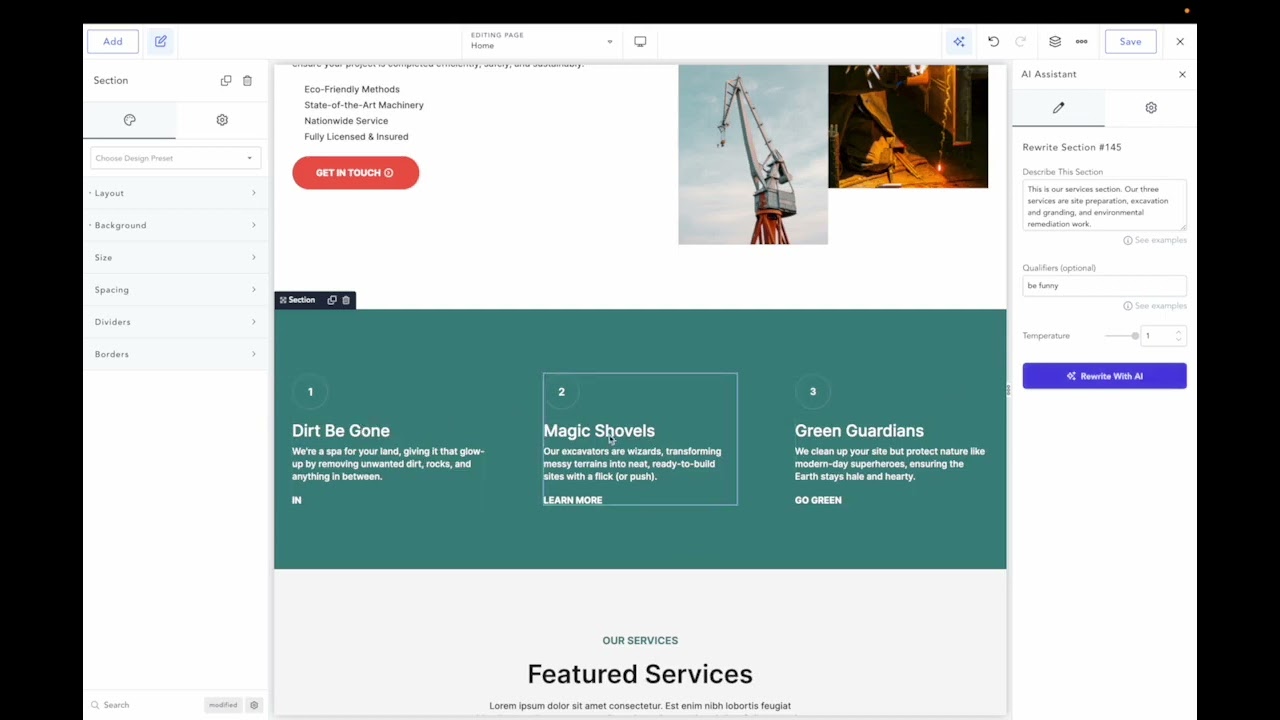
    Clicking the AI icon in Breakdance feels like unleashing a tiny wizard. I selected a section, added a qualifier like “engaging and concise,” and hit generate. Within seconds, my empty hero section had a bold headline and a punchy call-to-action. The text wasn’t perfect — think solid first draft — but it understood my layout, which was a relief. I played with the individual element customization, tweaking a button’s text to sound more urgent. The macro feature caught my eye, letting me save a prompt like “write in a friendly tone for a tech startup.” Applying it across multiple sections was a breeze, and it kept the voice consistent, which is a win for anyone juggling client projects. The variations feature, where you get multiple text options, felt like a mini brainstorming session, sparking ideas I hadn’t considered.

    The integration with Breakdance is seamless, no question. It’s built to live inside the builder, so you’re not bouncing between tools. The AI’s use of OpenAI’s GPT-4o model (I splurged for the advanced option) delivered sharp, context-aware text, and the direct API connection meant no lag. But here’s the rub: setting up the API key was a bit fiddly. I hit a “model not found” error until I realized my OpenAI account needed a $5 minimum spend to unlock GPT-4. Also, the AI sometimes churns out text that’s a tad stiff, like it’s trying too hard to sound professional. I had to rewrite a paragraph to add some personality, which was a minor hassle.

    Compared to Elementor’s AI or Divi’s AI, Breakdance AI feels more tailored to its ecosystem, but it’s not a standalone solution. You need Breakdance 2.0 or higher, and the learning curve for non-techies might be steeper than expected. Pricing seems fair — starting at an annual fee for one site, with a bundle option for unlimited sites — but you’re also paying for OpenAI’s API, which adds up. What surprised me most was the CSS generation tool. I tried it on a whim and got clean, functional code for a hover effect, which saved me a trip to Stack Overflow. If you’re diving in, start with a clear business description in the settings, test the free beta if it’s still available, and lean into the variations feature to refine your content. It’s a solid tool, just don’t expect it to read your mind perfectly.

    Visit Breakdance AI ↗
    Categories
    💻 Coding
    🏗️ Website Building 🚀 Landing Page Building 📱 App Building
    🎨 Art
    🖼️ Design Generation
    ✍️ Writing
    ✒️ Copywriting

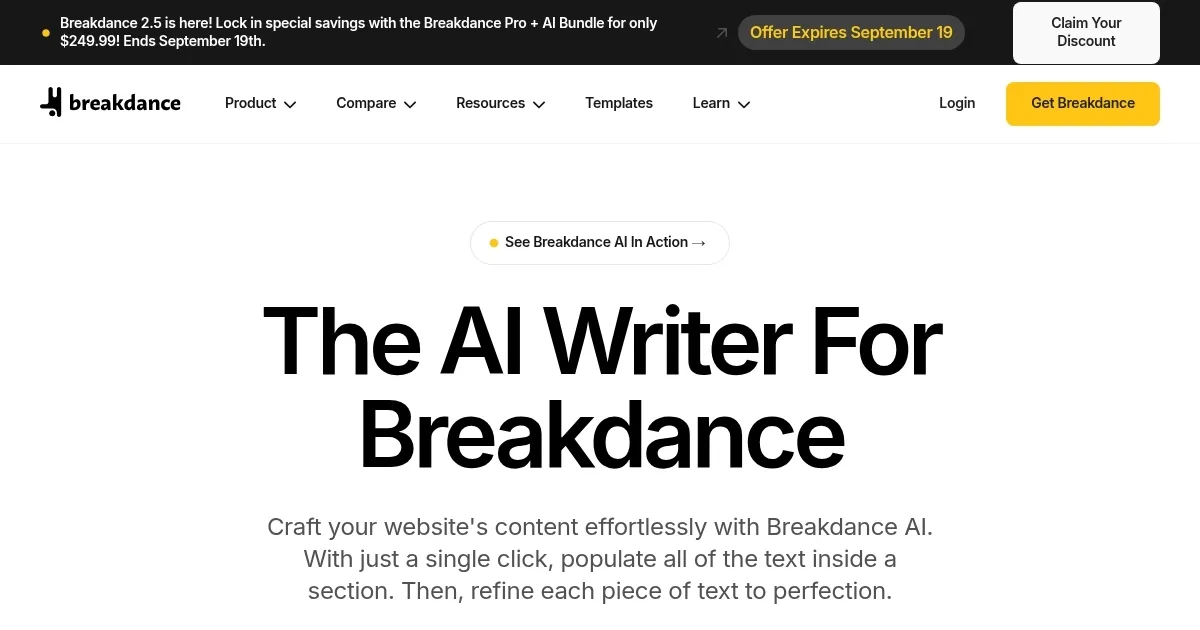
    Homepage Screenshot 📸

    Breakdance AI screenshot

    Video Overview 🎬

    Breakdance AI - Video Overview

    What are the key features? ✨

    • One-Click Section Writing: Generates text for entire sections or elements instantly.
    • Contextual Awareness: Analyzes page layouts to produce relevant content.
    • Macro Customization: Creates reusable prompts for consistent content application.
    • Text Locking: Prevents specific text from being altered during updates.
    • Content Variations: Offers multiple text options for user selection.

    Who is it for? 🤔

    Breakdance AI is ideal for WordPress developers, web designers, and agencies using the Breakdance visual builder who need to generate and refine website content quickly. It suits small business owners creating professional sites, e-commerce managers building product pages, and freelancers managing multiple client projects, particularly those seeking efficient, context-aware text generation without extensive copywriting expertise.

    Examples of what you can use it for 💡

    • Web Designer: Populates a client’s landing page with tailored text in one click.
    • E-commerce Manager: Generates product descriptions for WooCommerce pages.
    • Freelancer: Uses macros to maintain consistent tone across client sites.
    • Small Business Owner: Creates engaging homepage content without writing skills.
    • Agency: Streamlines content creation for multiple WordPress projects.

    Pros & Cons ⚖️

    • Seamless Breakdance integration
    • Customizable macros
    • CSS generation tool
    • Requires OpenAI API key
    • Occasional generic output

    FAQs 💬

    What is Breakdance AI?
    Breakdance AI is a tool that generates website content using OpenAI's GPT models, integrated with the Breakdance WordPress builder.
    Do I need an OpenAI API key?
    Yes, an active OpenAI API key is required to use Breakdance AI, separate from a ChatGPT license.
    What models does Breakdance AI support?
    It supports GPT-3.5 Turbo, GPT-4 Turbo, and GPT-4o, with varying billing rates.
    Can I use Breakdance AI without Breakdance?
    No, it requires Breakdance 2.0 or higher to function.
    Is there a free version?
    Breakdance AI was free during its beta phase, but now requires a paid license.
    What are macros in Breakdance AI?
    Macros are custom prompts for consistent content generation across pages.
    Can I lock text elements?
    Yes, text locking prevents specific content from being overwritten during updates.
    Does it work with WooCommerce?
    Yes, it generates content for WooCommerce product pages and layouts.
    What if I hit an API quota error?
    Check your OpenAI account for credits or upgrade your plan to resolve quota issues.
    Can Breakdance AI generate CSS?
    Yes, it includes a tool to create custom CSS for styling elements.

    Ready to try Breakdance AI?

    Generates tailored website content with one click, streamlining WordPress design

    Visit Breakdance AI ↗

    Breakdance AI alternatives 🔗

    1. Jetpack AI Assistant Jetpack AI Assistant Unleash the power of AI in WordPress to boost your content creation
    2. Landingsite.ai Landingsite.ai An AI-powered website builder that simplifies the process of creating professional websites
    3. Webstudio AI Webstudio AI Combining AI with a visual website builder to allow users to create websites more efficiently
    4. Framer Framer An AI-powered, zero-code website builder with a built-in copywriter
    5. Rollout Rollout Creates professional websites using AI-driven chat interface
    6. Brizy AI Website Builder Brizy AI Website Builder Using artificial intelligence to generate complete websites in seconds
    Share
    Breakdance AI screenshot enlarged
    Best AI Tools

    Discover the best AI tools for any use case

    Explore
    • Tool Categories
    • AI Use Cases
    • AI Events
    • AI News
    • Saved Tools
    Company
    • About Us
    • Contact Us
    • Media & Partnerships
    • Suggest a Tool
    Legal
    • Privacy Policy
    • Terms of Service
    Copyright © 2026 Best AI Tools 415 Mission Street, 37th Floor, San Francisco, CA 94105