logo-darklogo-darklogo-darklogo-dark
  • Tool Categories
    • 🎨Art & Creative Design505
    • 🏢Business Management644
    • 💻Coding & Development515
    • 👮Detection83
    • 🧠General Use727
    • 🏥Health & Wellness55
    • 📷Image & Photo Analysis100
    • 🖼️Image Generation & Editing618
    • 📐Interior & Architectural Design37
    • 🎓Learning & Education483
    • ⚖️Legal & Finance90
    • 🎭Lifestyle & Entertainment236
    • 📢Marketing & Advertising627
    • 🎧Music & Audio138
    • 👔Office & Workplace1,014
    • 🔬Research & Data Analysis372
    • 👥Social Media245
    • 🎥Video Generation & Editing426
    • 👧🏻Virtual Companion135
    • 🎤Voice Generation & Editing381
    • ✍️Writing & Editing808
    • All Categories
    • AI Use Cases
  • News
  • Events
    • Academic Conferences
    • Developer Conferences
    • Expos / Trade Shows
    • Industry Summits
    • Workshops / Training
    • All Events
    • Past Events
  • Saved Tools
  • Suggest a Tool
✕
Home › Office & Workplace › Diagram Generation› ChatUML
ChatUML

ChatUML

An AI tool that lets you transform your idea to diagrams in no time

ChatUML is an AI-assisted diagram generator that simplifies the creation of complex diagrams by utilizing cutting-edge AI algorithms to produce clear and concise visuals. As such, it provides an effortless way to transform your idea to diagrams in no time.

Instead of doing the “math stuff,” the tool — powered by OpenAI’s GPT-4 — lets you chat and create diagrams.

ChatUML supports various diagram types, including Sequence, Use case, Class, Object, Activity, Component, Deployment, State, Timing, BNF, Gantt, Mindmap, Work Break Down, and Entity Relationship.

Once created, you will be able to access your diagram from anywhere, whenever you need them.

ChatUML can be tried for free, but it is very limited — offering just 5 credits. In order to do more with it, you will have to pay for more credits. AI computing is not cheap, so it makes sense…

Visit ChatUML ↗
Categories
👔 Work
📐 Diagram Generation 📈 Charting
💻 Coding
👨‍💻 Development
🎓 Education
🗺️ Mind Mapping

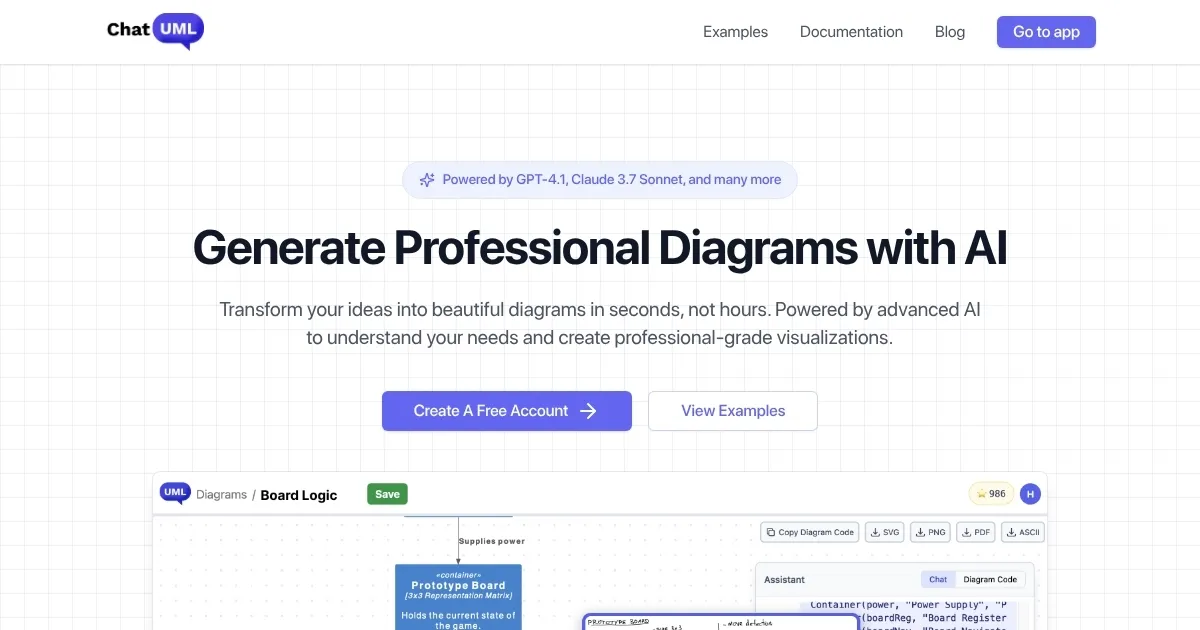
Homepage Screenshot 📸

ChatUML screenshot

Video Overview 🎬

ChatUML - Video Overview

What are the key features? ✨

  • AI Diagram Generation: Creates professional diagrams instantly from natural language descriptions, pasted text, or sketches.
  • Natural Language Iteration: Refines and updates diagrams through plain English follow-up messages without syntax knowledge.
  • Multiple Diagram Types: Supports PlantUML, C4 models, sequence diagrams, mindmaps, flowcharts, and additional formats.
  • Model Selection: Offers lightweight fast models for quick tasks and premium models for complex diagrams.
  • Easy Export & Sharing: Exports as images or PDFs and generates shareable links for team collaboration without accounts.

Who is it for? 🤔

ChatUML helps software engineers, architects, product managers, and technical teams who need to visualize systems, processes, or ideas quickly without spending hours on manual diagramming tools. It's especially useful for solo makers, early-stage startups, one-person tech teams, and anyone turning requirements, meeting notes, or rough concepts into clear diagrams for discussions, documentation, or planning.

Examples of what you can use it for 💡

  • Software Architect: Generates C4 context and container diagrams from system requirements to share with stakeholders quickly.
  • Product Manager: Converts PRD sections or user stories into flowcharts and mindmaps for sprint planning meetings.
  • Developer: Builds sequence diagrams from API interaction descriptions to clarify logic before coding.
  • Team Lead: Transforms messy meeting notes into structured process flowcharts for onboarding or retrospectives.
  • Indie Maker: Uploads hand-drawn sketches and refines them into professional visuals for pitches or docs.

Pros & Cons ⚖️

  • Fast diagram creation
  • Conversational refinements
  • Wide diagram support
  • Flexible credit system
  • Occasional prompt tweaks needed
  • Credit limits on free tier

FAQs 💬

What types of diagrams can ChatUML generate?
ChatUML supports PlantUML, C4 models, sequence diagrams, mindmaps, flowcharts, and more through AI processing.
Do I need to know PlantUML or diagram syntax?
No, you describe what you want in plain English, and ChatUML handles the syntax behind the scenes.
Is there a free version available?
Yes, the free tier lets you create diagrams with limited messages per diagram using basic models, no credit card required.
How does pricing work?
It uses a pay-as-you-go credit system where you buy credits for heavier use or premium models, and credits never expire.
Can I collaborate with my team?
Yes, generate shareable links so others can view or discuss diagrams without needing accounts.
What AI models power ChatUML?
It uses models like GPT-5.2, Claude 4.5 Sonnet, Deepseek, and others, with options to choose based on speed or complexity.
Can I upload sketches or images?
Yes, upload rough hand-drawn sketches, and ChatUML converts them into clean digital diagrams.
How does it compare to traditional tools like Lucidchart?
ChatUML focuses on AI speed and natural language input, while traditional tools emphasize manual precision and templates.

Ready to try ChatUML?

An AI tool that lets you transform your idea to diagrams in no time

Visit ChatUML ↗

ChatUML alternatives 🔗

  1. FigJam AI FigJam AI Instantly visualize ideas, suggest best practices, and automate tedious tasks
  2. Miro AI Miro AI Visual collaboration platform that lets you build the next big thing with a prompt and a chat
  3. Napkin AI Napkin AI Turn text into visually engaging content like infographics, flowcharts, and diagrams
  4. Mermaid Chart Mermaid Chart A diagramming tool that allows users to create a range of diagrams using text
  5. Whimsical Mind Maps Whimsical Mind Maps An AI-powered tool for the quick and collaborative creation of mind maps
  6. Whimsical AI: Text-to-Flowchart Whimsical AI: Text-to-Flowchart Transforms text prompts into editable flowcharts instantly
Share
ChatUML screenshot enlarged
Promote ChatUML
light badge
Copy Embed Code
dark badge
Copy Embed Code
neutral badge
Copy Embed Code
Best AI Tools

Discover the best AI tools for any use case

Explore
  • Tool Categories
  • AI Use Cases
  • AI Events
  • AI News
  • Saved Tools
Company
  • About Us
  • Contact Us
  • Media & Partnerships
  • Suggest a Tool
Legal
  • Privacy Policy
  • Terms of Service
Copyright © 2026 Best AI Tools 415 Mission Street, 37th Floor, San Francisco, CA 94105