logo-darklogo-darklogo-darklogo-dark
  • Tool Categories
    • ๐ŸŽจ Art
    • ๐Ÿข Business
    • ๐Ÿ’ป Coding
    • ๐Ÿ‘ฎ Detection
    • ๐Ÿง  General
    • ๐Ÿฅ Health
    • ๐Ÿ“ท Image Analysis
    • ๐Ÿ–ผ๏ธ Image
    • ๐Ÿ“ Architecture
    • ๐ŸŽ“ Education
    • โš–๏ธ Legal/Finance
    • ๐ŸŽญ Lifestyle
    • ๐Ÿ“ข Advertising
    • ๐ŸŽง Music
    • ๐Ÿ‘” Work
    • ๐Ÿ”ฌ Research
    • ๐Ÿ‘ฅ Social
    • ๐ŸŽฅ Video
    • ๐Ÿ‘ง๐Ÿป Companion
    • ๐ŸŽค Voice
    • โœ๏ธ Writing
    • All Categories
    • AI Use Cases
  • News
  • Events
    • Academic Conferences
    • Developer Conferences
    • Expos / Trade Shows
    • Industry Summits
    • Online Events
    • Workshops / Training
    • All Events
    • Past Events
  • Saved Tools
  • Suggest a Tool
โœ•
Home › Learning & Education › Mind Mapping› MyMap.ai
MyMap.ai

MyMap.ai

Transforms ideas into visual diagrams via AI chat

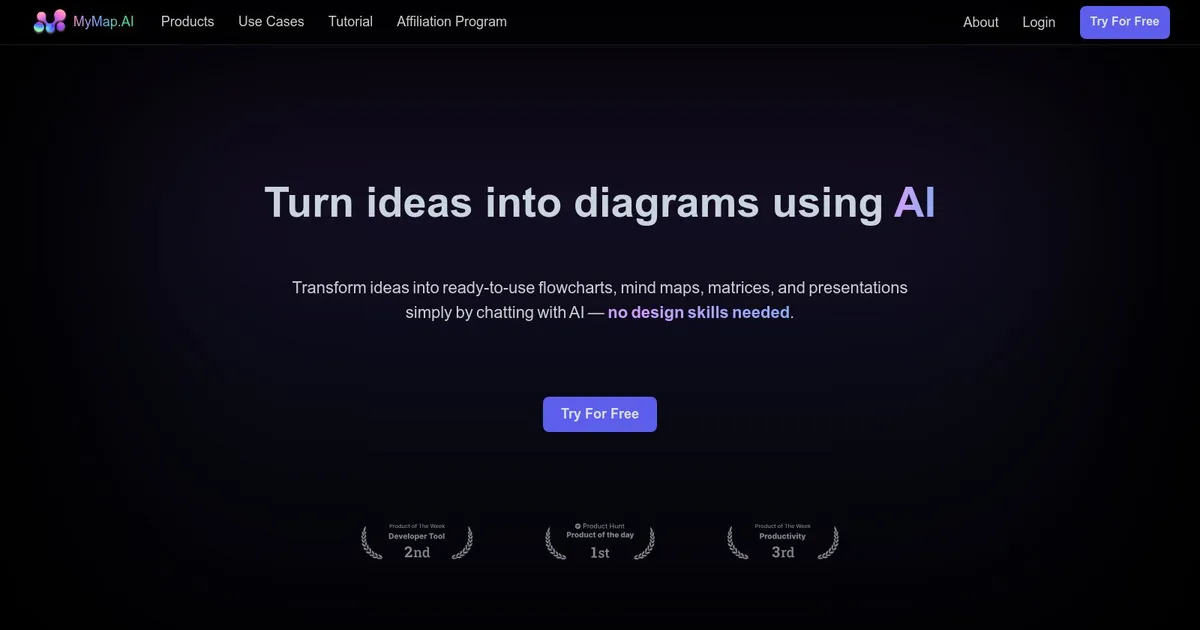
MyMap.AI is a cool platform designed to streamline the ideation and visualization process. At its core, MyMap.AI is a fancy mapping software that allows for the creation, sharing, and collaboration on customizable maps. This makes it a useful tool for a wide range of users — from business professionals to educators — seeking to visualize and analyze spatial data more effectivelyโ€‹.

The platform boasts a chat interface, which aids users in transforming text-based ideas into visual formats, such as mind maps and presentations, without the need for design skills. This feature is particularly appealing for those looking to save time and collaborate more efficiently on visual creationโ€‹.

MyMap.AI provides a variety of tools for idea visualization, including mind maps, visual stories, code snippets, Kanban boards, and SWOT analyses. Furthermore, it supports AI-generated essays, pitch decks, and roadmaps.

The service is offered on a subscription basis, with options tailored to different user needs, including a free trial to explore its capabilities.

Visit MyMap.ai ↗

Categories

๐ŸŽ“ Education

๐Ÿ—บ๏ธ Mind Mapping ๐Ÿ•ธ๏ธ Knowledge Graph ๐Ÿ—‚๏ธ Knowledge Management

๐Ÿ‘” Work

๐Ÿ“ Diagram Generation ๐Ÿ–๏ธ Whiteboard ๐Ÿ—’๏ธ Note Taking ๐Ÿ“ˆ Charting ๐Ÿ’ฌ Presentation Generation

Screenshot 📸

MyMap.ai screenshot

What are the key features? ✨

  • Chat-Based Creation: Generates diagrams instantly through natural language conversation with AI.
  • Web Search Integration: Automatically pulls real-time data from Google or Bing for context-rich maps.
  • File Upload Support: Analyzes uploaded files like PDFs or text to create visuals from existing content.
  • Real-Time Collaboration: Allows multiple users to edit the same diagram simultaneously.
  • Export and Share Options: Saves diagrams as images, PDFs, or shareable links for easy distribution.

Who is it for? 🤔

MyMap.AI works well for students organizing notes and research, professionals planning projects or brainstorming strategies, content creators outlining ideas, and teams needing quick collaborative visuals without advanced design skills.

Examples of what you can use it for 💡

  • Students: Summarizes lecture notes or research papers into mind maps for better retention.
  • Professionals: Builds project flowcharts or timelines by describing goals in chat.
  • Content Creators: Develops storyboards or content calendars from initial ideas.
  • Researchers: Creates concept maps with real-time web data on specific topics.
  • Teams: Collaborates on business strategies or presentations in real time.

Pros & Cons ⚖️

  • Fast diagram generation from chat
  • Real-time web data integration
  • Easy collaboration features
  • No design skills required
  • Limited deep customization
  • Credit limits on free plan

FAQs 💬

What is MyMap.AI?
MyMap.AI is an AI tool that creates visual diagrams like mind maps and flowcharts through chatting or uploading content.
Is MyMap.AI free to use?
Yes, it offers free daily credits, with paid plans available for unlimited access.
Can MyMap.AI handle file uploads?
Yes, it supports uploading various file types for the AI to analyze and turn into diagrams.
Does MyMap.AI support real-time collaboration?
Yes, multiple users can edit the same diagram at the same time.
How does web search work in MyMap.AI?
The AI automatically searches Google or Bing for up-to-date info when needed and incorporates it into diagrams.
What diagram types can MyMap.AI create?
It supports mind maps, flowcharts, matrices, presentations, concept maps, and more.
Can I export diagrams from MyMap.AI?
Yes, export options include PNG images, PDFs, and shareable links.
Is MyMap.AI suitable for students?
Yes, it's great for turning notes or papers into visual summaries for studying.
How does MyMap.AI compare to ChatGPT for visuals?
MyMap.AI creates actual visual diagrams, while ChatGPT provides only text descriptions.
Do I need design skills to use MyMap.AI?
No, the chat interface handles creation without manual design work.

Ready to try MyMap.ai?

Transforms ideas into visual diagrams via AI chat

Visit MyMap.ai ↗

MyMap.ai alternatives 🔗

  1. FigJam AI FigJam AI Instantly visualize ideas, suggest best practices, and automate tedious tasks
  2. Miro AI Miro AI Visual collaboration platform that lets you build the next big thing with a prompt and a chat
  3. NotebookLM NotebookLM Transforms uploaded documents into interactive AI-powered research assistants
  4. Napkin AI Napkin AI Turn text into visually engaging content like infographics, flowcharts, and diagrams
  5. Mermaid Chart Mermaid Chart A diagramming tool that allows users to create a range of diagrams using text
  6. Whimsical AI: Text-to-Flowchart Whimsical AI: Text-to-Flowchart Transforms text prompts into editable flowcharts instantly
Share
MyMap.ai screenshot enlarged
Promote MyMap.ai
light badge
Copy Embed Code
dark badge
Copy Embed Code
neutral badge
Copy Embed Code
Best AI Tools

Discover the best AI tools for any use case

About Us | Contact Us | Suggest an AI Tool
Privacy Policy | Terms of Service
Copyright © 2026 Best AI Tools 415 Mission Street, 37th Floor, San Francisco, CA 94105