logo-darklogo-darklogo-darklogo-dark
  • Tool Categories
    • 🎨Art & Creative Design505
    • 🏢Business Management644
    • 💻Coding & Development515
    • 👮Detection83
    • 🧠General Use727
    • 🏥Health & Wellness55
    • 📷Image & Photo Analysis100
    • 🖼️Image Generation & Editing618
    • 📐Interior & Architectural Design37
    • 🎓Learning & Education483
    • ⚖️Legal & Finance90
    • 🎭Lifestyle & Entertainment236
    • 📢Marketing & Advertising627
    • 🎧Music & Audio138
    • 👔Office & Workplace1,014
    • 🔬Research & Data Analysis372
    • 👥Social Media245
    • 🎥Video Generation & Editing426
    • 👧🏻Virtual Companion135
    • 🎤Voice Generation & Editing381
    • ✍️Writing & Editing808
    • All Categories
    • AI Use Cases
  • News
  • Events
    • Academic Conferences
    • Developer Conferences
    • Expos / Trade Shows
    • Industry Summits
    • Workshops / Training
    • All Events
    • Past Events
  • Saved Tools
  • Suggest a Tool
✕
Home › Image Generation & Editing › Image Generation› DreamUp
DreamUp

DreamUp by DeviantArt

An AI-powered tool allowing users to generate unique artworks by inputting text prompts

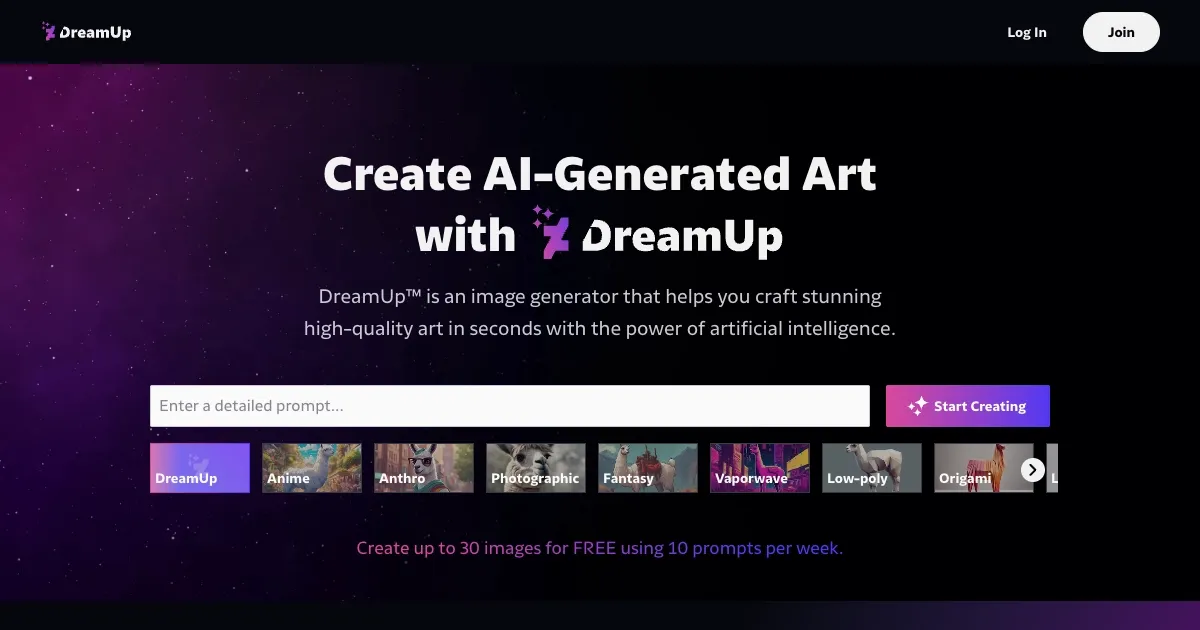
DreamUp, an AI-powered tool by DeviantArt, enables users to generate unique artworks by inputting text prompts. The tool leverages machine learning to interpret and transform user inputs into artistic creations.

Whether you prefer traditional, digital, or fantasy art styles – DreamUp lets you choose the mood, theme, and visual aesthetic. It is especially appealing to users who want to experiment with various creative ideas but lack technical, artistic skills.

DreamUp can also customize the generated artwork. Users can tweak details such as the style, composition, and even the “intensity” of the prompt. This is meant to ensure that the AI-generated results align with the user’s vision. Moreover, for DeviantArt Core members, DreamUp provides extra prompts.

DeviantArt acknowledges the concerns many creators have about AI art and has included a system that allows artists to opt in or out of having their styles used by the AI. This gives creators more agency over how their work is employed within the platform.

The bottom line is – DreamUp is useful for both hobbyists and professionals looking for inspiration or new visual ideas. You can use it to either enhance your projects or simply explore new styles without needing to master complex software. Check it out.

Visit DreamUp ↗
Categories
🖼️ Image
🖼️ Image Generation 🪄 Text to Image
🎨 Art
🎨 Art Generation 🌅 Illustration Generation 🌸 Anime Generation ✍️ Drawing

Homepage Screenshot 📸

DreamUp screenshot

Video Overview 🎬

DreamUp - Video Overview

What are the key features? ✨

  • AI image generation: Users can create unique, high-quality art by typing a text prompt and selecting various styles, such as anime, 3D, or cinematic.
  • Prompt flexibility: It allows fine-tuning output with options like aspect ratio, prompt strength, and negative prompts.
  • Free & paid options: You can create up to 30 free images a month or 500 images with a paid membership.
  • Artist protection: DreamUp lets artists control whether AI can use their style, offering credit when their work is referenced.
  • Community engagement: Users can share, sell, and explore AI art within the DeviantArt community.

Who is it for? 🤔

DreamUp is made for amateur and professional digital artists, illustrators, and content creators who want to produce art quickly using AI. It also appeals to hobbyists who enjoy creating unique digital art or wish to explore various visual styles. The platform suits anyone interested in experimenting with AI-generated art and engaging in the wider artistic community.

Examples of what you can use it for 💡

  • Quickly visualize ideas and concepts in different artistic styles
  • Generate artwork for social media, websites, or storytelling
  • Game designers, illustrators, or filmmakers can use it to draft visuals
  • Create unique visual content for advertising and branding
  • Hobbyists can use it to make art for personal enjoyment or gifts

Pros & Cons ⚖️

  • Allows experimentation with different styles without manual effort
  • Good for getting new ideas or overcoming artist's block
  • Access to comments and critiques from art community
  • AI might produce below-average art or inconsistencies
  • Less control over the final artwork details

FAQs 💬

How does DreamUp generate images?
It uses Stable Diffusion to interpret text prompts and produce visuals, with user controls for styles and refinements.
What are the free limits for new users?
Up to 10 prompts per week, generating 30 images, with no rollover to the next period.
Can artists opt out of style usage?
Yes, eligible users can apply via a form for manual review to prevent generations in their style.
What content is restricted in prompts?
Pornographic, hateful, violent, or offensive material, with blocked words enforcing policy compliance.
How do I improve prompt results?
Start with the subject, add genres like watercolor, moods such as cute, and specific backgrounds for better accuracy.
Is there a way to create image variations?
Yes, select a generated image and use the Create Variation option to seed new outputs with tweaks.
What pricing options exist beyond free?
Core memberships provide 100 to 1000 monthly prompts, with add-ons via Points starting at low costs.
Do generated images get watermarked?
No, but they auto-tag as AI art upon submission to DeviantArt for transparency.
Can I sell DreamUp creations?
Yes, submit as deviations for sharing or selling, following platform terms and crediting rules.
How does it handle copyrights?
Laws vary by region; consult local experts, but DeviantArt passes applicable copyrights to users.

Ready to try DreamUp?

An AI-powered tool allowing users to generate unique artworks by inputting text prompts

Visit DreamUp ↗

DreamUp alternatives 🔗

  1. ChatGPT ChatGPT All-round AI assistant generating human-like responses to user queries and tasks
  2. Grok Grok Delivers witty, real-time AI responses with advanced reasoning and image generation
  3. Imagen Imagen Generates photorealistic images from detailed text prompts
  4. Black Forest Labs Black Forest Labs Generates high-quality images from text prompts with precision and speed
  5. Kling AI Kling AI Generates cinematic videos from text or images with realistic motion
  6. Runway Runway Generates and edits AI-powered videos from text prompts
Share
DreamUp screenshot enlarged
Promote DreamUp
light badge
Copy Embed Code
dark badge
Copy Embed Code
neutral badge
Copy Embed Code
Best AI Tools

Discover the best AI tools for any use case

Explore
  • Tool Categories
  • AI Use Cases
  • AI Events
  • AI News
  • Saved Tools
Company
  • About Us
  • Contact Us
  • Media & Partnerships
  • Suggest a Tool
Legal
  • Privacy Policy
  • Terms of Service
Copyright © 2026 Best AI Tools 415 Mission Street, 37th Floor, San Francisco, CA 94105