Enlighten AI by Teaching Lab Ventures
Using AI to help teachers grade student writing quickly and fairly
Enlighten AI is a fancy tool that helps teachers grade student writing quickly and fairly. Instead of being a one-size-fits-all tool, it learns how each teacher gives feedback and then does the same. This means students get comments that feel personal, not just computer-made — while teachers can spend less time grading and more time teaching.
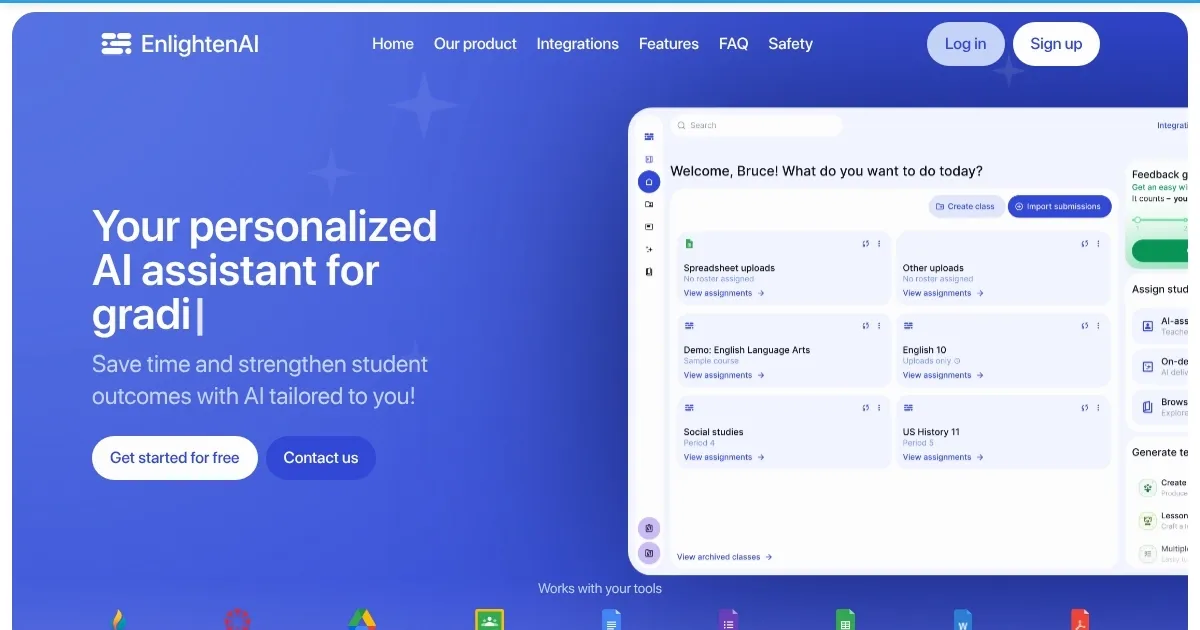
Teachers can connect Enlighten AI to Google Classroom or set up classes themselves. They create assignments or import them, and then – they grade a few papers to show the AI their style. After that, the AI helps grade the rest, providing feedback that matches the teacher’s way.
All this is meant to save teachers a lot of time, and unsurprisingly, teachers have said they can grade in about half the time they used to. Specifically, one teacher even said it was like having a helper who never gets tired or makes mistakes. On the other hand, students also benefit because they get quick feedback and can improve their work faster.
Unlike other generic AI tools, including ChatGPT, Enlighten AI is made specifically for teachers. It doesn’t use teacher data to train itself, so it’s safe and private — plus, it follows rules to keep student information secure.
Ultimately, teachers who use Enlighten AI have noticed their students are more engaged. They try harder to improve their writing because they get helpful comments right away. This makes it a win-win for everyone. And that’s the whole point, we would add.
Homepage Screenshot 📸
Video Overview 🎬

What are the key features? ✨
- Personalized feedback: Enlighten AI learns each teacher's grading style to provide comments that feel personal and helpful.
- Time-saving: Reduces grading time by up to 80%, giving teachers more time for other tasks.
- Easy integration: Works with Google Classroom or can be used on its own, making it flexible for different classrooms.
- Secure & private: Follows strict rules to keep student information safe and doesn't use teacher data for training.
- Improves student engagement: Provides quick feedback to encourage students to revise and improve their work.
Who is it for? 🤔
Examples of what you can use it for 💡
- Get help grading essays and stories, giving students clear advice on how to write better
- Assists in evaluating written responses, ensuring students understand historical events
- Provides feedback on lab reports to help students explain their experiments clearly
- Supports grading in language classes by focusing on grammar and sentence structure
- Offers consistent feedback, aiding students who need more structured guidance
Pros & Cons ⚖️
- Saves time on grading, so that teachers can focus on instruction.
- Provides consistent and personalized feedback for students
- Easy to set up and integrate with other classroom tools
- May require some time to train the AI on grading style
Ready to try Enlighten AI?
Using AI to help teachers grade student writing quickly and fairly
Visit Enlighten AIEnlighten AI alternatives 🔗