logo-darklogo-darklogo-darklogo-dark
  • Tool Categories
    • 🎨Art & Creative Design505
    • 🏢Business Management644
    • 💻Coding & Development515
    • 👮Detection83
    • 🧠General Use727
    • 🏥Health & Wellness55
    • 📷Image & Photo Analysis100
    • 🖼️Image Generation & Editing618
    • 📐Interior & Architectural Design37
    • 🎓Learning & Education483
    • ⚖️Legal & Finance90
    • 🎭Lifestyle & Entertainment236
    • 📢Marketing & Advertising627
    • 🎧Music & Audio138
    • 👔Office & Workplace1,014
    • 🔬Research & Data Analysis372
    • 👥Social Media245
    • 🎥Video Generation & Editing426
    • 👧🏻Virtual Companion135
    • 🎤Voice Generation & Editing381
    • ✍️Writing & Editing808
    • All Categories
    • AI Use Cases
  • News
  • Events
    • Academic Conferences
    • Developer Conferences
    • Expos / Trade Shows
    • Industry Summits
    • Workshops / Training
    • All Events
    • Past Events
  • Saved Tools
  • Suggest a Tool
✕
Home › Art & Creative Design › Design Assistant› Fermat
Fermat

Fermat

Transforms sketches into realistic fashion renders quickly

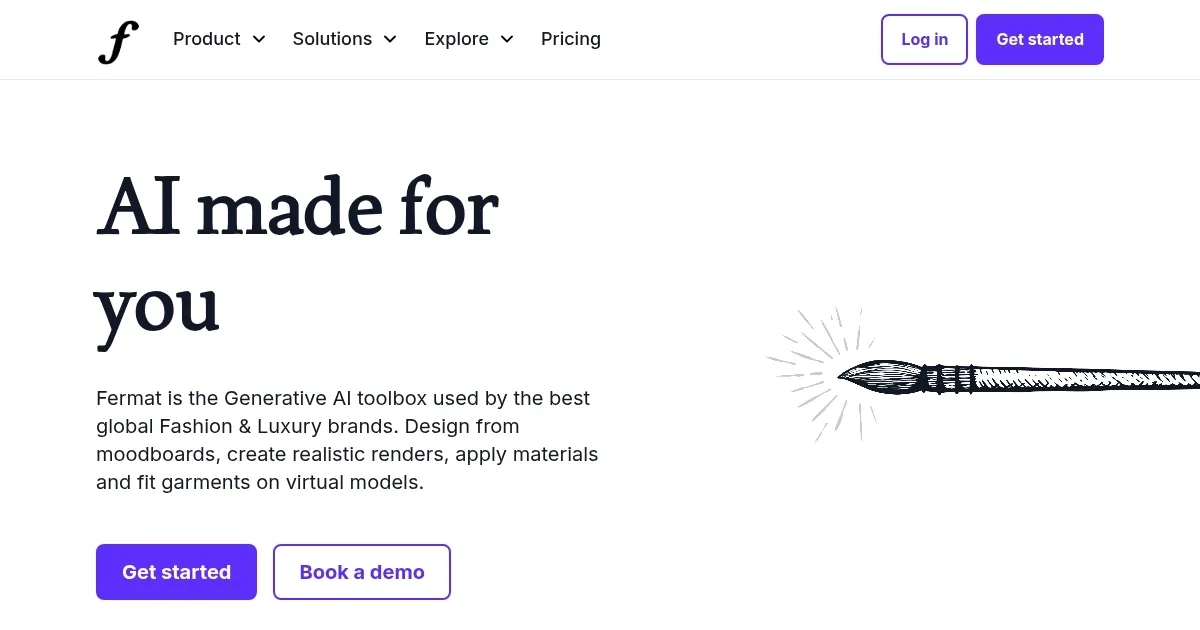
Fermat is an AI-powered platform that streamlines fashion design by transforming sketches into realistic renders, applying prints, and visualizing collections on virtual models. The ‘Sketch-to-render’ tool converts hand-drawn designs into photorealistic visuals 30 times faster than traditional 3D rendering software. Designers can upload sketches and see polished outputs without needing advanced technical skills. The “Change colors & materials” feature allows quick adjustments to fabrics and hues, saving significant manual effort. The platform’s ‘Assets library’ organizes all generated designs, making it easy to track progress.

The ‘Virtual try-on’ tool lets users visualize garments on different models and settings, reducing the need for physical photoshoots. This is particularly useful for marketers aiming to cut costs while maintaining high-quality visuals. Fermat also supports creating seamless prints with the ‘Apply print to garment’ tool, which integrates patterns into renders efficiently. The ‘Custom Styles’ feature enables brands to train AI models with their aesthetic, ensuring outputs align with their identity. This is done through moodboards, material samples, or product archives.

Compared to competitors like CLO 3D and Browzwear, Fermat prioritizes speed and ease over detailed garment simulation. CLO 3D excels in precise 3D modeling, while Browzwear offers advanced fabric physics. Fermat’s strength lies in its no-code editor, which simplifies the process for non-technical users but may limit those seeking granular control. Pricing is in line with premium design tools, though specific costs vary based on team size and needs.

Privacy is a key focus, with private AI models ensuring designs remain exclusive and GDPR compliance for secure team access. The ‘AI productivity analytics’ feature provides insights into tool usage, helping teams optimize workflows. However, some users report occasional render quality issues with intricate designs, which may require manual adjustments. The platform’s focus on automation makes it less suited for users needing hyper-detailed simulations.

To get started, upload a sketch to test the ‘Sketch-to-render’ tool, explore ‘Virtual try-on’ for quick visualizations, and use the ‘Assets library’ to stay organized, leverage custom style training for brand consistency.

Visit Fermat ↗
Categories
🎨 Art
🧑‍🎨 Design Assistant 🖼️ Design Generation 🖌️ Graphic Design 👗 Fashion
🖼️ Image
🖼️ Image Generation
👔 Work
🖍️ Whiteboard

Homepage Screenshot 📸

Fermat screenshot

Video Overview 🎬

What are the key features? ✨

    markdown
  • Sketch-to-render: Converts sketches to photorealistic renders 30x faster.
  • Virtual try-on: Visualizes garments on models in various settings.
  • Change colors & materials: Adjusts design hues and fabrics instantly.
  • Apply print to garment: Integrates seamless prints into high-quality renders.
  • Assets library: Organizes and tracks all generated designs.

Who is it for? 🤔

Fermat is ideal for fashion designers, creative directors, and marketing teams in luxury and retail who want to streamline design processes, visualize collections quickly, and maintain brand consistency without needing advanced 3D modeling skills.

Examples of what you can use it for 💡

    markdown
  • Fashion designer: Turns sketches into photorealistic renders for rapid prototyping.
  • Creative director: Trains AI with brand aesthetics for consistent design outputs.
  • Marketing team: Uses virtual try-on to create campaign images without photoshoots.
  • Pattern designer: Creates seamless prints and applies them to garments efficiently.
  • Brand manager: Generates mock-ups with logos for cohesive branding assets.

Pros & Cons ⚖️

    markdown
  • Fast sketch-to-render conversion
  • Streamlines design process
  • Strong privacy features
  • Easy-to-use no-code editor
    markdown
  • Limited customization options
  • Occasional render quality issues

FAQs 💬

markdown
What is Fermat used for?
Fermat streamlines fashion design by turning sketches into renders, applying prints, and visualizing garments on models.
Do I need 3D modeling skills to use Fermat?
No, Fermat’s no-code editor is designed for users without advanced technical skills.
Can Fermat maintain my brand’s aesthetic?
Yes, the Custom Styles feature lets you train AI models with your brand’s moodboards and archives.
Is my data secure with Fermat?
Fermat ensures data privacy with private AI models and GDPR compliance.
How does Fermat compare to CLO 3D?
Fermat focuses on speed and ease, while CLO 3D offers more precise 3D garment simulation.
Can Fermat help with marketing?
Yes, tools like Virtual try-on and background changes cut photoshoot costs for campaigns.
What is the Assets library?
It’s a feature that organizes all your generated designs and tracks their progress.
Does Fermat support team collaboration?
Yes, it offers SSO and role-based access for secure team workflows.
Can I create prints with Fermat?
The Apply print to garment tool creates and integrates seamless prints into renders.
Is Fermat suitable for small brands?
Yes, its intuitive tools and pricing make it accessible for brands of all sizes.

Ready to try Fermat?

Transforms sketches into realistic fashion renders quickly

Visit Fermat ↗

Fermat alternatives 🔗

  1. Canva Magic Design Canva Magic Design Generates custom, on-brand designs from text prompts or uploaded media in seconds.
  2. Adobe Express Adobe Express Creates on-brand content with AI-driven design and video tools
  3. FigJam AI FigJam AI Instantly visualize ideas, suggest best practices, and automate tedious tasks
  4. Miro AI Miro AI Visual collaboration platform that lets you build the next big thing with a prompt and a chat
  5. Vecteezy AI Vecteezy AI A reverse image search engine that generates related and fully licensable similar images
  6. Pixlr Pixlr An AI-powered online photo editing and design platform, enabling everyone to create stunning designs
Share
Fermat screenshot enlarged
Promote Fermat
light badge
Copy Embed Code
dark badge
Copy Embed Code
neutral badge
Copy Embed Code
Best AI Tools

Discover the best AI tools for any use case

Explore
  • Tool Categories
  • AI Use Cases
  • AI Events
  • AI News
  • Saved Tools
Company
  • About Us
  • Contact Us
  • Media & Partnerships
  • Suggest a Tool
Legal
  • Privacy Policy
  • Terms of Service
Copyright © 2026 Best AI Tools 415 Mission Street, 37th Floor, San Francisco, CA 94105