
FlyMSG by Vengreso
Automates text expansion and AI-driven messaging to boost productivity
FlyMSG is a cloud-based text expander and AI writing assistant by Vengreso, designed to automate repetitive typing and enhance communication across platforms like email, CRMs, and LinkedIn. It offers FlyCuts, customizable shortcuts for instant text insertion, and AI-powered tools like FlyEngage for LinkedIn comments and FlyPosts for post generation. The tool integrates with Chrome and Edge browsers, supporting over 39 languages and offering a library of 400+ FlyPlates, pre-written templates for various industries. Users at companies like Google and Netflix leverage it to save time, with Vengreso claiming an average of one hour saved daily.
The freemium plan provides basic access, while premium plans (Starter and Growth) unlock advanced features like unlimited FlyCuts, spell-checking, and styling options. FlyMSG’s LinkedIn integration is a key strength, allowing users to generate engaging comments and posts quickly. The tool’s dashboard organizes FlyCuts into categories, making it easy to manage snippets for sales, HR, or customer service. Its compatibility with web-based platforms ensures broad usability, though it requires an internet connection.
Drawbacks include occasional glitches in text expansion, as noted in user feedback on forums like Reddit. The tool is limited to Chrome and Edge, excluding users of other browsers. AI-generated content may require editing for a personal touch, and setup can be time-consuming for complex workflows. Compared to TextExpander, FlyMSG offers stronger LinkedIn-focused AI tools but fewer advanced automation options. PhraseExpress provides similar text expansion but lacks FlyMSG’s social media integration.
FlyMSG suits professionals who rely on repetitive messaging or social media engagement. Its growth from 2,900 users to over 14,000 in recent years highlights its appeal. The tool’s compliance with standards like GDPR and SOC 2 adds trustworthiness for enterprise users.
To get started, install the Chrome extension and create a few FlyCuts for your most common messages. Use FlyEngage to test AI comments on LinkedIn, and explore FlyPlates for quick wins. Adjust settings to fit your workflow, and check compatibility with your CRM.
Homepage Screenshot 📸
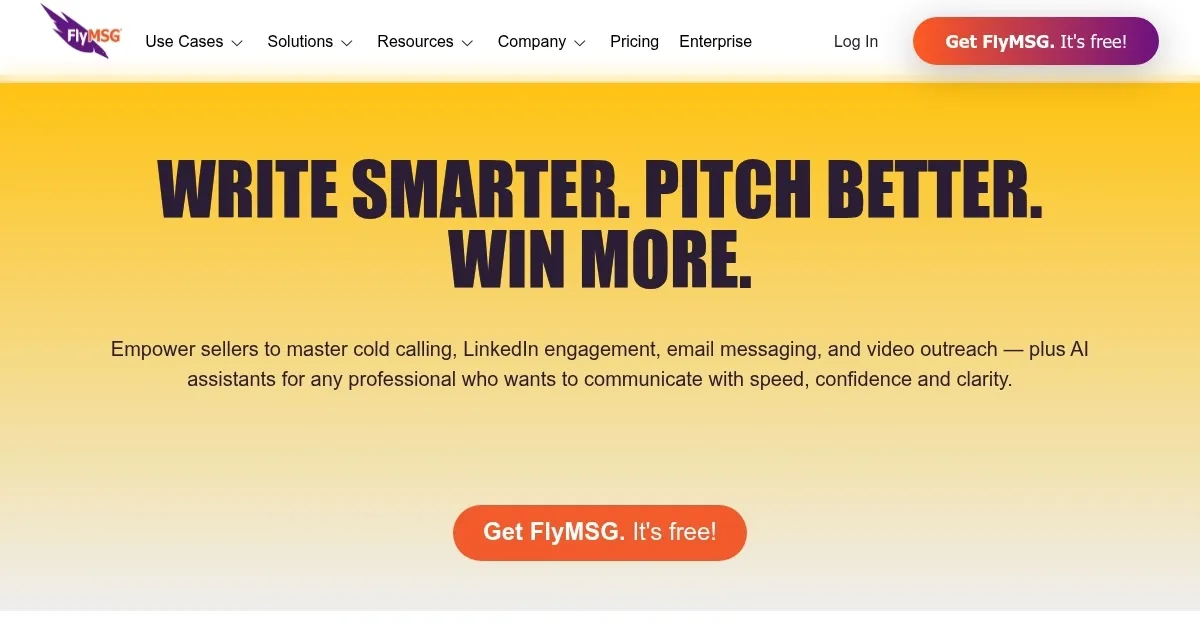
Video Overview 🎬

What are the key features? ✨
- FlyCuts: Customizable shortcuts autofill text snippets anywhere online.
- FlyEngage: AI-powered tool generates LinkedIn comments in seconds.
- FlyPosts: Creates AI-driven LinkedIn posts from predefined or custom prompts.
- FlyPlates: Library of 400+ pre-written templates for various industries.
- Cloud Storage: Organizes FlyCuts and FlyPlates for easy access via Chrome or Edge.
Who is it for? 🤔
Examples of what you can use it for 💡
- Sales Rep: Uses FlyCuts to insert personalized follow-up emails in Salesforce.
- HR Specialist: Deploys FlyPlates for quick job offer or rejection emails.
- Customer Service Agent: Autofills standard responses to common inquiries.
- Business Owner: Generates LinkedIn posts with FlyPosts to boost brand visibility.
- Recruiter: Crafts engaging LinkedIn comments with FlyEngage to attract candidates.
Pros & Cons ⚖️
- Strong LinkedIn AI integration.
- Freemium plan is feature-rich.
- Supports 39 languages.
- AI responses may feel generic.
FAQs 💬
Ready to try FlyMSG?
Automates text expansion and AI-driven messaging to boost productivity
Visit FlyMSG ↗FlyMSG alternatives 🔗
-
 Magical AI
Create messages from scratch, update forms instantly, automate tasks, and more
Magical AI
Create messages from scratch, update forms instantly, automate tasks, and more
-
 Compose AI
An AI-powered autocomplete and text generation Chrome extension
Compose AI
An AI-powered autocomplete and text generation Chrome extension
-
 Blizzy
Generates marketing content and chats with your documents plus web data
Blizzy
Generates marketing content and chats with your documents plus web data
-
 Flow AI
An AI-powered email writer that turns simple instructions into a fully written emails
Flow AI
An AI-powered email writer that turns simple instructions into a fully written emails
-
 Grammarly
Enhances writing with grammar, tone, and style suggestions.
Grammarly
Enhances writing with grammar, tone, and style suggestions.
-
 ChatGPT Writer
Google Chrome extension that brings ChatGPT to your web browser
ChatGPT Writer
Google Chrome extension that brings ChatGPT to your web browser