logo-darklogo-darklogo-darklogo-dark
  • Tool Categories
    • 🎨 Art
    • 🏢 Business
    • 💻 Coding
    • 👮 Detection
    • 🧠 General
    • 🏥 Health
    • 📷 Image Analysis
    • 🖼️ Image
    • 📐 Architecture
    • 🎓 Education
    • ⚖️ Legal/Finance
    • 🎭 Lifestyle
    • 📢 Advertising
    • 🎧 Music
    • 👔 Work
    • 🔬 Research
    • 👥 Social
    • 🎥 Video
    • 👧🏻 Companion
    • 🎤 Voice
    • ✍️ Writing
    • All Categories
    • AI Use Cases
  • News
  • Events
    • Academic Conferences
    • Developer Conferences
    • Expos / Trade Shows
    • Industry Summits
    • Online Events
    • Workshops / Training
    • All Events
    • Past Events
  • Saved Tools
  • Suggest a Tool
✕
Home › Image & Photo Analysis › Image Describing› Image-to-Prompt
Image-to-Prompt

Image-to-Prompt by Vheer

Generate captions from images instantly with one click.

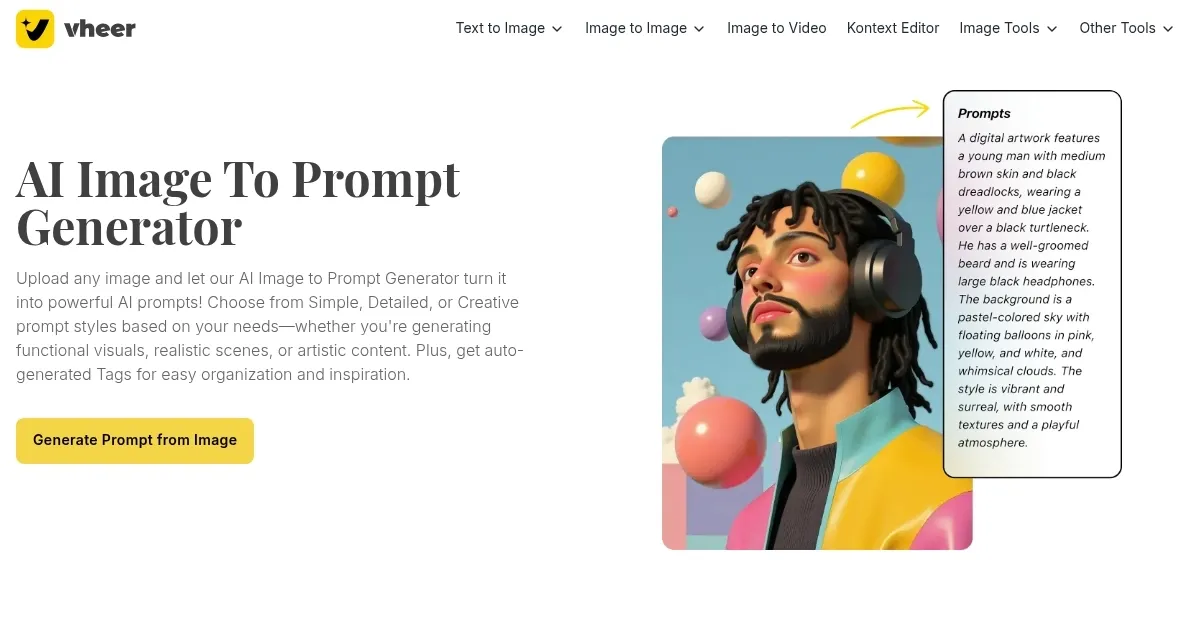
Vheer is an AI-powered Image-to-Prompt tool that generates captions or descriptive prompts from uploaded images with one click. Designed for creators using AI art platforms like Midjourney or Stable Diffusion, it simplifies the process of crafting prompts for generating AI artwork. Users upload an image, click “Generate,” and receive a prompt tailored to the image’s content, such as “A vibrant cityscape at dusk with neon lights reflecting on wet streets.” The tool is free, making it accessible compared to competitors like DALL-E or Leonardo.AI, which often require subscriptions for advanced features. Vheer’s interface is user-friendly, requiring no technical expertise, and it processes images quickly, typically in seconds.

The tool excels at producing prompts for a wide range of images, from landscapes to product photos. However, the prompts can sometimes feel generic, lacking nuanced customization options for tone or style. Unlike RunwayML, which offers advanced editing capabilities, Vheer’s Image-to-Prompt tool focuses solely on prompt generation. Its free pricing model stands out against competitors that charge for premium features. For best results, use high-quality images and refine the generated prompts to align with specific creative goals.

Visit Image-to-Prompt ↗

Categories

📷 Image Analysis

🗣️ Image Describing 👁️ Image Recognition

✍️ Writing

💡 Prompt Generation 🛠️ Prompt Engineering

🖼️ Image

🖼️ Image Generation

Screenshot 📸

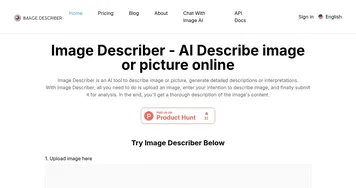
Image-to-Prompt screenshot

What are the key features? ✨

  • Image-to-Prompt Generation: Creates descriptive prompts from uploaded images in one click.
  • Free Access: Offers full functionality at no cost, unlike many competitors.
  • User-Friendly Interface: Features a simple drag-and-drop system for easy use.
  • Fast Processing: Delivers prompts in seconds, streamlining creative workflows.
  • Broad Image Compatibility: Works with various image types, from photos to artwork.

Who is it for? 🤔

Vheer’s Image-to-Prompt tool is made for digital artists, content creators, and social media managers who use AI art platforms like Midjourney or Stable Diffusion. It’s ideal for those seeking quick inspiration or struggling to articulate prompts for AI-generated visuals, especially beginners or time-strapped professionals. Its free access makes it perfect for hobbyists or small businesses looking to enhance their creative output without breaking the bank.

Examples of what you can use it for 💡

  • Digital Artist: Generates prompts to create AI artwork inspired by personal photos.
  • Social Media Manager: Creates captions for posts using product or event images.
  • Graphic Designer: Uses prompts to brainstorm concepts for client projects.
  • Content Creator: Turns travel photos into prompts for unique AI visuals.
  • Hobbyist: Experiments with AI art by converting random images into prompts.

Pros & Cons ⚖️

  • Free to use, no hidden costs.
  • Simple, intuitive interface.
  • Fast prompt generation.
  • Works with diverse images.
  • Great for AI art beginners.
  • Prompts can feel generic.
  • No customization options.

FAQs 💬

Is Vheer’s Image-to-Prompt tool really free?
Yes, Vheer is completely free to use with no subscription or hidden fees.
What types of images can I upload to Vheer?
Vheer supports various image types, including photos, artwork, and digital graphics.
Do I need an account to use Vheer?
No, Vheer requires no account or sign-up to generate prompts.
Can Vheer generate prompts for specific AI art platforms?
Yes, prompts are compatible with platforms like Midjourney and Stable Diffusion.
How fast does Vheer generate prompts?
Prompts are generated in seconds after uploading an image.
Can I customize the style of the prompts?
Currently, Vheer offers one prompt style without customization options.
Is Vheer suitable for professional use?
Yes, it’s useful for professionals, though manual prompt tweaking may be needed.
Does Vheer store my uploaded images?
Vheer’s privacy policy indicates images are not stored after processing.
Can Vheer handle low-quality images?
High-quality images yield better prompts, but it works with lower-quality ones too.
How does Vheer compare to paid AI tools?
Vheer’s free, simple approach rivals paid tools but lacks advanced features.

Ready to try Image-to-Prompt?

Generate captions from images instantly with one click.

Visit Image-to-Prompt ↗

Image-to-Prompt alternatives 🔗

  1. Vecteezy AI Vecteezy AI A reverse image search engine that generates related and fully licensable similar images
  2. Google Lens Homework Google Lens Homework A mobile app that uses AI to help students by providing visual explanations of concepts
  3. PictureThis PictureThis Identifies plants from photos, offering care tips and species info
  4. Lenso.ai Lenso.ai An AI-powered reverse image search platform
  5. ImagePrompt.org ImagePrompt.org Helping users create detailed prompts for AI art generation
  6. PlantNet PlantNet Identifies plants from photos, contributing to biodiversity research
Share
Image-to-Prompt screenshot enlarged
Promote Image-to-Prompt
light badge
Copy Embed Code
dark badge
Copy Embed Code
neutral badge
Copy Embed Code
Best AI Tools

Discover the best AI tools for any use case

About Us | Contact Us | Suggest an AI Tool
Privacy Policy | Terms of Service
Copyright © 2026 Best AI Tools 415 Mission Street, 37th Floor, San Francisco, CA 94105