logo-darklogo-darklogo-darklogo-dark
  • Tool Categories
    • 🎨Art & Creative Design505
    • 🏢Business Management644
    • 💻Coding & Development515
    • 👮Detection83
    • 🧠General Use727
    • 🏥Health & Wellness55
    • 📷Image & Photo Analysis100
    • 🖼️Image Generation & Editing618
    • 📐Interior & Architectural Design37
    • 🎓Learning & Education483
    • ⚖️Legal & Finance90
    • 🎭Lifestyle & Entertainment236
    • 📢Marketing & Advertising627
    • 🎧Music & Audio138
    • 👔Office & Workplace1,014
    • 🔬Research & Data Analysis372
    • 👥Social Media245
    • 🎥Video Generation & Editing426
    • 👧🏻Virtual Companion135
    • 🎤Voice Generation & Editing381
    • ✍️Writing & Editing808
    • All Categories
    • AI Use Cases
  • News
  • Events
    • Academic Conferences
    • Developer Conferences
    • Expos / Trade Shows
    • Industry Summits
    • Workshops / Training
    • All Events
    • Past Events
  • Saved Tools
  • Suggest a Tool
✕
Home › Coding & Development › Code Generation› Kiro
Kiro

Kiro

Transforms prompts into structured code with specs and agents

Kiro is an AI-powered integrated development environment from AWS that enables spec-driven development for software projects from prototype to production. It processes natural language prompts to generate requirements documents with user stories and acceptance criteria using EARS notation, followed by design documents that include data flow diagrams, TypeScript interfaces, database schemas, and API endpoints. The tool then creates a task list for implementation, allowing users to execute tasks step by step with AI agents that edit code across multiple files. Built on Code OSS, the open-source foundation of VS Code, Kiro supports Open VSX extensions, themes, and settings while adding AI-specific features like multimodal chat for text, images, and URLs.

Agent hooks automate tasks triggered by file events such as saves or commits, including generating unit tests, documentation, or performance optimizations. Steering files configure project-specific rules, such as coding standards in tech.md or structure in structure.md, to guide agent behavior. MCP integration connects to external resources like databases and APIs for context. Code diffs appear in real time for approval, editing, or rollback, with autopilot mode handling autonomous script execution. Models include Claude Sonnet 3.7 and 4, with response times of 500-2000ms depending on complexity.

Kiro targets developers handling complex features, outperforming in structured workflows compared to competitors. Cursor provides fast AI autocomplete and multi-file edits in a VS Code-like setup but lacks native spec generation and event-driven hooks. GitHub Copilot offers inline suggestions in various editors like VS Code and JetBrains, focusing on code completion without built-in planning artifacts or automated maintenance. Kiro’s free preview tier limits interactions, with paid plans offering higher quotas at general rates similar to or below competitors for agent usage.

Users appreciate the traceability from specs to code, reducing rework in team settings, and the privacy features that prevent code use in training. Challenges include slower agent execution for intricate tasks, up to several minutes, and limitations with proprietary extensions like Microsoft C# support via Open VSX. It performs best on languages like JavaScript, Python, and TypeScript, with occasional inaccuracies on low-level or niche prompts.

Test Kiro on a contained project to evaluate its fit, starting with spec creation for a feature and monitoring hook efficiency… and take it from there.

Visit Kiro ↗
Categories
💻 Coding
⌨️ Code Generation 🤖 Code Assistant 👨‍💻 Development ✨ Vibe Coding 📱 App Building
👔 Work
🤖 Copilot 🔗 Agent

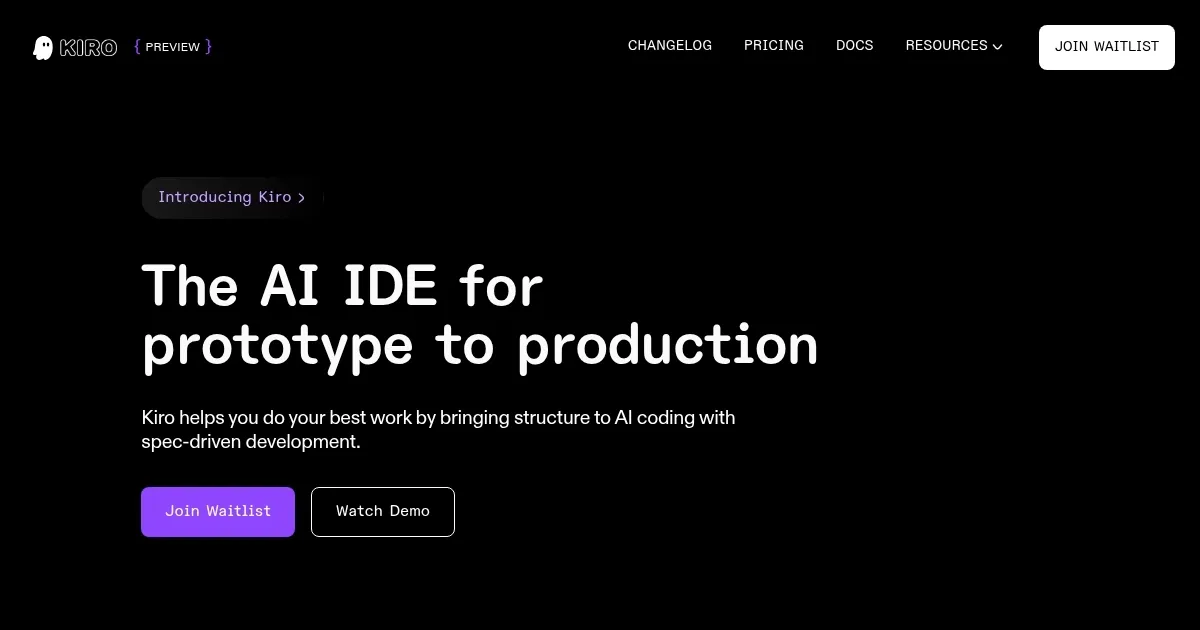
Homepage Screenshot 📸

Kiro screenshot

Video Overview 🎬

What are the key features? ✨

  • Spec-Driven Development: Converts prompts into requirements, designs, tasks, and code with tests for structured project planning.
  • Agent Hooks: Triggers AI actions on file events like saves to automate tests, documentation, or optimizations in the background.
  • Multimodal Chat: Processes text, images, URLs, and files for context-aware interactions during development.
  • Steering Files: Customizes agent behavior per project with rules for tech stacks, standards, and workflows.
  • MCP Integration: Links to external docs, databases, and APIs to enrich AI context and tool access.

Who is it for? 🤔

Kiro is made for developers and engineers working on mid-to-large projects where structure matters, from solo coders prototyping apps to teams building production software that needs clear docs and tests. Beginners learning stacks benefit from its guided specs that explain decisions, while experienced users save time on boilerplate via automation. It's ideal for full-stack work in JS, Python, or TS, but less so for niche languages without strong extensions. If you're tired of chaotic AI outputs, Kiro's planning focus empowers reliable coding without constant fixes.

Examples of what you can use it for 💡

  • Solo Developer: Uses spec-driven prompts to outline and implement a full authentication system, generating user stories, designs, and secure code with tests.
  • Team Lead: Sets steering files for project standards, then employs agent hooks to auto-review commits and update docs across a shared repo.
  • Prototype Builder: Inputs a UI image to create a responsive frontend feature, with Kiro handling layout code and integration tasks autonomously.
  • Refactor Engineer: Analyzes legacy code via MCP links to databases, then executes multi-file refactors with diffs for safe approvals.
  • Open Source Contributor: Builds a new module from a GitHub issue prompt, using autopilot for script tasks and hooks for compatibility checks.

Pros & Cons ⚖️

  • Structured specs reduce errors.
  • Automates tests and docs.
  • VS Code compatibility.
  • Slower on complex tasks.
  • Usage limits in preview.

FAQs 💬

What is Kiro's main focus?
Kiro emphasizes spec-driven development to structure AI coding from prompts into full project artifacts like requirements and designs.
Does Kiro require an AWS account?
No, it supports Google or GitHub login and works independently of AWS services.
What models power Kiro?
It uses Claude Sonnet 3.7 and 4, with plans for more options.
How does Kiro handle large codebases?
Through smart context management and steering files, it maintains awareness across files without losing track.
Is Kiro free to start?
Yes, the preview tier is free with interaction limits; paid plans add higher quotas.
Can Kiro integrate with external tools?
Yes, via MCP for docs, APIs, and databases to pull in real-time context.
What languages does Kiro support best?
JavaScript, TypeScript, Python, and others via VS Code extensions, but excels in web stacks.
How secure is code in Kiro?
Enterprise-grade privacy ensures code isn't used for training, with local processing options.
Does Kiro work offline?
Core editing is local, but AI features need internet for model access.
How does Kiro compare to VS Code?
It's a fork with added AI agents, hooks, and specs, but retains full VS Code compatibility for extensions.

Ready to try Kiro?

Transforms prompts into structured code with specs and agents

Visit Kiro ↗

Kiro alternatives 🔗

  1. ChatGPT ChatGPT All-round AI assistant generating human-like responses to user queries and tasks
  2. Gemini Gemini Generates responses from text, images, audio, and video inputs using advanced multimodal AI
  3. Claude Claude Assists users in reasoning, coding, writing, and analyzing data with advanced AI models
  4. DeepSeek DeepSeek Delivers advanced AI models for coding and reasoning at low costs
  5. Cursor Cursor Supercharges coding with AI agents that build, edit, and review code autonomously.
  6. Windsurf Windsurf Empowers developers with AI-driven code generation and real-time collaboration.
Share
Kiro screenshot enlarged
Promote Kiro
light badge
Copy Embed Code
dark badge
Copy Embed Code
neutral badge
Copy Embed Code
Best AI Tools

Discover the best AI tools for any use case

Explore
  • Tool Categories
  • AI Use Cases
  • AI Events
  • AI News
  • Saved Tools
Company
  • About Us
  • Contact Us
  • Media & Partnerships
  • Suggest a Tool
Legal
  • Privacy Policy
  • Terms of Service
Copyright © 2026 Best AI Tools 415 Mission Street, 37th Floor, San Francisco, CA 94105