logo-darklogo-darklogo-darklogo-dark
  • Tool Categories
    • 🎨Art & Creative Design505
    • 🏢Business Management644
    • 💻Coding & Development514
    • 👮Detection83
    • 🧠General Use728
    • 🏥Health & Wellness55
    • 📷Image & Photo Analysis100
    • 🖼️Image Generation & Editing618
    • 📐Interior & Architectural Design37
    • 🎓Learning & Education483
    • ⚖️Legal & Finance90
    • 🎭Lifestyle & Entertainment236
    • 📢Marketing & Advertising627
    • 🎧Music & Audio138
    • 👔Office & Workplace1,014
    • 🔬Research & Data Analysis373
    • 👥Social Media245
    • 🎥Video Generation & Editing426
    • 👧🏻Virtual Companion135
    • 🎤Voice Generation & Editing381
    • ✍️Writing & Editing808
    • All Categories
    • AI Use Cases
  • News
  • Events
    • Academic Conferences
    • Developer Conferences
    • Expos / Trade Shows
    • Industry Summits
    • Workshops / Training
    • All Events
    • Past Events
  • Saved Tools
  • Suggest a Tool
✕
Home › Coding & Development › Code Generation› Replit AI
Replit AI

Replit AI by Replit, Inc.

Transforms natural language prompts into fully deployable apps using AI agents

Replit is a cloud-based IDE that integrates AI agents to build, test, and deploy apps from natural language prompts. It supports over 50 programming languages and emphasizes real-time collaboration. The platform handles environment setup automatically, allowing users to focus on ideas rather than infrastructure.

Its key feature comes in the “form” of Agent 3, which can process prompts, search the web, and iterate on code using a reflection loop for self-testing. This is meant to reduce manual debugging by generating reports on issues and applying fixes. There is also the Visual Editor, which is able to import Figma designs for direct UI adjustments to streamline frontend work.

Built-in Database and Auth provide secure backend services, integrating with tools like Stripe and OpenAI without exposing keys. Agent Generation creates custom automations, such as Slack bots, from descriptions. Security options like SSO, SOC 2 compliance, and private deployments suit enterprise needs.

In comparison, Replit offers more end-to-end functionality than Cursor, which excels in local editing but requires separate deployment. Versus GitHub Copilot, Replit provides a full browser environment, while Copilot focuses on IDE plugins. Windsurf suits quick prototypes, but Replit adds robust collaboration. Lovable emphasizes no-code, differing from Replits hybrid approach.

Users appreciate the instant deployment and multiplayer editing, which speed up team workflows. However, the AI can alter code unexpectedly, leading to bugs in complex projects (this is true for all AI coding tools).

The platform’s testing via browser simulations catches UI errors early, a practical edge over manual checks in rivals. Recent updates enhance plan mode with auto-saved checkpoints and build score feedback for AI improvement.

For best results, start with small prompts, review the generated code step-by-step, and utilize collaboration for refinements. This approach maximizes efficiency while minimizing surprises.

Visit Replit AI ↗
Categories
💻 Coding
⌨️ Code Generation 🤖 Code Assistant 👨‍💻 Development 📱 App Building ✨ Vibe Coding 🏗️ Website Building 🎮 Game Generation 🔍 Code Review ✅ Testing
👔 Work
🤖 Copilot 🔗 Agent

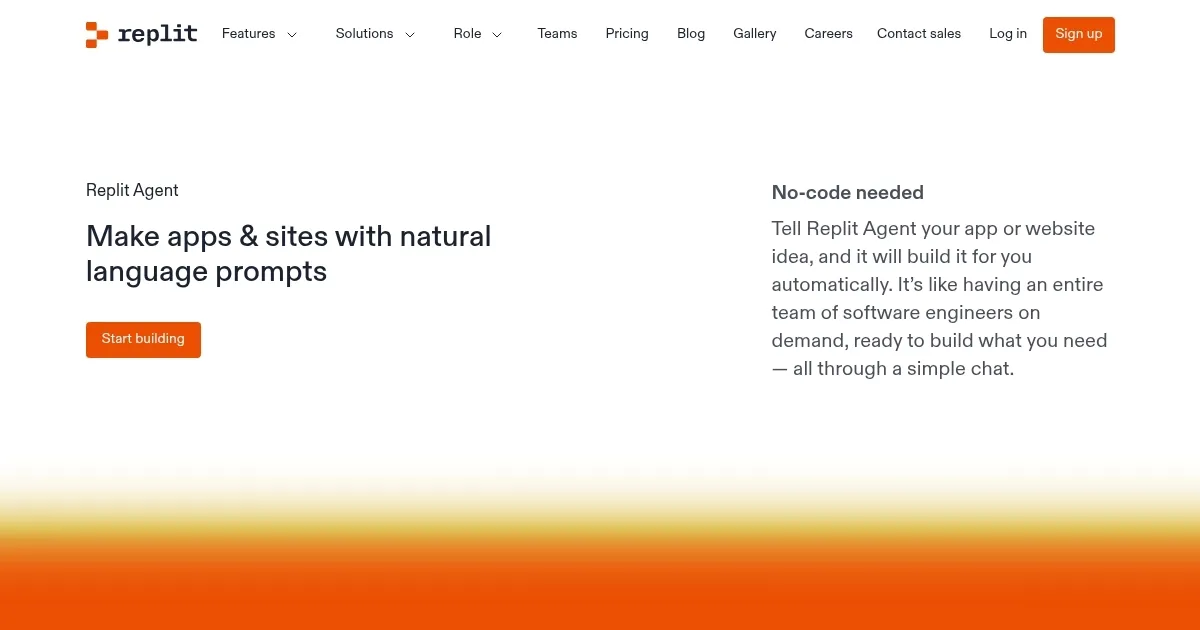
Homepage Screenshot 📸

Replit AI screenshot

Video Overview 🎬

Replit AI - Video Overview

What are the key features? ✨

  • Agent 3 by Replit: Interprets natural language to build and refine apps with web searches and self-testing reflection loops.
  • Visual Editor: Imports Figma designs for direct element selection and UI editing in app previews.
  • Built-in Database and Auth: Provides secure data storage and user authentication integrated seamlessly with third-party services.
  • Agent Generation: Creates custom AI agents and automations for tasks like Slack integrations from natural language prompts.
  • One-Click Deployment: Enables instant hosting with auto-scaling and global CDN for live app sharing.

Who is it for? 🤔

Replit suits beginners dipping into coding through its accessible AI prompts, educators fostering collaborative learning in classrooms, startup teams prototyping MVPs rapidly without setup hassles, non-technical product managers experimenting with ideas before handing off to devs, and enterprise groups needing secure, compliant environments for internal tools, empowering a wide range from hobbyists to pros who value speed and teamwork over heavy customization.

Examples of what you can use it for 💡

  • Student developer: Builds interactive web projects with classmates in real-time, using Agent 3 to generate code from assignment descriptions and deploy for presentations.
  • Startup founder: Prototypes a SaaS dashboard by describing features to the Visual Editor, integrating Stripe for payments and sharing live links with potential investors.
  • Freelance designer: Imports Figma mocks into the Visual Editor to add backend auth via Built-in services, creating client-ready portfolio apps without coding from scratch.
  • Product manager: Generates custom automations with Agent Generation to streamline workflows, like email alerts on task completions, tested in private deployments.
  • Enterprise team: Collaborates on internal tools using SSO and role-based access, with Agent 3 handling iterative refinements based on feedback loops.

Pros & Cons ⚖️

  • Instant setup free
  • Real-time collab easy
  • AI builds full apps
  • Secure integrations
  • AI bugs complex code
  • Costs add up fast

FAQs 💬

What is Replit Agent 3?
Agent 3 is Replits AI tool that builds apps from natural language, tests code autonomously, and refines based on feedback using web searches and reflection loops.
How does Replit handle collaboration?
It offers real-time multiplayer editing like Google Docs, with built-in chat and sharing via links for seamless team coding.
Is Replit suitable for beginners?
Yes, its browser-based with AI prompts that turn ideas into code, no local setup needed, ideal for learning over 50 languages.
What security features does Replit offer?
Includes SOC 2 compliance, SSO, private deployments, and secure key management for databases and third-party integrations.
How does Replit compare to GitHub Copilot?
Replit provides a full cloud IDE with end-to-end building and deployment, while Copilot focuses on autocomplete in existing IDEs like VS Code.
Can I deploy apps on Replit?
Yes, one-click deployment offers auto-scaling, global CDN, and live URLs, handling traffic spikes reliably.
What pricing options are available?
Free tier for basics, paid Core for unlimited AI, and enterprise plans with advanced security, often more flexible than flat competitors.
Does Replit support design imports?
The Visual Editor imports Figma files, allowing direct UI edits and refinements in the app preview.
How does Replit test code?
Agent 3 uses browser simulations and reflection loops to run tests, generate reports, and fix issues automatically.
Is Replit good for enterprise use?
Yes, with SCIM, role-based access, and compliance, it supports secure internal tool development for large teams.

Ready to try Replit AI?

Transforms natural language prompts into fully deployable apps using AI agents

Visit Replit AI ↗

Replit AI alternatives 🔗

  1. ChatGPT ChatGPT All-round AI assistant generating human-like responses to user queries and tasks
  2. Gemini Gemini Generates responses from text, images, audio, and video inputs using advanced multimodal AI
  3. Claude Claude Assists users in reasoning, coding, writing, and analyzing data with advanced AI models
  4. DeepSeek DeepSeek Delivers advanced AI models for coding and reasoning at low costs
  5. Cursor Cursor Supercharges coding with AI agents that build, edit, and review code autonomously.
  6. Windsurf Windsurf Empowers developers with AI-driven code generation and real-time collaboration.
Share
Replit AI screenshot enlarged
Promote Replit AI
light badge
Copy Embed Code
dark badge
Copy Embed Code
neutral badge
Copy Embed Code
Best AI Tools

Discover the best AI tools for any use case

Explore
  • Tool Categories
  • AI Use Cases
  • AI Events
  • AI News
  • Saved Tools
Company
  • About Us
  • Contact Us
  • Media & Partnerships
  • Suggest a Tool
Legal
  • Privacy Policy
  • Terms of Service
Copyright © 2026 Best AI Tools 415 Mission Street, 37th Floor, San Francisco, CA 94105