logo-darklogo-darklogo-darklogo-dark
  • Tool Categories
    • ๐ŸŽจArt & Creative Design505
    • ๐ŸขBusiness Management644
    • ๐Ÿ’ปCoding & Development515
    • ๐Ÿ‘ฎDetection83
    • ๐Ÿง General Use727
    • ๐ŸฅHealth & Wellness55
    • ๐Ÿ“ทImage & Photo Analysis100
    • ๐Ÿ–ผ๏ธImage Generation & Editing618
    • ๐Ÿ“Interior & Architectural Design37
    • ๐ŸŽ“Learning & Education483
    • โš–๏ธLegal & Finance90
    • ๐ŸŽญLifestyle & Entertainment236
    • ๐Ÿ“ขMarketing & Advertising627
    • ๐ŸŽงMusic & Audio138
    • ๐Ÿ‘”Office & Workplace1,014
    • ๐Ÿ”ฌResearch & Data Analysis372
    • ๐Ÿ‘ฅSocial Media245
    • ๐ŸŽฅVideo Generation & Editing426
    • ๐Ÿ‘ง๐ŸปVirtual Companion135
    • ๐ŸŽคVoice Generation & Editing381
    • โœ๏ธWriting & Editing808
    • All Categories
    • AI Use Cases
  • News
  • Events
    • Academic Conferences
    • Developer Conferences
    • Expos / Trade Shows
    • Industry Summits
    • Workshops / Training
    • All Events
    • Past Events
  • Saved Tools
  • Suggest a Tool
โœ•
Home › General Use › Assistant› Noa
Noa

Noa by Docplanner

Automates medical documentation and streamlines administrative tasks for healthcare professionals

Noa is an AI-powered virtual assistant designed for healthcare professionals to automate medical documentation, manage phone calls, and coordinate appointments. It streamlines administrative tasks, allowing clinicians to focus on patient care. Built by Docplanner, Noa uses advanced natural language processing to create structured medical notes and operates on secure, GDPR-compliant servers.

The Noa Notes feature transcribes patient conversations in real time, capturing clinically relevant details for integration into electronic health records. Noa Booking automates call handling and appointment scheduling, reducing front-desk workload. The tool supports multiple languages, including English, German, Polish, and Portuguese, making it suitable for diverse practices. It uses 256-bit encryption and cloud storage via Amazon Web Services and Microsoft Azure, ensuring data security. Noa has been refined over 12 years, serving individual practitioners and large medical centers.

Compared to competitors like Suki and DeepScribe, Noa offers broader functionality with call management alongside transcription. Suki excels in voice command accuracy, while DeepScribe focuses on ambient note-taking. Noa’s pricing is generally competitive, though specific costs depend on practice size and needs. User feedback on X highlights time savings of up to 50%, but some report occasional delays in transcription or scheduling during high-volume periods.

The tool’s multilingual support is a standout, catering to clinics with diverse patient bases. Setup can be complex for practices with unique workflows, and training the AI requires initial effort. Smaller clinics may find customization challenging. Noa integrates with most EHR systems, though compatibility varies.

To adopt Noa, verify EHR compatibility first. Run a trial to assess transcription accuracy for your practice’s needs. Train staff on its features to maximize efficiency. Regular updates ensure ongoing improvements, so check for new features periodically.

Visit Noa ↗
Categories
๐Ÿง  General
๐Ÿค– Assistant โœ… Productivity
๐ŸŽค Voice
๐Ÿค– Voice Assistant
๐Ÿ‘” Work
โœ‰๏ธ Email Assistant

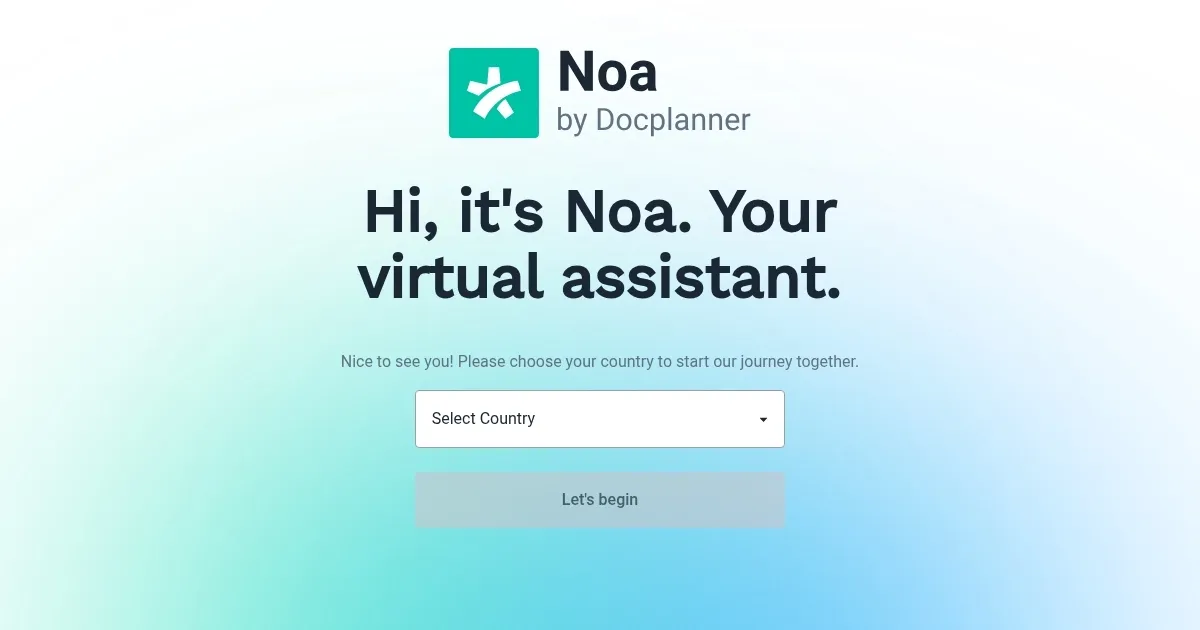
Homepage Screenshot 📸

Noa screenshot

What are the key features? ✨

  • Noa Notes: Automatically transcribes patient conversations into structured medical notes.
  • Noa Booking: Manages phone calls and coordinates appointments for streamlined scheduling.
  • Multilingual Support: Processes conversations in languages like English, German, Polish, and Portuguese.
  • Data Security: Uses 256-bit encryption and GDPR-compliant servers for patient data protection.
  • EHR Integration: Syncs with electronic health record systems for seamless workflow integration.

Who is it for? 🤔

Noa is ideal for healthcare professionals, including doctors, clinicians, and independent practitioners, who need to reduce administrative burdens. It suits both solo practices and large medical centers aiming to streamline documentation and scheduling. Those in multilingual regions benefit from its language support, while practices prioritizing data security appreciate its GDPR compliance. Smaller clinics with limited staff or high patient volumes find Noaโ€™s automation particularly valuable for saving time.

Examples of what you can use it for 💡

  • Solo Practitioner: Uses Noa Notes to transcribe patient visits, freeing up time for more appointments.
  • Clinic Receptionist: Relies on Noa Booking to handle calls and schedule patient visits efficiently.
  • Multilingual Doctor: Leverages Noaโ€™s language support to document visits in German or Polish seamlessly.
  • Large Medical Center: Integrates Noa with EHR systems to streamline documentation across departments.
  • Busy Clinician: Employs Noa to manage administrative tasks, focusing more on patient care.

Pros & Cons ⚖️

  • Handles multilingual notes
  • Integrates with EHR systems
  • Automates call scheduling
  • Occasional transcription lag
  • Learning curve for customization

FAQs 💬

What is Noa designed to do?
Noa automates medical note-taking, call handling, and appointment scheduling for healthcare professionals.
Is Noa secure for patient data?
Yes, it uses 256-bit encryption and GDPR-compliant servers hosted by AWS and Azure.
Can Noa handle multiple languages?
Yes, it supports languages like English, German, Polish, and Portuguese for transcription.
Does Noa integrate with EHR systems?
Yes, it syncs with most electronic health record systems, though compatibility varies.
How accurate is Noaโ€™s transcription?
Itโ€™s highly accurate for clinical terms but may need training for unique workflows.
Is Noa suitable for small practices?
Yes, though smaller clinics may find setup and customization challenging initially.
Does Noa require extensive training?
Initial training is needed to optimize transcription and scheduling for your practice.
Can Noa manage phone calls?
Yes, Noa Booking handles incoming calls and coordinates appointments automatically.
Is Noa available in multiple countries?
Yes, itโ€™s tailored for various regions, with localized language and workflow support.
How does Noa compare to competitors?
It offers broader features like call management compared to transcription-focused tools like Suki.

Ready to try Noa?

Automates medical documentation and streamlines administrative tasks for healthcare professionals

Visit Noa ↗

Noa alternatives 🔗

  1. ChatGPT ChatGPT All-round AI assistant generating human-like responses to user queries and tasks
  2. Gemini Gemini Generates responses from text, images, audio, and video inputs using advanced multimodal AI
  3. Claude Claude Assists users in reasoning, coding, writing, and analyzing data with advanced AI models
  4. Grok Grok Delivers witty, real-time AI responses with advanced reasoning and image generation
  5. DeepSeek DeepSeek Delivers advanced AI models for coding and reasoning at low costs
  6. Perplexity Perplexity Delivers cited AI answers from web searches instantly
Share
Noa screenshot enlarged
Promote Noa
light badge
Copy Embed Code
dark badge
Copy Embed Code
neutral badge
Copy Embed Code
Best AI Tools

Discover the best AI tools for any use case

Explore
  • Tool Categories
  • AI Use Cases
  • AI Events
  • AI News
  • Saved Tools
Company
  • About Us
  • Contact Us
  • Media & Partnerships
  • Suggest a Tool
Legal
  • Privacy Policy
  • Terms of Service
Copyright © 2026 Best AI Tools 415 Mission Street, 37th Floor, San Francisco, CA 94105