logo-darklogo-darklogo-darklogo-dark
  • Tool Categories
    • 🎨Art & Creative Design505
    • 🏢Business Management644
    • 💻Coding & Development515
    • 👮Detection83
    • 🧠General Use727
    • 🏥Health & Wellness55
    • 📷Image & Photo Analysis100
    • 🖼️Image Generation & Editing618
    • 📐Interior & Architectural Design37
    • 🎓Learning & Education483
    • ⚖️Legal & Finance90
    • 🎭Lifestyle & Entertainment236
    • 📢Marketing & Advertising627
    • 🎧Music & Audio138
    • 👔Office & Workplace1,014
    • 🔬Research & Data Analysis372
    • 👥Social Media245
    • 🎥Video Generation & Editing426
    • 👧🏻Virtual Companion135
    • 🎤Voice Generation & Editing381
    • ✍️Writing & Editing808
    • All Categories
    • AI Use Cases
  • News
  • Events
    • Academic Conferences
    • Developer Conferences
    • Expos / Trade Shows
    • Industry Summits
    • Workshops / Training
    • All Events
    • Past Events
  • Saved Tools
  • Suggest a Tool
✕
Home › Office & Workplace › Presentation Generation› Presentations.AI
Presentations.AI

Presentations.AI

ChatGPT for presentations producing stunning decks with little effort

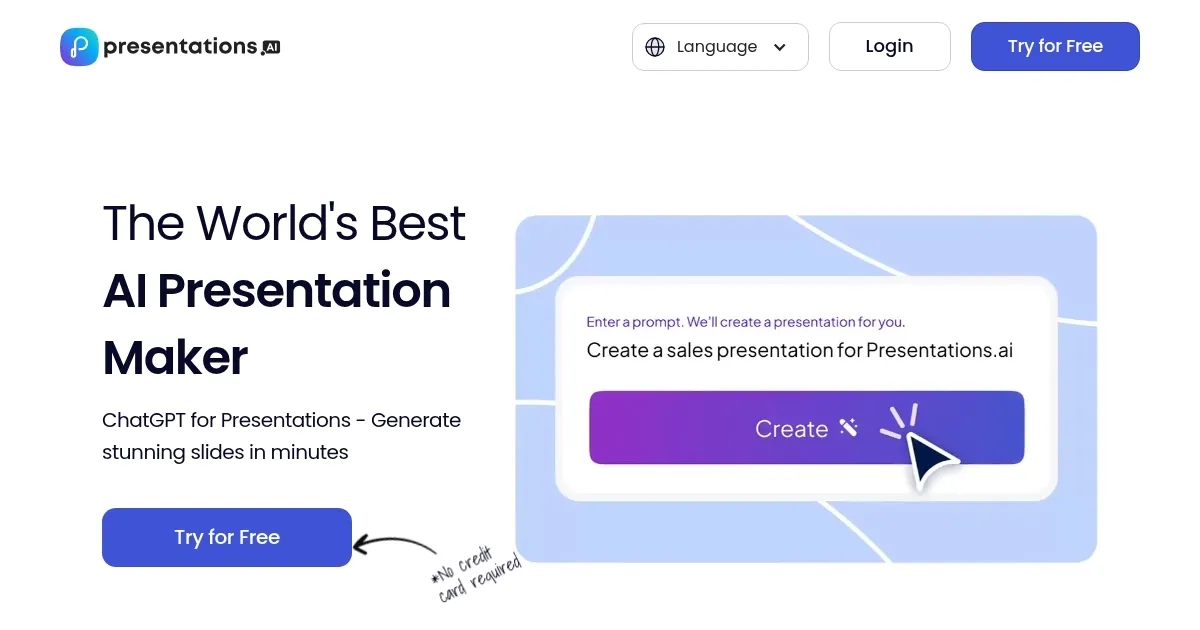
Presentations.AI is a cutting-edge tool that aims to transform the way presentations are created — offering a seamless and efficient solution for individuals and businesses alike.

The AI-powered platform enables users to generate professional-looking presentations with minimal effort, streamlining the process from start to finish. By simply inputting a text prompt, Presentations.AI will craft complete PowerPoint presentations in seconds, saving you a ton of time along the way.

What’s more, the tool also ensures that each slide is not only visually appealing but also tailored to convey your message effectively. This focus on ease of use and quality output makes Presentations.AI an invaluable tool for anyone looking to create impactful presentations without the need for extensive design skills.

Collaboration also comes included with Presentations.AI, enabling teamwork and project sharing among users. The platform supports real-time collaboration, allowing teams to work together regardless of their location. This feature is particularly beneficial for businesses and educational institutions where teamwork and shared projects are common.

The platform also offers customization options, including a wide range of templates and design options — enabling users to personalize their presentations to fit their specific needs and preferences.

So, whether you’re looking for a sleek and professional design for a business presentation or a more creative and engaging layout for an educational project, Presentations.AI has you covered.

Finally, we should add that the team behind Presentations.AI is continually updating its features and capabilities to stay ahead of the curve. And that’s just awesome!

Visit Presentations.AI ↗
Categories
👔 Work
💬 Presentation Generation 📽️ PPT Generation 📄 Document Generation ⚡ Work Productivity
🏢 Business
📊 Pitch Deck Generation
🎨 Art
🖼️ Design Generation

Homepage Screenshot 📸

Presentations.AI screenshot

Video Overview 🎬

Presentations.AI - Video Overview

What are the key features? ✨

  • Slide generation: Just type in what you need, and the AI creates a full PowerPoint presentation for you in seconds. It's like magic!
  • Easy to use: So you can focus on your message and spend less time figuring out how to use complicated software.
  • Collaboration included: Presentations.AI lets you work together with your team on presentations, no matter where you are. You can share your projects, get feedback in real time, and make changes together.
  • Customizations: Whether you need something formal for business or something fun for school, you can make your slides look just right.
  • Continuous updates: The team behind Presentations.AI is always working to make it better, adding new features and using the latest AI advancements to help you create impressive presentations more easily.

Who is it for? 🤔

Presentations.AI targets a broad range of users who need to create presentations for various purposes. This includes business professionals who require sleek and professional slides for meetings, pitches, or reports; educators and students looking for an efficient way to produce educational materials and projects; marketing teams needing to create compelling sales and marketing presentations; and individuals preparing for public speaking engagements, such as conference talks or workshops. Essentially, anyone who seeks to create visually appealing presentations quickly and without extensive design skills can benefit from Presentations.AI.

Examples of what you can use it for 💡

  • Quickly create professional and polished presentations for business meetings, sales pitches, or company reports
  • Students and educators can use Presentations.AI to make engaging and informative slides for class projects, lectures, or assignments
  • Marketing professionals can leverage Presentations.AI to craft compelling sales decks that highlight the benefits of their products or services
  • For those hosting training sessions or workshops, Presentations.AI offers an efficient way to put together educational materials
  • If you're preparing for a conference talk or a keynote speech, Presentations.AI can help you create a memorable presentation that supports your narrative

Pros & Cons ⚖️

  • Create a PowerPower presentation in seconds!
  • It also makes those presentations look fancy
  • Included templates are a huge time saver
  • It's AI, not a wizardry, so you'll still have work to do

FAQs 💬

What is Presentations.AI?
Presentations.AI is an AI-powered tool that acts like a ChatGPT for presentations, letting you generate professional slides, reports, and decks from simple prompts, outlines, or uploaded files in seconds. It handles design, layout, and content automatically, so you focus on your message. I think it's especially handy for busy pros who hate starting from blank slides.
How does Presentations.AI work?
You start by typing a prompt, pasting content from a doc or webpage, or uploading a file; the AI then creates a full deck with visuals, text, and structure. Chat with the AI to tweak slides, add brand elements, or regenerate sections. It's quick, often under a minute for a draft, and exports to PowerPoint or PDF.
Who is Presentations.AI best for?
It's ideal for professionals, marketers, educators, and teams needing fast, polished presentations without design skills. If you're in sales pitching clients or creating reports, it shines; students and freelancers might find it overkill compared to free basics.
What are the main features of Presentations.AI?
Key ones include instant deck generation from prompts, anti-fragile templates that adapt to changes, brand sync for consistent styling, real-time collaboration, slide analytics for engagement tracking, and multilingual support. Plus, it suggests designs and handles charts or infographics automatically.
Can Presentations.AI integrate with other tools?
Yes, it exports seamlessly to PowerPoint and PDF, works across devices, and supports team sharing via links. It doesn't have deep integrations like Zapier yet, but that's coming; for now, it's standalone with easy file imports from docs or URLs.
Is there a free version of Presentations.AI?
Absolutely, the Starter plan is free with basic features like limited AI credits, collaboration, and sharing. You can try unlimited decks in the Public Beta for up to 10 members, though advanced exports might nudge you to upgrade.
How accurate is the content generated by Presentations.AI?
It pulls from your input and reliable sources to minimize errors, with built-in guardrails against AI hallucinations like inaccurate facts. Still, always review outputs; users say it's 80-90% spot-on for drafts, but complex topics need a quick fact-check.
Can I customize designs in Presentations.AI?
Sure, you apply custom themes, fonts, colors, and logos via Brand Sync, plus toggle layouts or regenerate slides via chat. Templates are flexible, not rigid, so it adapts to your style without much hassle.
Does Presentations.AI support collaboration?
Yep, teams edit in real-time, assign tasks to slides, add comments or reactions, and manage access for guests. It's great for remote work, with a central hub to track feedback and versions.
What file formats can I export from Presentations.AI?
You export to PowerPoint for editing in familiar tools, PDF for sharing, or view online via links. No direct Google Slides yet, but the PowerPoint compatibility covers most needs.

Ready to try Presentations.AI?

ChatGPT for presentations producing stunning decks with little effort

Visit Presentations.AI ↗

Presentations.AI alternatives 🔗

  1. Canva Magic Design Canva Magic Design Generates custom, on-brand designs from text prompts or uploaded media in seconds.
  2. Adobe Express Adobe Express Creates on-brand content with AI-driven design and video tools
  3. Gamma Gamma An AI tool for creating presentations, documents, or webpages.
  4. Prezi Prezi Creates engaging AI-powered presentations in seconds
  5. MiriCanvas MiriCanvas Creates stunning designs with AI-powered templates and editing tools
  6. Genspark Genspark An innovative AI-powered search engine designed to improve how we access information online
Share
Presentations.AI screenshot enlarged
Promote Presentations.AI
light badge
Copy Embed Code
dark badge
Copy Embed Code
neutral badge
Copy Embed Code
Best AI Tools

Discover the best AI tools for any use case

Explore
  • Tool Categories
  • AI Use Cases
  • AI Events
  • AI News
  • Saved Tools
Company
  • About Us
  • Contact Us
  • Media & Partnerships
  • Suggest a Tool
Legal
  • Privacy Policy
  • Terms of Service
Copyright © 2026 Best AI Tools 415 Mission Street, 37th Floor, San Francisco, CA 94105