logo-darklogo-darklogo-darklogo-dark
  • Tool Categories
    • 🎨Art & Creative Design505
    • 🏢Business Management644
    • 💻Coding & Development515
    • 👮Detection83
    • 🧠General Use727
    • 🏥Health & Wellness55
    • 📷Image & Photo Analysis100
    • 🖼️Image Generation & Editing618
    • 📐Interior & Architectural Design37
    • 🎓Learning & Education483
    • ⚖️Legal & Finance90
    • 🎭Lifestyle & Entertainment236
    • 📢Marketing & Advertising627
    • 🎧Music & Audio138
    • 👔Office & Workplace1,014
    • 🔬Research & Data Analysis372
    • 👥Social Media245
    • 🎥Video Generation & Editing426
    • 👧🏻Virtual Companion135
    • 🎤Voice Generation & Editing381
    • ✍️Writing & Editing808
    • All Categories
    • AI Use Cases
  • News
  • Events
    • Academic Conferences
    • Developer Conferences
    • Expos / Trade Shows
    • Industry Summits
    • Workshops / Training
    • All Events
    • Past Events
  • Saved Tools
  • Suggest a Tool
✕
Home › Image Generation & Editing › QR Code Generation› Quick QR Art
Quick QR Art

Quick QR Art

Generates artistic, scannable QR codes using AI from prompts or images for creative branding

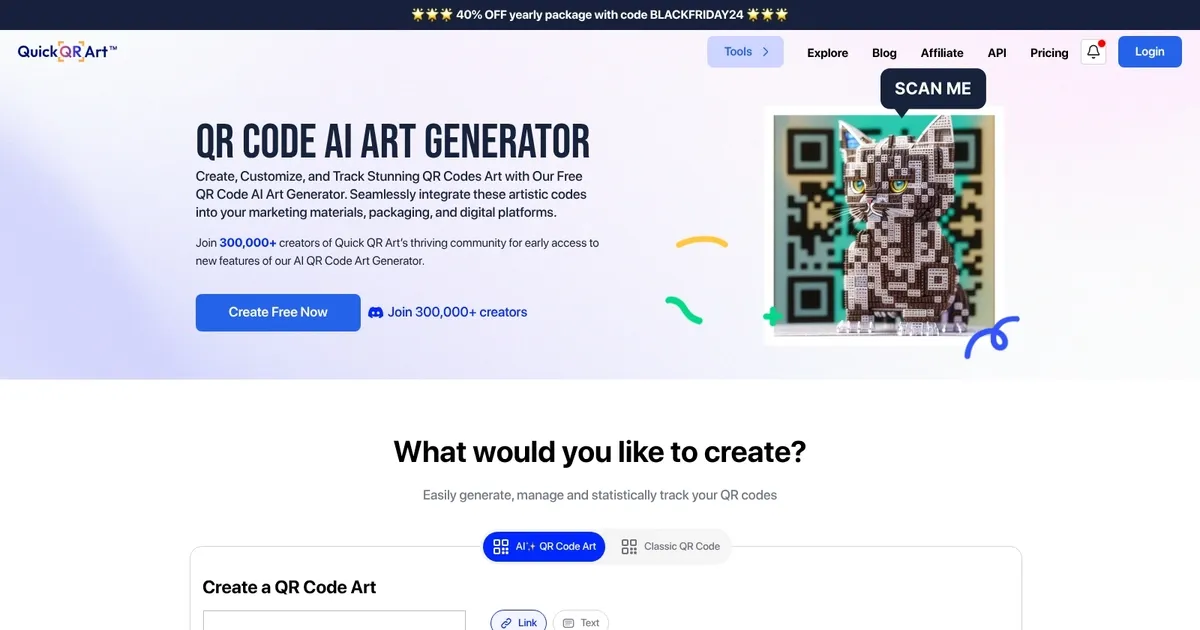
Quick QR Art is an AI-powered tool designed to create, customize, and track visually appealing QR codes that can be seamlessly integrated into marketing materials, packaging, and digital platforms. It allows users to generate both classic QR codes and AI-enhanced QR code art, offering a range of customization options — including various QR code types, destination settings, dynamic QR capabilities, and advanced analytics for tracking.

Aside from QR code creation, Quick QR Art extends its capabilities to include link management and a unique link-in-bio feature — enabling users to shorten URLs, create custom links with branded URLs, and develop customizable landing pages for social media purposes.

The platform’s comprehensive solutions aim to optimize every point of connection between content and audience, making it a versatile tool for event organizers, digital marketers, freelancers, startups, and entrepreneurs.

With its user-friendly interface, Quick QR Art caters to the needs of over 300,000 creators — enabling them to generate and manage QR codes effortlessly.

Visit Quick QR Art ↗
Categories
🖼️ Image
🔳 QR Code Generation 🖼️ Image Generation
🎨 Art
🎨 Art Generation 🖼️ Design Generation
📢 Advertising
🚀 Marketing

Homepage Screenshot 📸

Quick QR Art screenshot

What are the key features? ✨

  • AI QR Art Generation: Creates scannable artistic QR codes from text prompts or image blends in seconds.
  • Prompt Presets: Offers styles like ultra-realism, cinematic-warm, intricate-details to guide artistic output quickly.
  • Scan Tracking & Analytics: Monitors clicks and scans on generated codes for performance insights.
  • Link Management: Includes URL shortening and basic link-in-bio pages for unified handling.
  • Mobile & Discord Access: Supports generation via iOS/Android apps and a Discord bot for flexible use.

Who is it for? 🤔

Quick QR Art helps marketers who want standout codes for campaigns, small business owners adding visual flair to packaging or flyers, content creators sharing links on social media with style, event organizers making tickets or posters memorable, and anyone tired of boring black-and-white squares who enjoys experimenting with AI art that actually works.

Examples of what you can use it for 💡

  • Marketing professional: Designs branded QR codes for ads or product packaging that match campaign themes and drive traffic.
  • Small business owner: Creates artistic menu or storefront links that enhance customer experience and encourage scans.
  • Content creator: Generates eye-catching codes for social posts, videos, or profiles to boost engagement.
  • Event planner: Produces themed QR codes for invitations, tickets, or schedules that fit the event aesthetic.
  • Freelance designer: Blends client logos or images into QR art for unique portfolio or business card additions.

Pros & Cons ⚖️

  • Creative artistic results
  • Easy to use interface
  • Free plan available
  • Scan tracking included
  • Scannability varies
  • Generation time wait

FAQs 💬

Is Quick QR Art free to use?
Yes, the free plan includes AI QR generation, classic QR codes, short links, and a link-in-bio page with no credit card required.
How long does it take to generate a QR code art?
Generation usually takes about 20 seconds using their GPU setup.
What if the QR code doesnt scan?
Try shorter URLs, adjust parameters like --qrw to 2 or --steps to 20, or switch presets for better readability.
Can I upload my own image for blending?
Yes, use the From Image or blend mode to fuse your background with the QR pattern.
Are there presets to help with ideas?
Yes, options like ultra-realism, cinematic-expanse, intricate-details, and more guide the style.
Does it work on mobile?
Yes, dedicated apps exist for iOS and Android besides the website.
Can I track scans?
Basic tracking of clicks and scans is available, even on the free plan.
What file format do I get?
Generated QR art comes as PNG files at 768x768 pixels.

Ready to try Quick QR Art?

Generates artistic, scannable QR codes using AI from prompts or images for creative branding

Visit Quick QR Art ↗

Quick QR Art alternatives 🔗

  1. QRCode AI QRCode AI An AI tool that transforms plain QR codes into eye-catching designs
  2. ChatGPT ChatGPT All-round AI assistant generating human-like responses to user queries and tasks
  3. Grok Grok Delivers witty, real-time AI responses with advanced reasoning and image generation
  4. Imagen Imagen Generates photorealistic images from detailed text prompts
  5. Black Forest Labs Black Forest Labs Generates high-quality images from text prompts with precision and speed
  6. Kling AI Kling AI Generates cinematic videos from text or images with realistic motion
Share
Quick QR Art screenshot enlarged
Promote Quick QR Art
light badge
Copy Embed Code
dark badge
Copy Embed Code
neutral badge
Copy Embed Code
Best AI Tools

Discover the best AI tools for any use case

Explore
  • Tool Categories
  • AI Use Cases
  • AI Events
  • AI News
  • Saved Tools
Company
  • About Us
  • Contact Us
  • Media & Partnerships
  • Suggest a Tool
Legal
  • Privacy Policy
  • Terms of Service
Copyright © 2026 Best AI Tools 415 Mission Street, 37th Floor, San Francisco, CA 94105