logo-darklogo-darklogo-darklogo-dark
  • Tool Categories
    • 🎨Art & Creative Design505
    • 🏢Business Management644
    • 💻Coding & Development515
    • 👮Detection83
    • 🧠General Use727
    • 🏥Health & Wellness55
    • 📷Image & Photo Analysis100
    • 🖼️Image Generation & Editing618
    • 📐Interior & Architectural Design37
    • 🎓Learning & Education483
    • ⚖️Legal & Finance90
    • 🎭Lifestyle & Entertainment236
    • 📢Marketing & Advertising627
    • 🎧Music & Audio138
    • 👔Office & Workplace1,014
    • 🔬Research & Data Analysis372
    • 👥Social Media245
    • 🎥Video Generation & Editing426
    • 👧🏻Virtual Companion135
    • 🎤Voice Generation & Editing381
    • ✍️Writing & Editing808
    • All Categories
    • AI Use Cases
  • News
  • Events
    • Academic Conferences
    • Developer Conferences
    • Expos / Trade Shows
    • Industry Summits
    • Workshops / Training
    • All Events
    • Past Events
  • Saved Tools
  • Suggest a Tool
✕
Home › General Use › Productivity› Raycast Pro
Raycast Pro

Raycast Pro

Enhances macOS productivity with AI-driven search and automation

Raycast Pro is a neat productivity tool designed to enhance Mac users’ efficiency by integrating AI and various productivity features. It allows users to perform tasks more intelligently by incorporating ChatGPT directly into macOS, enabling instant access to AI-driven assistance.

This AI integration lets users write code faster, quickly summarize text in any application, explain code snippets in their favorite editors, and even create custom AI commands to streamline their workflow. Furthermore, with always-on ChatGPT, Raycast Pro allows users to ask questions, generate content, or find solutions to programming-related queries at any time, streamlining their work process significantly.

Beyond the AI capabilities, Raycast Pro includes other features to enhance user productivity and personalization. Cloud Sync ensures that all user settings and data are synchronized across multiple Mac devices, enabling seamless transitions between work and personal setups.

Also, there is the custom themes feature using which users can personalize the look and feel of their Raycast interface, while an unlimited clipboard history makes it easy to retrieve previously copied content.

The software also promises future updates, introducing even more functionality, such as improved note-taking features and window management commands. Raycast Pro is offered in individual and team subscription models, with additional options, including GPT-4, for an enhanced AI experience.

Visit Raycast Pro ↗
Categories
🧠 General
✅ Productivity 🤖 Assistant 💬 Chatbot
👔 Work
⚡ Work Productivity 💼 Workplace Assistant 🤖 Copilot
💻 Coding
👨‍💻 Development

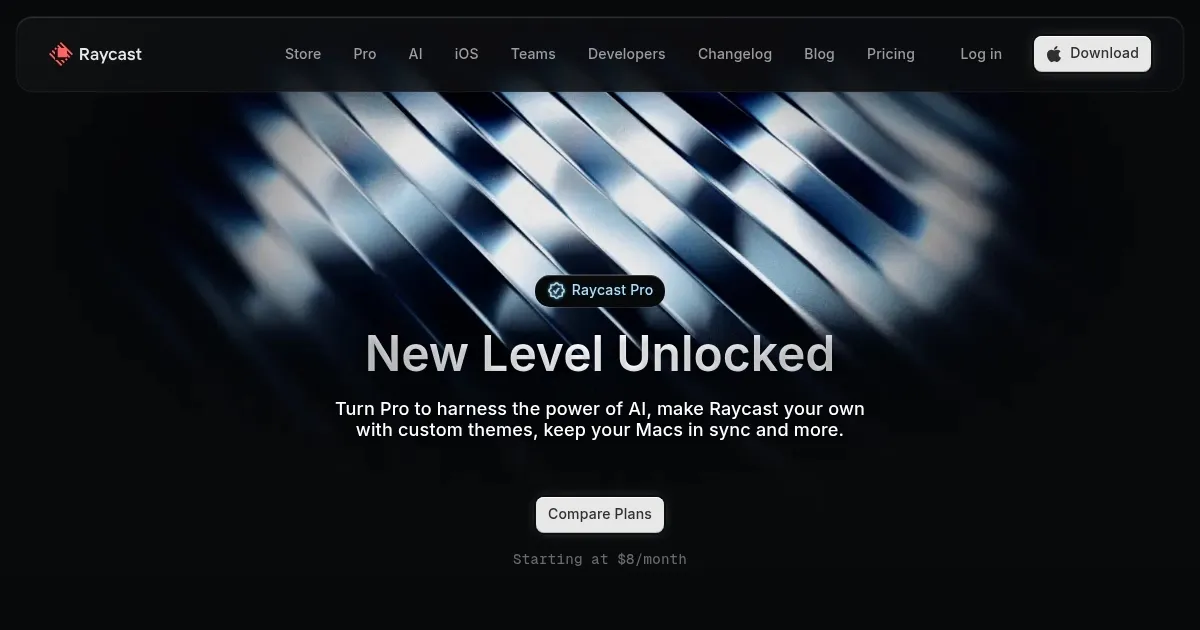
Homepage Screenshot 📸

Raycast Pro screenshot

What are the key features? ✨

  • Quick AI: Combines AI models with web search for instant answers to complex queries.
  • AI Commands: Automates repetitive tasks like code fixes or email drafting using custom prompts.
  • Cloud Sync: Seamlessly synchronizes settings, notes, and clipboard across multiple devices.
  • Unlimited Clipboard History: Stores and retrieves copied items, including images, without limits.
  • Custom Themes: Personalizes the interface with community-designed or user-created visuals.

Who is it for? 🤔

Raycast Pro suits power users on macOS who crave keyboard efficiency, like developers juggling code and tools, designers hopping between Figma and browsers, or remote teams syncing workflows without friction; it empowers anyone tired of app clutter, offering AI smarts and extensions that streamline daily hustles, though beginners might warm up with the free tier first.

Examples of what you can use it for 💡

  • Developer: Quickly debugs code snippets using AI Commands that analyze errors and suggest fixes inline.
  • Designer: Manages Figma files and color palettes via extensions, launching projects with a single hotkey.
  • Writer: Generates email drafts or outlines with Quick AI, pulling web research without leaving the document.
  • Team Lead: Shares custom snippets and Quicklinks in team plans, ensuring consistent task automation across members.
  • Student: Translates notes on the fly and organizes study materials in unlimited Raycast Notes for exam prep.

Pros & Cons ⚖️

  • Lightning fast search
  • Rich AI integrations
  • Extensive extensions
  • Seamless cloud sync
  • Subscription based
  • Mac focused mainly

FAQs 💬

What is Raycast Pro?
Raycast Pro is the premium version of Raycast, adding AI features, unlimited storage, and sync to the free launcher's core search and extensions.
How does Raycast Pro's AI work?
It integrates models from OpenAI and others via Quick AI for queries and Commands for automation, with options to use your own API keys.
Is there a free version of Raycast?
Yes, the free version includes basic search, clipboard history, and thousands of extensions, with limited AI access.
Can I use Raycast on Windows?
Raycast is in beta for Windows, offering core features and Pro AI for subscribers.
How does Raycast compare to Alfred?
Raycast provides more built-in AI and extensions out of the box, while Alfred excels in custom workflows with a one-time fee.
Does Raycast Pro support team collaboration?
Team plans allow sharing commands, snippets, and a private extension store for group workflows.
What about privacy with AI features?
No sensitive data is collected or used for training; chats are encrypted if cloud sync is enabled.
How do I get started with extensions?
Browse the store in the app, install with one click, and customize via hotkeys for instant use.
Is there a student discount for Pro?
Students get 50% off the base Pro plan after verification, excluding advanced AI.
What recent updates came in 2025?
Updates include Raycast Wrapped analytics, improved AI Presets, and beta Windows support.

Ready to try Raycast Pro?

Enhances macOS productivity with AI-driven search and automation

Visit Raycast Pro ↗

Raycast Pro alternatives 🔗

  1. ChatGPT ChatGPT All-round AI assistant generating human-like responses to user queries and tasks
  2. Gemini Gemini Generates responses from text, images, audio, and video inputs using advanced multimodal AI
  3. Claude Claude Assists users in reasoning, coding, writing, and analyzing data with advanced AI models
  4. Grok Grok Delivers witty, real-time AI responses with advanced reasoning and image generation
  5. Perplexity Perplexity Delivers cited AI answers from web searches instantly
  6. SwiftKey AI Keyboard SwiftKey AI Keyboard Enhances typing with AI-powered autocorrect and predictions
Share
Raycast Pro screenshot enlarged
Promote Raycast Pro
light badge
Copy Embed Code
dark badge
Copy Embed Code
neutral badge
Copy Embed Code
Best AI Tools

Discover the best AI tools for any use case

Explore
  • Tool Categories
  • AI Use Cases
  • AI Events
  • AI News
  • Saved Tools
Company
  • About Us
  • Contact Us
  • Media & Partnerships
  • Suggest a Tool
Legal
  • Privacy Policy
  • Terms of Service
Copyright © 2026 Best AI Tools 415 Mission Street, 37th Floor, San Francisco, CA 94105