Skip to content
logo-darklogo-darklogo-darklogo-dark
  • Tool Categories
    • 🎨Art & Creative Design505
    • 🏢Business Management644
    • 💻Coding & Development514
    • 👮Detection83
    • 🧠General Use728
    • 🏥Health & Wellness55
    • 📷Image & Photo Analysis100
    • 🖼️Image Generation & Editing618
    • 📐Interior & Architectural Design37
    • 🎓Learning & Education483
    • ⚖️Legal & Finance90
    • 🎭Lifestyle & Entertainment236
    • 📢Marketing & Advertising627
    • 🎧Music & Audio138
    • 👔Office & Workplace1,014
    • 🔬Research & Data Analysis373
    • 👥Social Media245
    • 🎥Video Generation & Editing426
    • 👧🏻Virtual Companion135
    • 🎤Voice Generation & Editing381
    • ✍️Writing & Editing808
    • All Categories
    • AI Use Cases
  • News
  • Events
    • Academic Conferences
    • Developer Conferences
    • Expos / Trade Shows
    • Industry Summits
    • Workshops / Training
    • All Events
    • Past Events
  • Saved Tools
  • Suggest a Tool
    ✕
    Home › General Use › Assistant› Toolsmart
    Toolsmart

    Toolsmart

    Provides over 50 free AI tools to boost productivity across writing, PDFs, and media

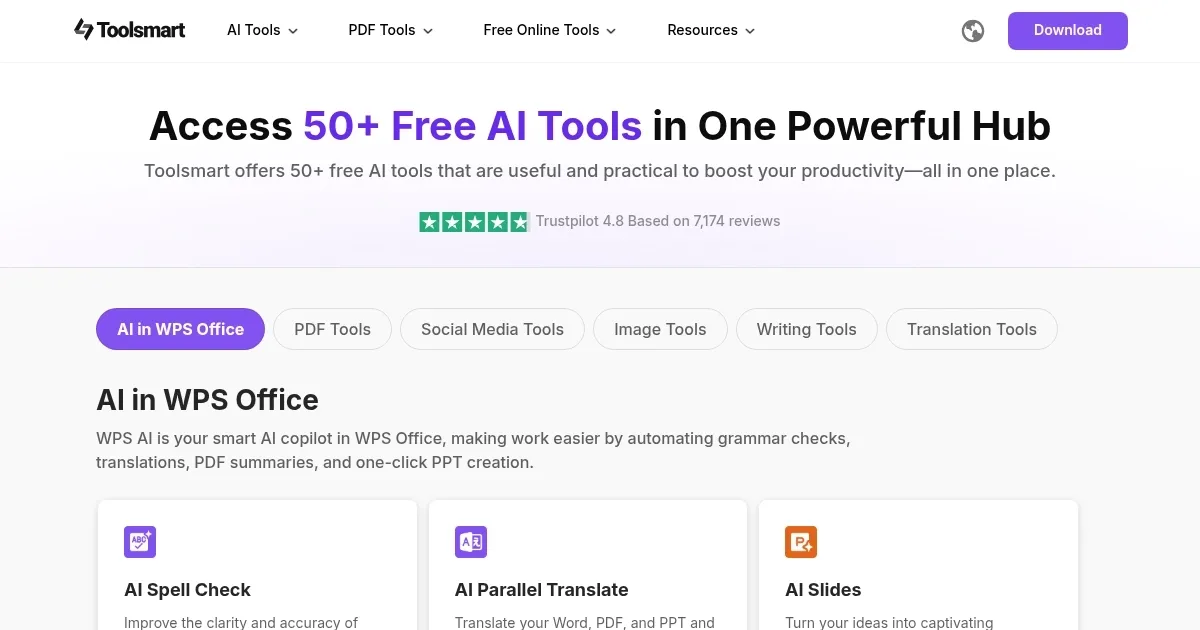
    Toolsmart isn’t just a tool — it’s a toolbox brimming with over 50 free AI-powered utilities, each designed to make your work faster and sharper. From rewriting text to converting PDFs to downloading YouTube videos, this platform feels like a Swiss Army knife for digital tasks, built on the robust ChatGPT-4o framework. The WPS AI suite stands out, with features like AI Spell Check for cleaning up text, AI Slides for crafting PowerPoint presentations, and Chat PDF for pulling insights from documents. You can summarize a 50-page PDF with clickable source links or turn a Word doc into a polished PDF in a few clicks. The interface is clean, almost too simple, with each tool accessible via a single homepage, no sign-up or ads to distract you.

    What’s impressive is the sheer variety. Need to download a TikTok video without a watermark? The TikTok Video Downloader has you covered. Want to enhance a blurry photo? The Image Enhancer boosts resolution in seconds. I tested the Paraphrasing Tool’s Academic mode on a dense research summary, and it churned out clear, professional prose without losing the point. The PDF to Excel tool also surprised me, extracting data from a scanned document with startling accuracy. No tool feels half-baked, which is rare for a free suite. You get up to 1500 words per session for text-based tools, generous for most tasks.

    But there are quirks. The 1500-word limit on text tools can feel restrictive for longer projects, requiring you to split work into chunks. Some tools, like the Watermark Remover, occasionally leave faint traces on complex images. Compared to specialized platforms like Canva for design or Adobe Acrobat for PDFs, Toolsmart’s tools are less feature-rich but unbeatable for cost — zero dollars. The lack of a mobile app might irk on-the-go users, though the web interface works fine on mobile browsers.

    A delightful surprise? The Humanize AI tool. It rewrites AI-generated text to slip past AI detectors, which I tested with a blog post that passed undetected. It’s a boon for content creators. The social media downloaders also shine, pulling high-quality videos from Instagram or Pinterest effortlessly. For new users, start with WPS AI for writing or PDF tools for document tasks. Experiment with modes like Creative for storytelling or Formal for emails. Keep a notepad to manage longer texts, and you’ll find Toolsmart a reliable ally for juggling multiple tasks.

    Visit Toolsmart ↗
    Categories
    🧠 General
    🤖 Assistant
    👔 Work
    ⚡ Work Productivity
    🖼️ Image
    🖼️ Image Generation
    ✍️ Writing
    🤖 Writing Assistant

    Homepage Screenshot 📸

    Toolsmart screenshot

    What are the key features? ✨

    • WPS AI Suite: Includes AI Spell Check, AI Slides, and Chat PDF for writing and document tasks.
    • Paraphrasing Modes: Offers nine modes to adapt text for various styles and purposes.
    • PDF Conversion Tools: Converts PDFs to Word, Excel, or PPT with high accuracy.
    • Social Media Downloaders: Downloads videos from YouTube, TikTok, Instagram without watermarks.
    • Image Enhancer: Improves image quality and resolution quickly.

    Who is it for? 🤔

    Toolsmart’s diverse suite of over 50 free AI tools benefits students refining essays, marketers downloading social media content, professionals managing PDFs, and content creators enhancing images or text, offering a cost-free, versatile solution for varied digital tasks.

    Examples of what you can use it for 💡

    • Student: Converts lecture PDFs to editable Word docs for note-taking.
    • Marketer: Downloads Instagram videos for repurposing in campaigns.
    • Freelancer: Uses AI Slides to create client presentations quickly.
    • Blogger: Paraphrases posts to improve readability and avoid duplication.
    • Researcher: Summarizes lengthy PDFs with Chat PDF for quick insights.

    Pros & Cons ⚖️

    • Over 50 free tools
    • No sign-up or ads
    • Fast processing speed
    • Image tools may falter
    • No mobile app

    FAQs 💬

    What tools does Toolsmart offer?
    Over 50 tools for writing, PDF management, image editing, and social media downloads.
    Is Toolsmart completely free?
    Yes, all tools are free with no sign-up or ads required.
    Can I use Toolsmart on my phone?
    It’s web-based and works on mobile browsers, but no dedicated app exists.
    Does Toolsmart preserve PDF formatting?
    Yes, PDF conversion tools maintain original layouts accurately.
    Can Toolsmart download TikTok videos?
    The TikTok Video Downloader saves videos without watermarks in high quality.
    Is my data safe with Toolsmart?
    No sign-up minimizes data collection, but review the privacy policy for details.
    Can Toolsmart improve AI-generated text?
    The Humanize AI tool makes AI text appear natural and less detectable.
    How does Toolsmart compare to Adobe Acrobat?
    Toolsmart is free with broader tools, while Acrobat offers deeper PDF features for a fee.
    What’s the word limit for text tools?
    Text tools process up to 1500 words per session.
    Can Toolsmart enhance blurry images?
    The Image Enhancer improves resolution and quality quickly.

    Ready to try Toolsmart?

    Provides over 50 free AI tools to boost productivity across writing, PDFs, and media

    Visit Toolsmart ↗

    Toolsmart alternatives 🔗

    1. Tenorshare AI Tenorshare AI A suite of AI-powered tools designed to enhance productivity across different tasks
    2. TinyWow TinyWow A collection of PDF, video, image, and other AI-powered online tools to make your life easier
    3. EaseMate AI EaseMate AI Streamlines study, work, and creativity with AI-powered chat, summarization, and content generation
    4. MagicTool MagicTool A versatile productivity platform integrating various AI features to enhance user efficiency
    5. Wordtune Summarizer Wordtune Summarizer An AI tool that summarizes long documents
    6. Decopy AI Decopy AI Detects AI-generated text and transforms it into natural human-like content
    Share
    Toolsmart screenshot enlarged
    Best AI Tools

    Discover the best AI tools for any use case

    Explore
    • Tool Categories
    • AI Use Cases
    • AI Events
    • AI News
    • Saved Tools
    Company
    • About Us
    • Contact Us
    • Media & Partnerships
    • Suggest a Tool
    Legal
    • Privacy Policy
    • Terms of Service
    Copyright © 2026 Best AI Tools 415 Mission Street, 37th Floor, San Francisco, CA 94105