logo-darklogo-darklogo-darklogo-dark
  • Tool Categories
    • ๐ŸŽจArt & Creative Design505
    • ๐ŸขBusiness Management644
    • ๐Ÿ’ปCoding & Development514
    • ๐Ÿ‘ฎDetection83
    • ๐Ÿง General Use728
    • ๐ŸฅHealth & Wellness55
    • ๐Ÿ“ทImage & Photo Analysis100
    • ๐Ÿ–ผ๏ธImage Generation & Editing618
    • ๐Ÿ“Interior & Architectural Design37
    • ๐ŸŽ“Learning & Education483
    • โš–๏ธLegal & Finance90
    • ๐ŸŽญLifestyle & Entertainment236
    • ๐Ÿ“ขMarketing & Advertising627
    • ๐ŸŽงMusic & Audio138
    • ๐Ÿ‘”Office & Workplace1,014
    • ๐Ÿ”ฌResearch & Data Analysis373
    • ๐Ÿ‘ฅSocial Media245
    • ๐ŸŽฅVideo Generation & Editing426
    • ๐Ÿ‘ง๐ŸปVirtual Companion135
    • ๐ŸŽคVoice Generation & Editing381
    • โœ๏ธWriting & Editing808
    • All Categories
    • AI Use Cases
  • News
  • Events
    • Academic Conferences
    • Developer Conferences
    • Expos / Trade Shows
    • Industry Summits
    • Workshops / Training
    • All Events
    • Past Events
  • Saved Tools
  • Suggest a Tool
โœ•
Home › Video Generation & Editing › Avatar Video Generation› vidBoard.ai
vidBoard.ai

vidBoard.ai

Transform text, documents, or URLs into engaging videos with AI avatars and voices.

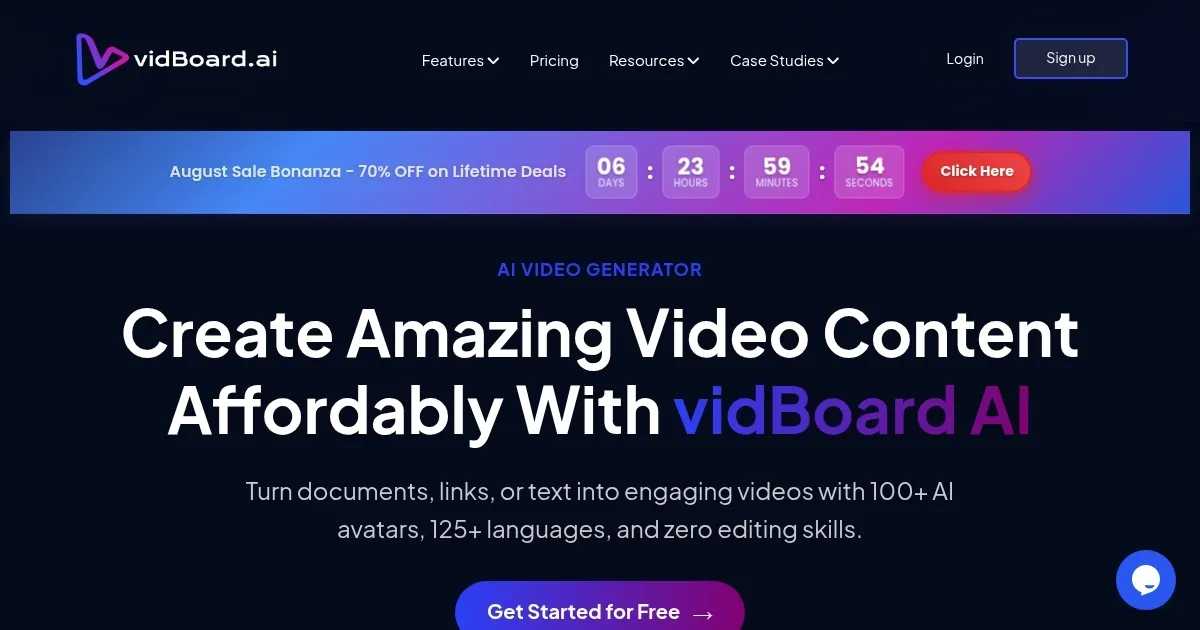
vidBoard.ai is an AI-powered platform that transforms text, documents, or URLs into professional videos with lifelike avatars, voices, and captions, requiring no editing skills. Supporting 125+ languages and offering 100+ avatars, it delivers 1080p videos with 99.5% lip-sync accuracy. Users can select from 80+ templates, add multimedia from Pexels or Unsplash, and generate AI scripts or captions. The platform suits marketers, educators, and businesses needing quick, high-quality video content.

The process is simple: choose a template, input content, customize with visuals or music, preview, and export. Features like faceless videos ensure privacy, while AI voiceovers from ElevenLabs and Azure sound natural. Users on Trustpilot praise the responsive support, often replying in minutes, and the platformโ€™s ability to cut production time by up to 90%. Since launching in 2021, vidBoard has served over 3,000 paying users, creating 50,000+ videos.

Compared to VEED.io or Rephrase, vidBoard offers a broader feature set, including document-to-video conversion, though its template library is smaller. Pricing includes a free trial and flexible plans, competitive with similar tools. Some users note the free tierโ€™s limits and occasional avatar stiffness as drawbacks.

For best results, use concise scripts (under 2,000 words) and leverage the post-generation editor for tweaks. Test the AI captions for accessibility and experiment with custom avatars for brand consistency.

Visit vidBoard.ai ↗
Categories
๐ŸŽฅ Video
๐Ÿค– Avatar Video Generation ๐Ÿ“น Video Generation ๐Ÿ“ Text to Video ๐Ÿ“œ Script To Video Generation ๐Ÿ‘„ Lip Sync Generation ๐ŸŽ™๏ธ Video Dubbing
๐Ÿ–ผ๏ธ Image
๐Ÿง‘โ€๐ŸŽค Avatar Generation
๐Ÿ“ข Advertising
๐Ÿš€ Marketing

Homepage Screenshot 📸

vidBoard.ai screenshot

What are the key features? ✨

  • AI Avatars: Over 100 lifelike avatars with 99.5% lip-sync accuracy deliver professional video presentations.
  • Text-to-Video: Converts text, PDFs, or URLs into high-quality videos in under five minutes.
  • Multilingual Support: Supports 125+ languages with natural-sounding AI voiceovers for global reach.
  • AI-Generated Scripts: Automatically generates scripts to streamline video content creation.
  • Multimedia Assets: Integrates visuals from Pexels, Unsplash, and royalty-free music for enhanced videos.

Who is it for? 🤔

vidBoard.ai is ideal for marketers, educators, small business owners, and content creators who need to produce professional videos quickly without technical expertise. Its intuitive interface and AI-driven features make it perfect for those creating promotional content, educational materials, or corporate communications, especially for global audiences due to its multilingual support.

Examples of what you can use it for 💡

  • Marketer: Creates daily social media videos to boost engagement with AI avatars and captions.
  • Educator: Turns lesson plans into engaging video tutorials in multiple languages.
  • Small Business Owner: Produces product demos without appearing on camera, saving time.
  • Content Creator: Converts blog posts into videos for YouTube using AI scripts and visuals.
  • Corporate Trainer: Transforms internal memos into professional video announcements.

Pros & Cons ⚖️

  • Marketer: Creates daily social media videos to boost engagement with AI avatars and captions.
  • Educator: Turns lesson plans into engaging video tutorials in multiple languages.
  • Small Business Owner: Produces product demos without appearing on camera, saving time.
  • Content Creator: Converts blog posts into videos for YouTube using AI scripts and visuals.
  • Corporate Trainer: Transforms internal memos into professional video announcements.
  • Limited free tier access.
  • Templates could be more varied.
  • Avatar movements need refinement.

FAQs 💬

What types of content can vidBoard.ai create?
vidBoard.ai creates videos from text, PDFs, URLs, or ChatGPT prompts for marketing, education, or corporate use.
Do I need video editing skills to use vidBoard.ai?
No, the platformโ€™s intuitive interface requires no prior editing experience.
Can I create videos in multiple languages?
Yes, vidBoard supports 125+ languages with natural-sounding AI voiceovers.
Is there a free trial available?
Yes, a free trial allows one video creation to test the platform.
Can I customize avatars with my own image?
Yes, you can create a custom avatar from a single front-facing photo.
How long does it take to create a video?
Most videos from a 150-word script are ready in under three minutes.
Does vidBoard offer customer support?
Yes, support responds within minutes, highly praised by users.
Can I add my own visuals or music?
Yes, you can upload custom images, videos, or music to enhance videos.
Is the video quality professional-grade?
Videos are 1080p with 99.5% lip-sync accuracy, comparable to professional production.
Are there limitations on the free plan?
The free plan limits users to one video, encouraging a paid upgrade.

Ready to try vidBoard.ai?

Transform text, documents, or URLs into engaging videos with AI avatars and voices.

Visit vidBoard.ai ↗

vidBoard.ai alternatives 🔗

  1. VEED VEED Creates pro-level videos with AI-powered editing and collaboration tools
  2. HeyGen HeyGen Generative AI video creation platform
  3. Pollo AI Pollo AI Bring your creative ideas to life through advanced AI
  4. Vidnoz AI Vidnoz AI An AI-powered text-to-video platform, made for marketers, businesses, educators, and more
  5. FlexClip FlexClip Easily create and edit videos for the brand, marketing, social media, and any other purpose
  6. Viggle Viggle Using AI to animate characters from images and generate videos with ease
Share
vidBoard.ai screenshot enlarged
Best AI Tools

Discover the best AI tools for any use case

Explore
  • Tool Categories
  • AI Use Cases
  • AI Events
  • AI News
  • Saved Tools
Company
  • About Us
  • Contact Us
  • Media & Partnerships
  • Suggest a Tool
Legal
  • Privacy Policy
  • Terms of Service
Copyright © 2026 Best AI Tools 415 Mission Street, 37th Floor, San Francisco, CA 94105