logo-darklogo-darklogo-darklogo-dark
  • Home
  • Browse
    • Assistant
    • Coding
    • Image
    • Productivity
    • Video
    • Voice
    • Writing
    • All Categories
    • AI Use Cases
  • Events
  • My Favorites
  • Suggest a Tool
✕
Home â€ș Image Generation & Editingâ€ș
Published by Dusan Belic on July 10, 2023

What Font Is

What Font Is
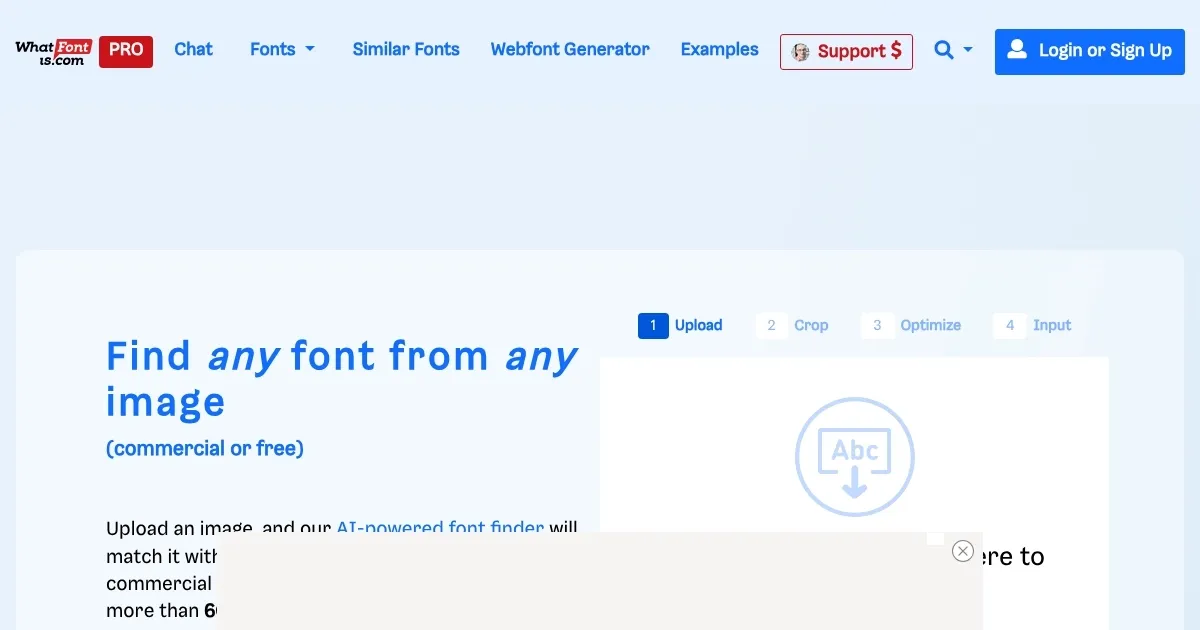
What Font Is Homepage
Categories Image Generation & Editing
Identify a font from any image

What Font Is

What Font Is or WhatFontIs is a web-based service that helps users identify fonts from images. It utilizes a comprehensive catalog of over 990,000 fonts, both commercial and free, and employs advanced AI technology to assist in font identification.

Users can upload an image containing the font they wish to identify, and the system — with a claimed 90% success rate — will provide a list of over 60 similar fonts. The service caters to a variety of needs, such as finding a specific font that a client might have omitted or simply identifying an appealing font spotted by the user.

It is important to note that the quality of the image can significantly impact the identification process. Naturally, high-resolution images with clear, non-distorted text yield the best results. For cursive fonts, users might need to use the website’s advanced image editor to separate each letter, aiding the AI in recognizing the font.

Once the font is analyzed, WhatFontIs displays a selection of over 60 fonts that closely match the one in the uploaded image. These results include links to pages where users can download or purchase the fonts.

WhatFontIs also offers various member benefits for PRO (paid) users. These benefits include unlimited access to the font database, custom text previews, a Google Fonts search feature, an ad-free experience, advanced filtering options, and more. PRO members also enjoy enhanced precision and accuracy in their font searches, with access to a curated list of 100 fonts for each search and the ability to save search results for future reference.

What Font Is Homepage
Categories Image Generation & Editing

Video Overview ▶️

What Font Is - Video Overview

What are the key features? ⭐

  • Font identification: The primary feature of WhatFontIs is its ability to identify fonts used in images. This is particularly helpful if you've seen a font you like in an image but don't know its name.
  • Large font database: WhatFontIs boasts a vast database containing over 990,000 fonts, both free and commercial ones.
  • Multiple font suggestions: After analyzing your image, WhatFontIs doesn't just give you one result; it provides a list of over 60 fonts that resemble the one in your image.
  • PRO membership: PRO membership includes benefits like unlimited access to the font database, the ability to preview custom text, an ad-free experience, and advanced search filters. Also included are more precise results, with a curated list of 100 fonts for each search.
  • Google Fonts integration: When you search for a font, the website can also look through the Google Fonts library, which is a popular source of free and open-source fonts.

Who is it for? 🤔

WhatFontIs primarily targets graphic designers, web designers, and marketing professionals who frequently work with various fonts and need to identify or match fonts for their projects. It is also aimed at hobbyists or enthusiasts engaged in personal design projects, such as creating invitations, posters, or custom graphics. Additionally, the service caters to businesses and branding agencies looking to maintain consistency in their visual branding by accurately identifying and using specific fonts.

Examples of what you can use it for 💭

  • Identifying fonts in design inspirations
  • Recreate logos and/or artwork with the original or similar font
  • Find fonts for marketing materials
  • Discover cool fonts for personal projects
  • Exploring new fonts for web design

Pros & Cons ⚖️

  • Handy when you need to identify a font from an image
  • Great for all kinds of designers
  • And also for marketers looking for inspiration
  • Too many ads on the site

FAQs 💬

What is WhatFontIs, and how does it help with font identification?
WhatFontIs is an AI-powered online tool that lets you upload an image of text—like a logo, poster, or screenshot—and matches it against over 1.1 million fonts, both free and commercial. It analyzes glyph shapes to suggest exact matches or up to 60 similar options, saving designers time on projects. I think it shines for quick scans, with a 90% accuracy rate on clear images, according to their site and 2025 reviews on DesignZig.
Is WhatFontIs free to use, or does it have paid plans?
Yes, there’s a free plan that covers up to five identifications per day, though it includes ads to keep things running. For unlimited searches, no ads, and extras like advanced filters by price or foundry, the PRO membership kicks in—starts around $29.90 a year, with a seven-day free trial. Sources like their pricing page and OpenTools.ai confirm this setup works well for casual versus heavy users in 2025.
How accurate is WhatFontIs at identifying fonts?
It hits about 90% accuracy with high-quality, high-contrast images of horizontal text, pulling from its massive database. But it might struggle with custom, distorted, or super low-res fonts—users on Reddit in mid-2025 noted needing the image editor for cursive styles. Overall, reviews on AIxploria and Beebom call it one of the most reliable, especially compared to smaller-database tools.
What file types can I upload to WhatFontIs?
You can upload JPEG, PNG, or GIF files directly, or drop in a URL for online images. No PDFs or videos yet, but the drag-and-drop makes it easy on any browser, even mobile. Their examples page and Chrome extension docs verify this keeps things simple for quick checks.
Does WhatFontIs work on cursive or script fonts?
Pretty well, yeah—it uses AI to auto-separate letters, but for connected scripts, you might need the built-in editor to draw lines between characters. Recent X posts from November 2025 praise it for nailing tricky handwriting styles after tweaks, though it’s not perfect on hand-drawn ones.
Can WhatFontIs find free font alternatives?
Absolutely, it lists both free and paid options, with filters to sort by price in the PRO plan. If no exact match shows, you get 60+ similars, often including Google Fonts knockoffs. Designers on Product Hunt in 2025 highlight this as a budget-saver over pricier foundries.
Is there a mobile app for WhatFontIs, or just web?
It’s fully web-based, so it runs smooth on phones or tablets without an app download. The Chrome extension adds on-the-fly web font spotting too. No native iOS or Android app as of late 2025, per their site and app store alternatives like Fonti.
How does WhatFontIs compare to WhatTheFont?
WhatFontIs edges out with a bigger database—1.1 million versus WhatTheFont’s 300,000—and broader coverage of free/commercial fonts without foundry bias. It’s got better image editing tools too, though WhatTheFont feels snappier for basics. 2025 blogs like TopDesignMag say WhatFontIs wins for pros needing alternatives.
What if WhatFontIs doesn’t identify my font correctly?
Post the image to their free community forum—expert users often chime in within days. Or tweak your upload with the editor for contrast and cropping. Trustpilot reviews from August 2025 mention this forum saves the day for obscure fonts, boosting overall success.
Is WhatFontIs safe and trustworthy to use?
Yep, it’s legit—no malware flags, and Scamadviser gives it a high trust score in 2025 for secure uploads. They don’t store images long-term, and PRO payments go through standard gateways. Just watch for ad pop-ups on free tier, as noted in Chrome Store feedback.
Visit What Font Is

Related tools ↙

  1. Dawn AI Dawn AI Generates personalized avatars and images from selfies using advanced AI technology
  2. Imajinn Imajinn Transforms user photos into artistic images and custom visuals using AI
  3. Imgix Imgix Optimizes images in real-time using AI for faster web delivery
  4. Cloudinary Cloudinary Manages, transforms, optimizes, and delivers images and videos with AI-powered features
  5. SVG AI SVG AI Transforms text prompts into scalable vector icons and logos instantly
  6. Blackshark.ai Blackshark.ai Creates photorealistic 3D digital twins from satellite imagery using AI
Last update: November 25, 2025
Share
Promote What Font Is
light badge
Copy Embed Code
dark badge
Copy Embed Code
neutral badge
Copy Embed Code
About Us | Contact Us | Suggest an AI Tool | Privacy Policy | Terms of Service

Copyright © 2026 Best AI Tools
415 Mission Street, 37th Floor, San Francisco, CA 94105