logo-darklogo-darklogo-darklogo-dark
  • Tool Categories
    • ๐ŸŽจ Art
    • ๐Ÿข Business
    • ๐Ÿ’ป Coding
    • ๐Ÿ‘ฎ Detection
    • ๐Ÿง  General
    • ๐Ÿฅ Health
    • ๐Ÿ“ท Image Analysis
    • ๐Ÿ–ผ๏ธ Image
    • ๐Ÿ“ Architecture
    • ๐ŸŽ“ Education
    • โš–๏ธ Legal/Finance
    • ๐ŸŽญ Lifestyle
    • ๐Ÿ“ข Advertising
    • ๐ŸŽง Music
    • ๐Ÿ‘” Work
    • ๐Ÿ”ฌ Research
    • ๐Ÿ‘ฅ Social
    • ๐ŸŽฅ Video
    • ๐Ÿ‘ง๐Ÿป Companion
    • ๐ŸŽค Voice
    • โœ๏ธ Writing
    • All Categories
    • AI Use Cases
  • News
  • Events
    • Academic Conferences
    • Developer Conferences
    • Expos / Trade Shows
    • Industry Summits
    • Online Events
    • Workshops / Training
    • All Events
    • Past Events
  • Saved Tools
  • Suggest a Tool
โœ•
Home › Video Generation & Editing › Video Editing› 123VideoTool
123VideoTool

123VideoTool

Download and convert YouTube videos, Shorts, thumbnails, and MP3s effortlessly.

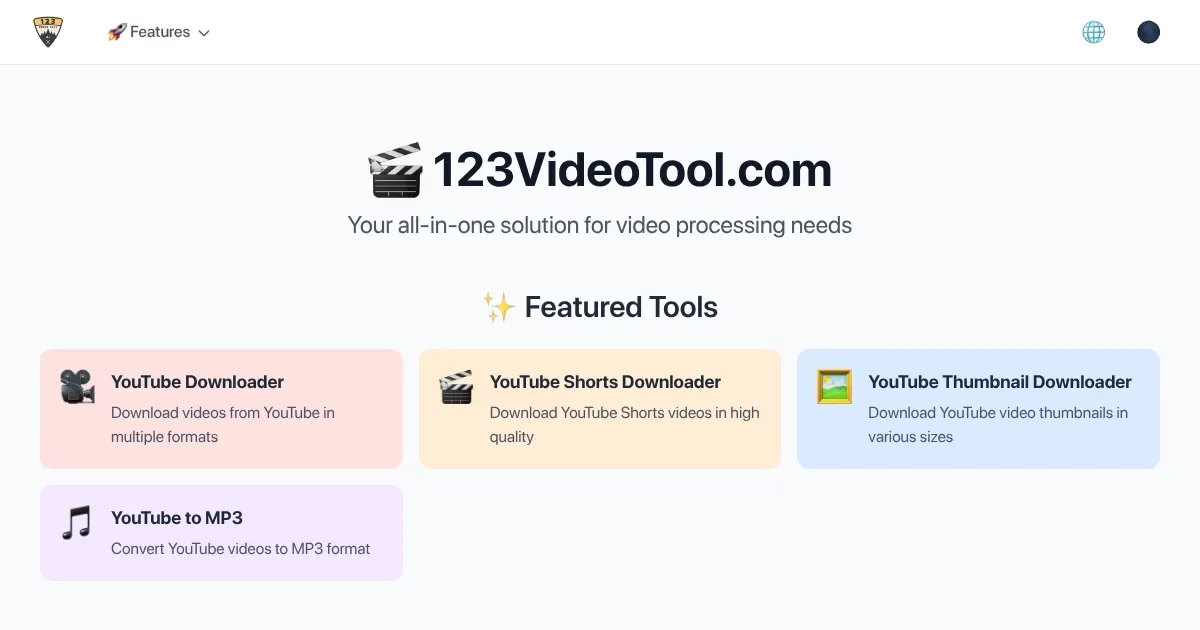
123VideoTool is a web-based platform designed to download and convert YouTube videos, Shorts, thumbnails, and MP3s with ease. Users paste a YouTube URL, select a format (MP4, MP3, or thumbnail), and choose from available resolutions, up to 1080p on the free plan or 4K with a premium subscription. The tool processes files quickly, often in seconds, and delivers high-quality outputs. Its audio extraction feature ensures clear MP3 conversions, ideal for music or podcast downloads. The interface is intuitive, requiring no technical expertise, and itโ€™s compatible with desktop and mobile browsers.

Key competitors include Y2Mate and SnapDownloader. Y2Mate offers free downloads but is plagued by ads, while SnapDownloader provides advanced features like batch downloads at a higher cost. 123VideoToolโ€™s free tier is ad-light, and its premium plan is competitively priced, offering 4K downloads and an ad-free experience. Limitations include the 1080p cap on the free plan and the lack of video editing tools. A notable feature is the ability to download high-resolution thumbnails, which is useful for content creators.

To get started, visit the site, paste a YouTube link, and experiment with the free version. If you need 4K videos or frequent downloads, the premium plan is worth exploring. Regularly check your downloaded files for quality to ensure they meet your needs.

Visit 123VideoTool ↗

Categories

๐ŸŽฅ Video

โœ๏ธ Video Editing ๐Ÿ“น Video Generation ๐Ÿ“ฒ Short Video Generation โœจ Video Enhancing

Screenshot 📸

123VideoTool screenshot

What are the key features? ✨

  • Video Download: Downloads YouTube videos in MP4 format up to 1080p for free or 4K with premium.
  • MP3 Conversion: Extracts high-quality audio from videos into MP3 files.
  • Thumbnail Grabber: Saves high-resolution YouTube thumbnails for creative projects.
  • Multi-Resolution Support: Offers multiple resolution options, from 480p to 4K.
  • Mobile Compatibility: Works seamlessly on mobile browsers without an app.

Who is it for? 🤔

123VideoTool is ideal for content creators, students, educators, and casual users who need to download YouTube videos, Shorts, thumbnails, or MP3s for offline use or creative projects. Its simplicity suits beginners, while the premium features appeal to professionals needing high-quality media.

Examples of what you can use it for 💡

  • Content Creator: Downloads high-res thumbnails to design engaging social media posts.
  • Student: Saves lecture videos for offline study during commutes.
  • Musician: Converts music videos to MP3s for personal playlists.
  • Educator: Downloads educational Shorts to use in classroom presentations.
  • Blogger: Grabs video clips to embed in blog posts for enhanced content.

Pros & Cons ⚖️

  • Fast download speeds
  • Clean, user-friendly interface
  • High-quality MP3 conversion
  • Mobile-friendly design
  • Thumbnail download feature
  • Free version limited to 1080p
  • No built-in video editing

FAQs 💬

Is 123VideoTool free to use?
Yes, it offers a free version with downloads up to 1080p, but premium features like 4K require a subscription.
Does it work on mobile devices?
Yes, the tool is fully compatible with mobile browsers, no app needed.
Can I download YouTube Shorts?
Absolutely, 123VideoTool supports downloading YouTube Shorts in MP4 format.
Is it safe to use 123VideoTool?
The platform is secure, with no intrusive ads in the free version and a reputable privacy policy.
What formats can I download?
You can download videos in MP4, audio in MP3, and thumbnails as image files.
Does it support 4K video downloads?
Yes, 4K downloads are available with a premium subscription.
Can I download entire playlists?
Currently, playlist downloads are not supported; you must download videos individually.
Are there ads in the free version?
The free version has minimal ads, far less intrusive than many competitors.

Ready to try 123VideoTool?

Download and convert YouTube videos, Shorts, thumbnails, and MP3s effortlessly.

Visit 123VideoTool ↗

123VideoTool alternatives 🔗

  1. Runway Runway Generates and edits AI-powered videos from text prompts
  2. Canva Magic Design Canva Magic Design Generates custom, on-brand designs from text prompts or uploaded media in seconds.
  3. Adobe Express Adobe Express Creates on-brand content with AI-driven design and video tools
  4. Vimeo AI Vimeo AI Creates polished videos from single recordings using AI edits and scripts
  5. CapCut Creative Suite CapCut Creative Suite Online creative suite for everyone to create stunning images and videos
  6. Loom AI Loom AI Record better video messages with automatic titles, summaries, share messages, and more
Share
123VideoTool screenshot enlarged
Promote 123VideoTool
light badge
Copy Embed Code
dark badge
Copy Embed Code
neutral badge
Copy Embed Code
Best AI Tools

Discover the best AI tools for any use case

About Us | Contact Us | Suggest an AI Tool
Privacy Policy | Terms of Service
Copyright © 2026 Best AI Tools 415 Mission Street, 37th Floor, San Francisco, CA 94105