logo-darklogo-darklogo-darklogo-dark
  • Tool Categories
    • 🎨Art & Creative Design505
    • 🏢Business Management644
    • 💻Coding & Development515
    • 👮Detection83
    • 🧠General Use727
    • 🏥Health & Wellness55
    • 📷Image & Photo Analysis100
    • 🖼️Image Generation & Editing618
    • 📐Interior & Architectural Design37
    • 🎓Learning & Education483
    • ⚖️Legal & Finance90
    • 🎭Lifestyle & Entertainment236
    • 📢Marketing & Advertising627
    • 🎧Music & Audio138
    • 👔Office & Workplace1,014
    • 🔬Research & Data Analysis372
    • 👥Social Media245
    • 🎥Video Generation & Editing426
    • 👧🏻Virtual Companion135
    • 🎤Voice Generation & Editing381
    • ✍️Writing & Editing808
    • All Categories
    • AI Use Cases
  • News
  • Events
    • Academic Conferences
    • Developer Conferences
    • Expos / Trade Shows
    • Industry Summits
    • Workshops / Training
    • All Events
    • Past Events
  • Saved Tools
  • Suggest a Tool
✕
Home › Image Generation & Editing › Photo Editing› AiPassportPhotos
AiPassportPhotos

AiPassportPhotos

Generates compliant passport, visa, and ID photos from uploaded selfies using AI adjustments

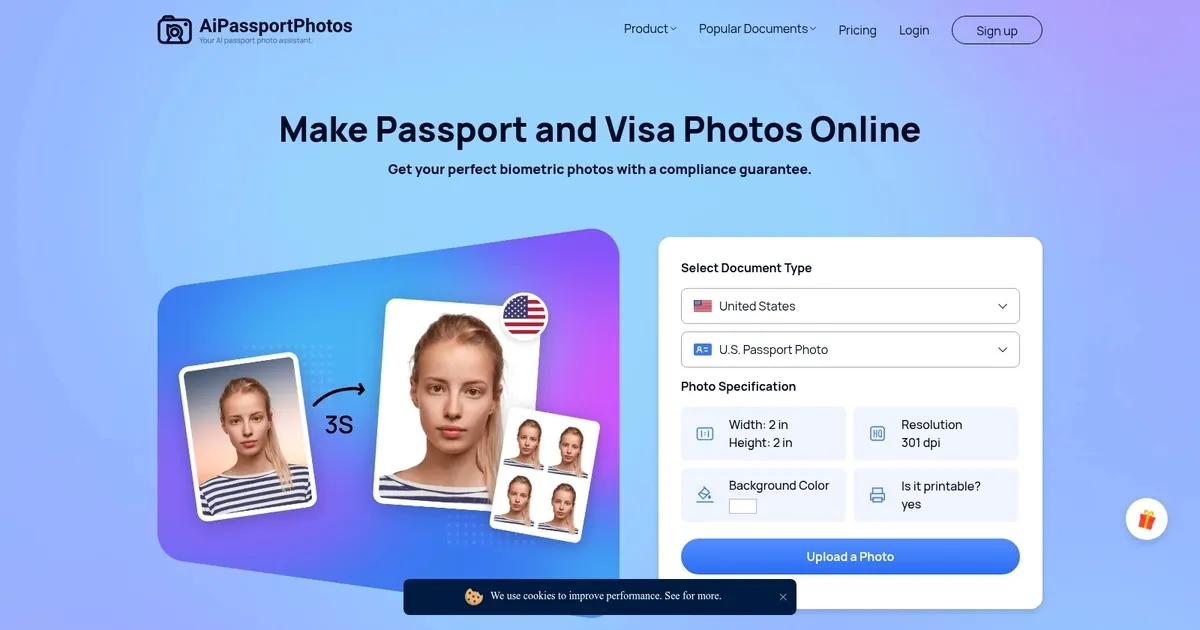
AiPassportPhotos is an online platform that employs artificial intelligence to generate compliant passport and ID photos. The service streamlines the process, ensuring that photos meet the strict criteria required for official documents.

AiPassportPhotos promises guaranteed acceptance, reflecting the confidence in the accuracy of its AI algorithms. This reassurance is crucial for users seeking to avoid the common pitfalls and delays associated with passport photo rejections.

Accessibility and ease of use are at the core of AiPassportPhotos’ design. Users simply upload their photos, and the AI handles the rest — from ensuring proper size and background color to compliance with international standards.

This service not only saves time but also reduces the cost associated with obtaining passport photos through traditional means.

Visit AiPassportPhotos ↗
Categories
🖼️ Image
✏️ Photo Editing ✂️ Background Removal 📸 Headshot Generation 🏞️ Background Generation 🌟 Photo Enhancing
🎨 Art
📷 Photography

Homepage Screenshot 📸

AiPassportPhotos screenshot

What are the key features? ✨

  • AI Auto-Crop and Resize: Automatically adjusts face position, head size, and image dimensions to match exact official passport and visa specs.
  • Background Removal/Replacement: Intelligently removes existing backgrounds and replaces them with plain white or off-white for compliance.
  • Compliance Check: Analyzes photos for issues like lighting, shadows, glasses, and alignment to help ensure government acceptance.
  • Multiple Document Support: Handles US passport, visa, green card, baby photos, Canadian visa, and other ID formats in one platform.
  • Free Download Options: Provides digital files and printable templates at no charge with no hidden fees.

Who is it for? 🤔

AiPassportPhotos suits frequent travelers, families applying for passports or visas, immigrants handling green cards or EAD renewals, students needing ID photos, and anyone who wants to avoid photo studio costs and appointments. Its especially helpful for people with busy schedules, those living far from reliable photo services, or parents dealing with young children who dislike studio settings. Casual users preparing for occasional trips find it practical too, since the free access lowers the barrier to trying it.

Examples of what you can use it for 💡

  • Frequent traveler: Quickly generates compliant US passport or visa photos from a smartphone selfie before an international trip.
  • Family with infants: Creates baby passport photos at home without stressing out a toddler in a studio environment.
  • Immigrant or worker: Produces green card or EAD card photos that meet USCIS requirements for renewal applications.
  • Student or job applicant: Makes professional ID or driver's license photos for official documents without paying for professional shoots.
  • Budget-conscious user: Downloads free printable templates to print at a local shop instead of overpaying at chain stores.

Pros & Cons ⚖️

  • Completely free to use
  • Fast processing in seconds
  • Wide document support
  • Simple no-signup flow
  • Quality tied to input photo
  • Occasional minor artifacts

FAQs 💬

Is AiPassportPhotos really free?
Yes, the core passport and visa photo generation and download features are free with no hidden charges or watermarks.
What kind of photo should I upload?
Use a clear, well-lit selfie or portrait taken in daylight against a plain background, preferably with a neutral expression and no head tilt.
Does it guarantee acceptance by authorities?
It follows official guidelines closely to maximize chances, but final acceptance depends on the issuing office; many users report successful outcomes.
Can I use it for baby or child passport photos?
Yes, it supports baby and child photos with adjustments for smaller head sizes and relaxed expression rules where allowed.
What countries does it support?
It focuses on US (passport, visa, green card) and Canadian visa specs, plus some other ID formats, with ongoing updates for compliance.
Do I need to create an account?
No, you can upload, process, and download without signing up for basic use.
Can I wear glasses in the photo?
It depends on the document rules (e.g., US passports allow glasses if no glare); the tool flags potential issues like reflections.
How do I print the photo?
Download the printable template and take it to a photo shop or use home printing on quality photo paper at 300 dpi or higher.

Ready to try AiPassportPhotos?

Generates compliant passport, visa, and ID photos from uploaded selfies using AI adjustments

Visit AiPassportPhotos ↗

AiPassportPhotos alternatives 🔗

  1. Imagen Imagen Generates photorealistic images from detailed text prompts
  2. Black Forest Labs Black Forest Labs Generates high-quality images from text prompts with precision and speed
  3. Stable Diffusion Stable Diffusion Generates high-quality images from text prompts with versatile styles
  4. Adobe Express Adobe Express Creates on-brand content with AI-driven design and video tools
  5. Adobe Firefly Adobe Firefly Generates images, videos, audio, and vectors using AI.
  6. Freepik AI Freepik AI Creates AI images and videos with fluid motion, detailed textures, and synced audio up to 1080p
Share
AiPassportPhotos screenshot enlarged
Promote AiPassportPhotos
light badge
Copy Embed Code
dark badge
Copy Embed Code
neutral badge
Copy Embed Code
Best AI Tools

Discover the best AI tools for any use case

Explore
  • Tool Categories
  • AI Use Cases
  • AI Events
  • AI News
  • Saved Tools
Company
  • About Us
  • Contact Us
  • Media & Partnerships
  • Suggest a Tool
Legal
  • Privacy Policy
  • Terms of Service
Copyright © 2026 Best AI Tools 415 Mission Street, 37th Floor, San Francisco, CA 94105