logo-darklogo-darklogo-darklogo-dark
  • Tool Categories
    • 🎨 Art
    • 🏢 Business
    • 💻 Coding
    • 👮 Detection
    • 🧠 General
    • 🏥 Health
    • 📷 Image Analysis
    • 🖼️ Image
    • 📐 Architecture
    • 🎓 Education
    • ⚖️ Legal/Finance
    • 🎭 Lifestyle
    • 📢 Advertising
    • 🎧 Music
    • 👔 Work
    • 🔬 Research
    • 👥 Social
    • 🎥 Video
    • 👧🏻 Companion
    • 🎤 Voice
    • ✍️ Writing
    • All Categories
    • AI Use Cases
  • News
  • Events
    • Academic Conferences
    • Developer Conferences
    • Expos / Trade Shows
    • Industry Summits
    • Online Events
    • Workshops / Training
    • All Events
    • Past Events
  • Saved Tools
  • Suggest a Tool
✕
Home › Image Generation & Editing › Profile Picture Generation› Profile Pic Maker
Profile Pic Maker

Profile Pic Maker

Create an awesome AI profile picture with features like background remover and face enhancer

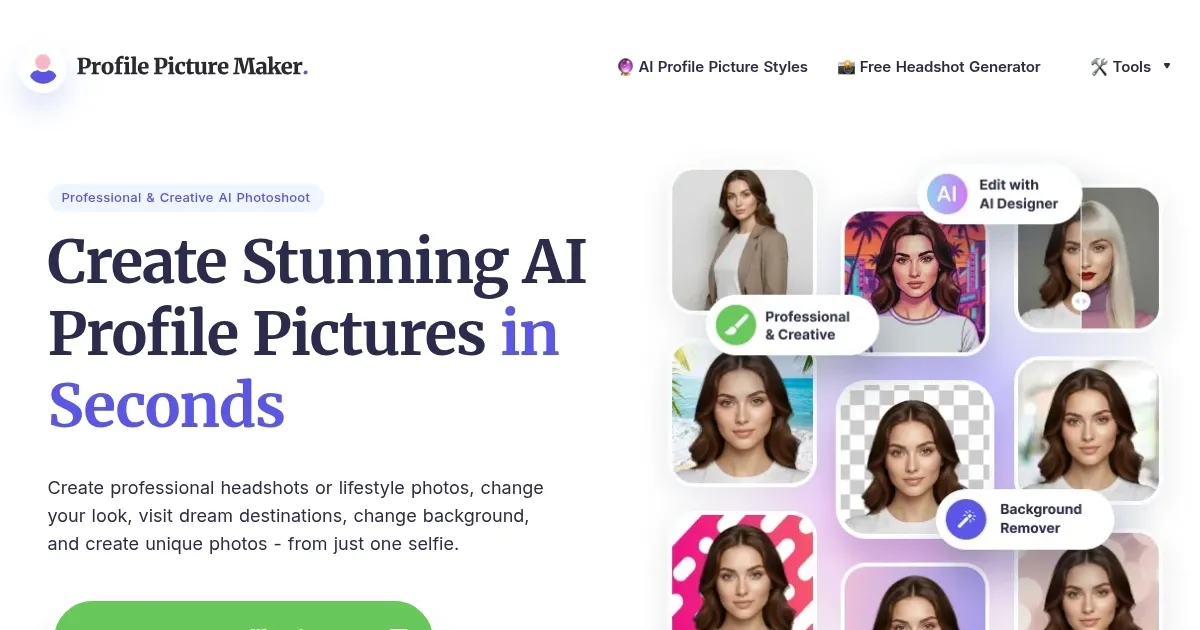
Profile Pic Maker (PFPMaker) is an AI-powered tool designed to create professional-looking profile pictures. The website allows users to upload a photo, instantly generating various profile pictures suitable for platforms such as LinkedIn, Instagram, and more. The process is straightforward and requires no design skills.

PFPMaker offers both free and premium options. The free version allows users to remove backgrounds, change colors, and replace backdrops in their photos. On the other hand, the premium service provides more advanced features like generating over 100 photos that place your face in different settings.

One of the key features of Profile Pic Maker is its AI Portrait Editor, which includes features like background removal, background replacement, AI portrait enhancement, and professional templates. Users can fine-tune every little detail of their profile picture to perfection, experimenting with AI, filters, backgrounds, and templates to find their ideal look.

PFPMaker emphasizes the importance of a professional profile picture in building a strong personal brand. The website suggests that a professional profile picture can significantly increase online engagement and lead to more interactions, networking opportunities, and job prospects.

By providing tools to create high-quality profile pictures, they want to help users project style, confidence, and approachability in their online persona.

Visit Profile Pic Maker ↗

Categories

🖼️ Image

👤 Profile Picture Generation 🧑‍🎤 Avatar Generation ✂️ Background Removal 📸 Headshot Generation ✏️ Photo Editing 🏞️ Background Generation 🌟 Photo Enhancing

👥 Social

💼 Linkedin Headshot

Screenshot 📸

Profile Pic Maker screenshot

Video Overview 🎬

What are the key features? ✨

  • AI-enhanced profile picture creation: PFPMaker uses AI to transform your uploaded photo into a professional-looking profile picture that is more suitable for professional or social media use.
  • Background editing: The platform provides tools to remove or change the background of your photo, which is especially useful if you want a cleaner, more professional look.
  • AI Portrait Editor: This comprehensive tool lets you adjust various aspects of your picture, such as lighting and sharpness, to ensure that your profile picture looks polished and high-quality.
  • Templates: PFPMaker also offers a range of professional templates that can be used to give your profile picture a more formal or stylized appearance, depending on your preference and the impression you wish to convey on your social or professional networks.
  • Privacy included: The platform prioritizes user privacy and security. Photos uploaded to PFPMaker are automatically deleted from their servers every 24 hours, ensuring that your personal data is not stored longer than necessary.

Who is it for? 🤔

Profile Pic Maker is made for individuals who are keen on improving their online presence across various platforms. This includes job seekers wanting to make their LinkedIn profiles more appealing, professionals looking to enhance their digital persona, and social media users aiming to elevate their profiles with more polished and professional images. Additionally, it caters to freelancers and entrepreneurs who require a consistent and professional image for their personal branding across multiple platforms.

Examples of what you can use it for 💡

  • Create a polished and professional profile picture for LinkedIn
  • Craft an attractive and engaging profile picture for social media platforms
  • Creating a professional email signature with your professional photo
  • Create a picture for online dating sites
  • Design personal branding materials like business cards, personal websites, or promotional materials

Pros & Cons ⚖️

  • Makes it easy to create a professionally-looking profile photo
  • Also includes tools for fine-tuning the image
  • Great for job seekers and other savvy LinkedIn users
  • We've seen similar tools with more style options

FAQs 💬

What kind of photo should I upload to get the best results?
Upload a clear, well-lit selfie or headshot where your face is clearly visible and facing forward. Higher quality inputs produce more accurate and polished AI-generated pictures.
Does PFPMaker really remove backgrounds automatically?
Yes, the tool instantly removes the original background from your uploaded photo to create clean cutouts suitable for professional or creative profile use.
Can I create artistic or fantasy-style profile pictures?
Absolutely. PFPMaker offers over 1,100 styles, including creative, cartoon, cyberpunk, and artistic options, letting you experiment far beyond standard headshots.
How long does it take to generate profile pictures?
Most generations complete in about 15 seconds, though times can vary slightly depending on server load and the specific tools used.
Is PFPMaker suitable for LinkedIn or professional profiles?
Yes, it specializes in professional AI headshots with clean backgrounds, enhancements, and business-friendly templates that help boost approachability and engagement.
Do I need any design or editing skills to use it?
No. The AI handles enhancements, styles, and edits automatically, so no prior experience is required to create impressive results.
What platforms are the generated pictures good for?
Pictures work great for LinkedIn, Instagram, Twitter/X, resumes, CVs, dating apps, email signatures, messengers, and most social or professional sites.
Can I customize details like hair, clothing, or makeup?
Yes, especially with premium tools and the chat-based AI Portrait Editor, where you describe changes and the AI applies them naturally.
Does it keep my uploaded photos private?
Uploaded images are processed for background removal and generation, then automatically deleted after 24 hours for privacy.
Are there options for cartoon or emoji-style avatars?
Yes, built-in tools include cartoonizer effects and emoji profile picture generators for fun, stylized versions.

Ready to try Profile Pic Maker?

Create an awesome AI profile picture with features like background remover and face enhancer

Visit Profile Pic Maker ↗

Profile Pic Maker alternatives 🔗

  1. LiveMemory LiveMemory A tool from MyHeritage that creates AI-generated avatars of people in historical attire and settings
  2. Artguru Artguru Transforms text or photos into unique AI-generated artwork in seconds
  3. Artguru Avatar Generator Artguru Avatar Generator Create highly realistic and expressive avatars with Artguru's advanced AI model
  4. Supawork Supawork Streamlines the job application process by leveraging AI to enhance professional presentation
  5. AnimeGenius AnimeGenius Create anime-style art from text descriptions, images, or pose-based inputs
  6. APOB APOB Easily create personalized digital portraits and videos with the help of AI
Share
Profile Pic Maker screenshot enlarged
Promote Profile Pic Maker
light badge
Copy Embed Code
dark badge
Copy Embed Code
neutral badge
Copy Embed Code
Best AI Tools

Discover the best AI tools for any use case

About Us | Contact Us | Suggest an AI Tool
Privacy Policy | Terms of Service
Copyright © 2026 Best AI Tools 415 Mission Street, 37th Floor, San Francisco, CA 94105