logo-darklogo-darklogo-darklogo-dark
  • Tool Categories
    • ๐ŸŽจArt & Creative Design505
    • ๐ŸขBusiness Management644
    • ๐Ÿ’ปCoding & Development515
    • ๐Ÿ‘ฎDetection83
    • ๐Ÿง General Use727
    • ๐ŸฅHealth & Wellness55
    • ๐Ÿ“ทImage & Photo Analysis100
    • ๐Ÿ–ผ๏ธImage Generation & Editing618
    • ๐Ÿ“Interior & Architectural Design37
    • ๐ŸŽ“Learning & Education483
    • โš–๏ธLegal & Finance90
    • ๐ŸŽญLifestyle & Entertainment236
    • ๐Ÿ“ขMarketing & Advertising627
    • ๐ŸŽงMusic & Audio138
    • ๐Ÿ‘”Office & Workplace1,014
    • ๐Ÿ”ฌResearch & Data Analysis372
    • ๐Ÿ‘ฅSocial Media245
    • ๐ŸŽฅVideo Generation & Editing426
    • ๐Ÿ‘ง๐ŸปVirtual Companion135
    • ๐ŸŽคVoice Generation & Editing381
    • โœ๏ธWriting & Editing808
    • All Categories
    • AI Use Cases
  • News
  • Events
    • Academic Conferences
    • Developer Conferences
    • Expos / Trade Shows
    • Industry Summits
    • Workshops / Training
    • All Events
    • Past Events
  • Saved Tools
  • Suggest a Tool
โœ•
Home › Music & Audio › Noise Cancellation› AudioCleaner
AudioCleaner

AudioCleaner

Removes background noise and enhances audio clarity with AI

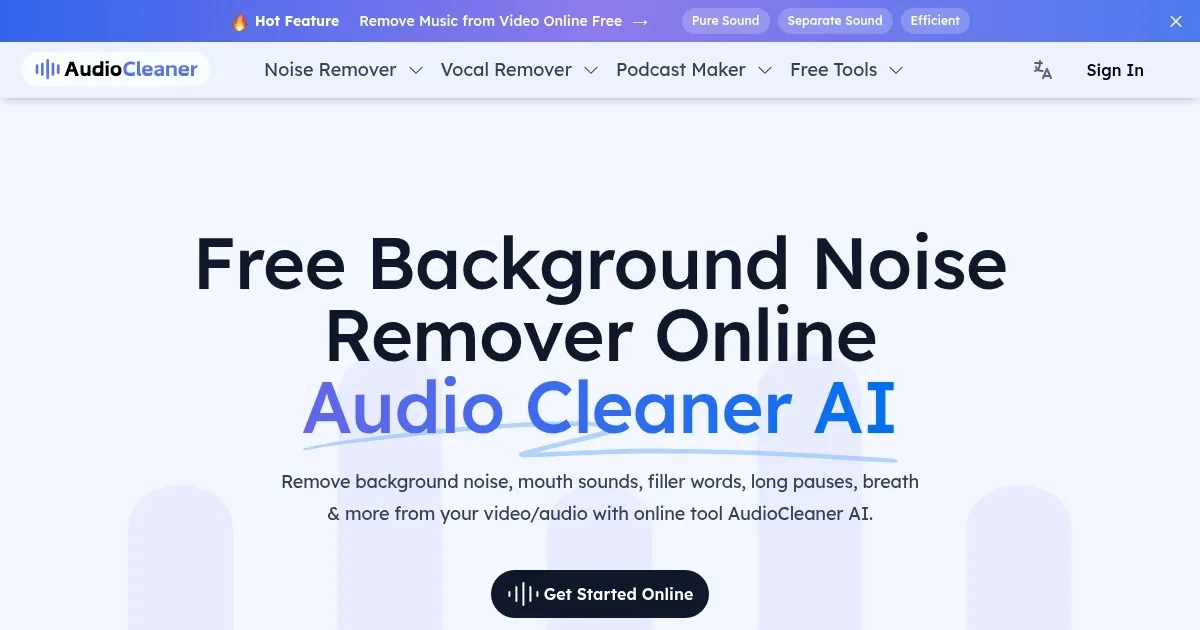
AudioCleaner is an online tool that uses artificial intelligence to remove background noise, mouth sounds, breaths, and filler words from audio and video files, delivering clear, professional sound. It operates directly in your browser, requiring no software installation, and supports formats like MP3, WAV, AAC, MP4, and MOV. Users upload a file, select an enhancement type, and download the processed result, often within seconds for short clips or a few minutes for longer recordings.

The tool offers multiple features, including “Remove Noise” for eliminating background chatter or hums, “Filler Words” for cutting “um”s and “uh”s, and “Studio Sound” for enhancing overall audio clarity. It also includes a “Keep Music” option to preserve background tracks while cleaning speech, which is useful for vlogs or presentations. The platform provides 35 free credits upon signup and 10 additional credits daily, though heavy users may need a paid plan for more capacity.

Compared to competitors, AudioCleaner holds its own. Audo Studio focuses on noise and echo removal but lacks filler word editing. Cleanvoice AI supports multilingual processing but doesn’t handle video files as seamlessly. AudioCleaner’s strength lies in its broad feature set, catering to both audio and video cleanup with a user-friendly interface.

Limitations exist. The free plan’s credit system can restrict frequent use, and some users report occasional over-processing, which may alter natural voice tones. Processing times for large files can also stretch beyond a few minutes, depending on complexity. The tool’s privacy policy ensures files are deleted after 24 hours, adding a layer of security.

To get started, upload a small audio or video file and experiment with the free credits. Test features like “Remove Mouth Sounds” or “AutoEQ” to optimize your content. For podcasters, vloggers, or educators, AudioCleaner offers a quick way to achieve polished audio without technical expertise.

Visit AudioCleaner ↗
Categories
๐ŸŽง Music
๐Ÿ”‡ Noise Cancellation ๐ŸŽ›๏ธ Audio Enhancing ๐ŸŽš๏ธ Audio Editing ๐Ÿ”ˆ Vocal Removal
๐ŸŽค Voice
โœจ Voice Enhancing

Homepage Screenshot 📸

AudioCleaner screenshot

What are the key features? ✨

  • Background Noise Removal: Eliminates unwanted sounds like chatter or hums for clearer audio.
  • Filler Words Removal: Cuts out โ€œumโ€s, โ€œuhโ€s, and other speech hesitations automatically.
  • Studio Sound: Enhances audio clarity and balances volume for a professional finish.
  • Keep Music: Preserves background music while cleaning up speech in recordings.
  • Multi-Format Support: Works with audio (MP3, WAV, AAC) and video (MP4, MOV) files.

Who is it for? 🤔

AudioCleaner is designed for content creators like podcasters, vloggers, educators, and musicians who need polished audio without diving into complex editing software. It suits beginners and professionals alike, offering a quick, browser-based solution for cleaning up recordings, whether for social media, online courses, or music production.

Examples of what you can use it for 💡

  • Podcaster: Removes background noise and filler words for a professional episode.
  • Vlogger: Cleans up outdoor video audio, eliminating wind or traffic sounds.
  • Educator: Enhances lecture recordings for clear, distraction-free lessons.
  • Musician: Isolates vocals or removes unwanted noise from demo tracks.
  • Sales Rep: Improves client testimonial videos by removing silences and noise.

Pros & Cons ⚖️

  • Supports video files
  • Free credits available
  • Preserves background music
  • Limited free credits
  • Unclear paid plan details

FAQs 💬

Is AudioCleaner AI free to use?
Yes, it offers 35 free credits upon signup and 10 daily credits, with paid plans for more usage.
Can it clean audio from video files?
Absolutely, it supports video formats like MP4 and MOV, cleaning audio tracks efficiently.
What file formats are supported?
It handles MP3, WAV, AAC, FLAC, MP4, MOV, and more for versatile use.
How long does processing take?
Short clips take seconds, while longer files may need a few minutes, depending on complexity.
Does it work on mobile devices?
Yes, itโ€™s browser-based and compatible with iPhones and Android devices.
Can it remove filler words like โ€œumโ€?
The Filler Words feature automatically cuts out โ€œumโ€s, โ€œuhโ€s, and similar hesitations.
Is my data secure?
Files are stored for 24 hours and then permanently deleted for privacy.
Can it preserve background music?
The Keep Music feature ensures background tracks stay intact during cleanup.
How does it compare to Audacity?
Itโ€™s faster and simpler than Audacity, requiring no editing skills.
Do I need to install software?
No, itโ€™s entirely web-based, so you can use it directly in your browser.

Ready to try AudioCleaner?

Removes background noise and enhances audio clarity with AI

Visit AudioCleaner ↗

AudioCleaner alternatives 🔗

  1. Vocal Remover Vocal Remover Separates vocals from instrumentals in songs using AI
  2. Streamlabs Podcast Editor Streamlabs Podcast Editor A podcast editing solution that transcribes audio and video to text for easy edits and repurposing content
  3. Moises Moises Separates vocals and instruments from songs using AI for practice and production.
  4. Descript Descript Transforms video editing with AI-driven text-based tools and automated design
  5. LALAL.AI LALAL.AI Splits audio into vocals, instruments, and stems with AI precision
  6. LANDR LANDR Offers AI mastering, music distribution, samples, plugins, and courses for creators
Share
AudioCleaner screenshot enlarged
Promote AudioCleaner
light badge
Copy Embed Code
dark badge
Copy Embed Code
neutral badge
Copy Embed Code
Best AI Tools

Discover the best AI tools for any use case

Explore
  • Tool Categories
  • AI Use Cases
  • AI Events
  • AI News
  • Saved Tools
Company
  • About Us
  • Contact Us
  • Media & Partnerships
  • Suggest a Tool
Legal
  • Privacy Policy
  • Terms of Service
Copyright © 2026 Best AI Tools 415 Mission Street, 37th Floor, San Francisco, CA 94105