logo-darklogo-darklogo-darklogo-dark
  • Tool Categories
    • 🎨Art & Creative Design505
    • 🏢Business Management644
    • 💻Coding & Development515
    • 👮Detection83
    • 🧠General Use727
    • 🏥Health & Wellness55
    • 📷Image & Photo Analysis100
    • 🖼️Image Generation & Editing618
    • 📐Interior & Architectural Design37
    • 🎓Learning & Education483
    • ⚖️Legal & Finance90
    • 🎭Lifestyle & Entertainment236
    • 📢Marketing & Advertising627
    • 🎧Music & Audio138
    • 👔Office & Workplace1,014
    • 🔬Research & Data Analysis372
    • 👥Social Media245
    • 🎥Video Generation & Editing426
    • 👧🏻Virtual Companion135
    • 🎤Voice Generation & Editing381
    • ✍️Writing & Editing808
    • All Categories
    • AI Use Cases
  • News
  • Events
    • Academic Conferences
    • Developer Conferences
    • Expos / Trade Shows
    • Industry Summits
    • Workshops / Training
    • All Events
    • Past Events
  • Saved Tools
  • Suggest a Tool
✕
Home › Social Media › Social Media Management› Blabigo
Blabigo

Blabigo

Creates engaging LinkedIn posts with AI, schedules content, and tracks performance

Blabigo is an AI-powered platform designed to streamline LinkedIn content creation, scheduling, and performance tracking. It offers tools to format posts, generate content ideas, and analyze engagement, targeting professionals and businesses building their LinkedIn presence. The platform integrates AI to simplify workflows, making it accessible for users with varying levels of expertise.

The LinkedIn Post Formatter allows users to apply bold, italic, and custom fonts to posts, enhancing readability and visual appeal. The AI Post Generator creates drafts based on keywords or viral post templates, drawing from a dataset of over 500 million posts. The Content Calendar enables scheduling with audience-based timing suggestions, while the analytics suite tracks metrics like reach, engagement, and follower growth. The LinkedIn Video Downloader lets users save videos for repurposing, a feature not commonly found in similar tools.

Compared to Hootsuite and Buffer, Blabigo is more LinkedIn-specific, lacking multi-platform support. Its analytics are robust but can overwhelm users unfamiliar with data interpretation. The free plan includes basic tools, with premium plans offering advanced features like team collaboration and deeper insights, aligning with industry pricing standards.

The platform’s interface is user-friendly, with a clean design and intuitive navigation. However, the mobile experience lags behind the desktop version, and some AI-generated content may require editing to avoid sounding formulaic. The carousel maker and QR code generator add unique value for creative content needs.

Users should explore the free trial to assess core features. Focus on the Post Formatter and AI Generator for quick wins, and use analytics to refine your posting strategy over time.

Visit Blabigo ↗
Categories
👥 Social
📱 Social Media Management 📝 Social Media Post Generation
✍️ Writing
♻️ Content Repurposing 🤖 Writing Assistant
📢 Advertising
💻 Digital Marketing

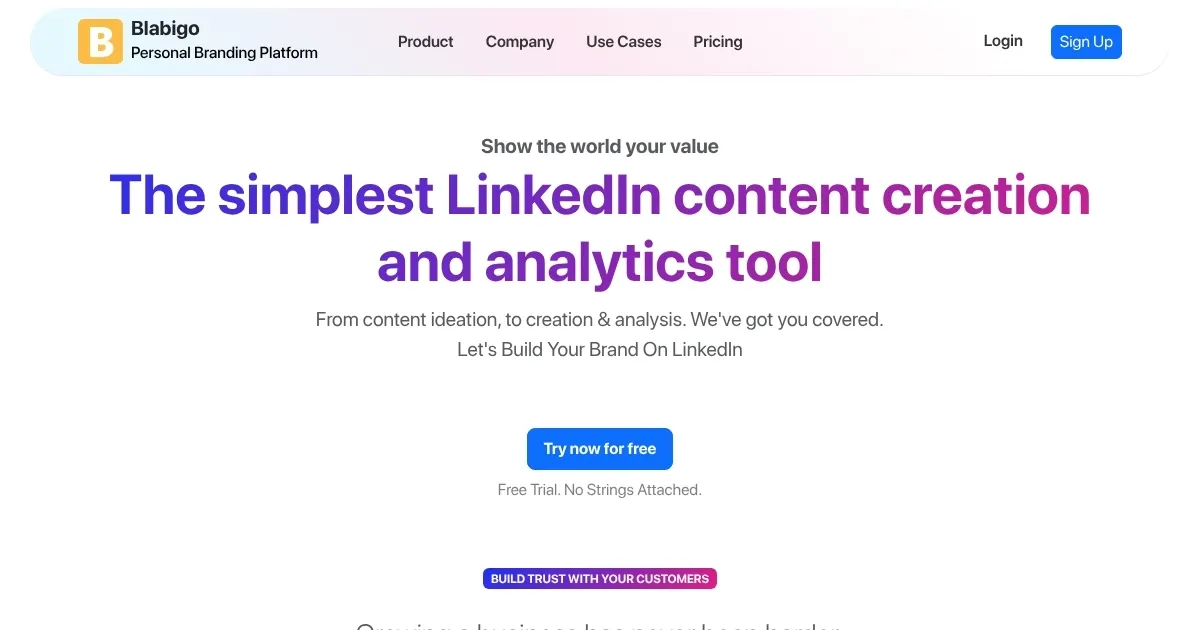
Homepage Screenshot 📸

Blabigo screenshot

Video Overview 🎬

Blabigo - Video Overview

What are the key features? ✨

  • Post Formatter: Enhances LinkedIn posts with bold, italic, and custom fonts for visual appeal.
  • AI Post Generator: Creates post drafts using AI, based on keywords or viral templates.
  • Content Calendar: Schedules posts with optimal timing suggestions for audience engagement.
  • Analytics Suite: Tracks engagement, reach, and follower growth with detailed metrics.
  • Video Downloader: Downloads LinkedIn videos for repurposing in user content.

Who is it for? 🤔

Blabigo is designed for professionals, entrepreneurs, and businesses focused on building a strong LinkedIn presence, particularly those who want to streamline content creation and boost engagement without deep technical expertise. It suits solo creators, small teams, and corporate marketers aiming to establish thought leadership or promote their brand on LinkedIn.

Examples of what you can use it for 💡

  • Freelancer: Crafts engaging posts to showcase expertise and attract clients.
  • Startup Founder: Schedules branded content to build company visibility.
  • Social Media Manager: Uses analytics to optimize team content strategies.
  • Career Coach: Generates post ideas to share insights and grow influence.
  • Sales Professional: Creates carousels to highlight products and drive leads.

Pros & Cons ⚖️

  • AI generates quick, tailored post ideas.
  • Free tier offers solid starting features.
  • Unique video downloader enhances content.
  • LinkedIn only
  • Analytics can overwhelm

FAQs 💬

What is Blabigo’s main function?
Blabigo helps users create, schedule, and analyze LinkedIn content with AI tools.
Is there a free version of Blabigo?
Yes, Blabigo offers a free tier with basic tools like the Post Formatter.
Can Blabigo manage multiple social platforms?
No, it’s designed specifically for LinkedIn content creation and analytics.
Does the AI Post Generator require editing?
Some generated posts may need tweaks to align with your unique voice.
How does the Content Calendar work?
It schedules posts and suggests optimal times based on audience engagement.
Can teams collaborate on Blabigo?
Yes, premium plans include features for team draft sharing and collaboration.
Is the Video Downloader ethical to use?
It’s for repurposing content you have permission to use, ensuring compliance.
How detailed are Blabigo’s analytics?
They track reach, engagement, and follower growth with in-depth metrics.
Does Blabigo support carousel posts?
Yes, the Carousel Maker creates multi-slide posts for storytelling.
Is Blabigo suitable for beginners?
Its intuitive design makes it accessible, though analytics may require learning.

Ready to try Blabigo?

Creates engaging LinkedIn posts with AI, schedules content, and tracks performance

Visit Blabigo ↗
Blabigo alternatives 🔗

  1. Beacons.ai Beacons.ai An AI platform that helps creators manage their online presence and monetize their content
  2. VidIQ VidIQ Boosts YouTube channel growth with AI-driven analytics and optimization tools
  3. Opus Clip Opus Clip A generative AI video creation tool that repurposes long videos into shorts
  4. Buffer AI Assistant Buffer AI Assistant An advanced tool for streamlining social media content creation
  5. Publer AI Assist Publer AI Assist An AI-powered assistant making social media management easier
  6. OwlyGPT OwlyGPT Streamlines social media management with AI-driven content creation and analytics
Share
Blabigo screenshot enlarged
Promote Blabigo
light badge
Copy Embed Code
dark badge
Copy Embed Code
neutral badge
Copy Embed Code
Best AI Tools

Discover the best AI tools for any use case

Explore
  • Tool Categories
  • AI Use Cases
  • AI Events
  • AI News
  • Saved Tools
Company
  • About Us
  • Contact Us
  • Media & Partnerships
  • Suggest a Tool
Legal
  • Privacy Policy
  • Terms of Service
Copyright © 2026 Best AI Tools 415 Mission Street, 37th Floor, San Francisco, CA 94105