BotGem
Powers conversations with advanced AI chat capabilities
BotGem bursts onto the scene with a promise: to make AI conversations as natural as chatting with a friend, and I think it delivers in spades. This isn’t just another chatbot. It’s a versatile tool that runs on your phone, tablet, or computer, ready to tackle questions, brainstorm ideas, or even help you practice a new language. The app, developed by Deng Gao, leans on cutting-edge natural language processing to understand your queries with surprising nuance. Whether you’re on an iPhone, Android, or Mac, BotGem feels like a trusty sidekick, always ready to respond with wit or wisdom.
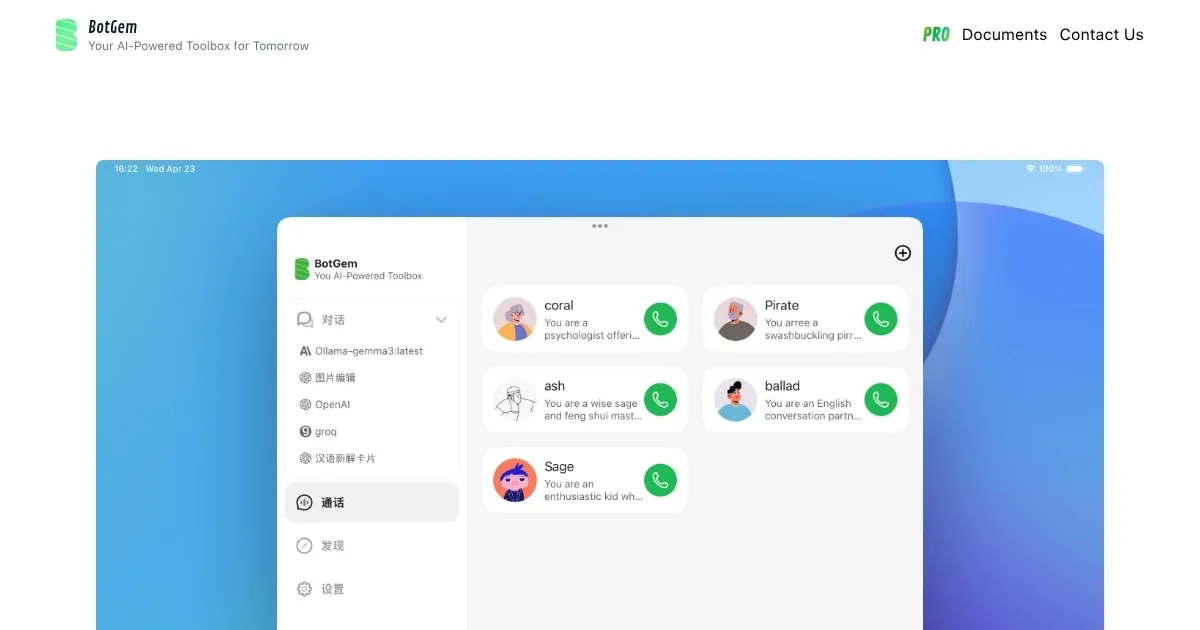
What sets BotGem apart is its flexibility. It supports a range of AI models, from OpenAI’s offerings to Anthropic’s Claude, and even lets you run local models with Ollama for offline privacy. The Extended Thinking Mode for Claude, for instance, allocates tokens for deeper reasoning, which is a nerdy way of saying it thinks harder before answering tough questions. Real-time voice conversations, powered by OpenAI’s API, make it feel like you’re talking to a real person, not a machine. I was particularly impressed by how smoothly it handles voice inputs — great for practicing foreign languages or just hands-free chatting. Plus, the app’s clean interface makes it easy to jump in and start typing or talking.
But it’s not all sunshine. The catch? You’ll need your own API keys for most AI providers, which can feel like a hassle if you’re not tech-savvy. Setting up an OpenAI or Anthropic account isn’t hard, but it’s an extra step. The free version also has limits, and some users might find the premium plans a bit steep for what they get. Compared to competitors like ChatGPT or Claude, BotGem’s strength is its platform-agnostic approach, but it lacks the brand recognition and ecosystem those giants offer. Still, the ability to run local models with Ollama is a unique perk that privacy buffs will love.
There’s a surprise element here: BotGem’s community vibe. Through its Telegram group, users can share tips, report bugs, or suggest features directly to the developers. It’s refreshing to see an app that feels like it’s built with user feedback in mind. The documentation, hosted at docs.botgem.com, is thorough, guiding you through everything from setup to advanced features like Gemini’s Thinking Mode, which lets you peek into the AI’s reasoning process.
For those looking to get started, download BotGem from the App Store, Google Play, or its website, and set up your API keys first. Play with the voice feature to test its conversational flow, and if you’re privacy-conscious, try the Ollama setup for offline use. It’s a solid tool that’s worth a spin if you want AI that feels personal and adaptable.
Homepage Screenshot 📸
What are the key features? ✨
- Real-Time Voice Conversations: Enables natural, hands-free interactions using OpenAI’s API.
- Extended Thinking Mode: Enhances Claude’s reasoning for complex tasks by allocating extra tokens.
- Ollama Integration: Allows offline AI model use for enhanced privacy and no API costs.
- Gemini Thinking Mode: Shows the AI’s reasoning process for Gemini 2.5 models, customizable via settings.
- Cross-Platform Support: Runs on iOS, Android, Windows, and Mac for seamless access.
Who is it for? 🤔
Examples of what you can use it for 💡
- Student: Uses BotGem to explain complex math concepts with Claude’s Extended Thinking Mode.
- Language Learner: Practices conversational Spanish via real-time voice chats.
- Developer: Runs local AI models with Ollama to test code ideas offline.
- Professional: Brainstorms project ideas using Gemini’s Thinking Mode for transparency.
- Casual User: Asks quick questions on the go with cross-platform chat access.
Pros & Cons ⚖️
- Supports multiple AI models
- Real-time voice feature shines
- Offline use with Ollama
- Requires API key setup
- Free version feels limited
FAQs 💬