logo-darklogo-darklogo-darklogo-dark
  • Tool Categories
    • 🎨 Art
    • 🏢 Business
    • 💻 Coding
    • 👮 Detection
    • 🧠 General
    • 🏥 Health
    • 📷 Image Analysis
    • 🖼️ Image
    • 📐 Architecture
    • 🎓 Education
    • ⚖️ Legal/Finance
    • 🎭 Lifestyle
    • 📢 Advertising
    • 🎧 Music
    • 👔 Work
    • 🔬 Research
    • 👥 Social
    • 🎥 Video
    • 👧🏻 Companion
    • 🎤 Voice
    • ✍️ Writing
    • All Categories
    • AI Use Cases
  • News
  • Events
    • Academic Conferences
    • Developer Conferences
    • Expos / Trade Shows
    • Industry Summits
    • Online Events
    • Workshops / Training
    • All Events
    • Past Events
  • Saved Tools
  • Suggest a Tool
✕
Home › Business Management › CRM› Clarify
Clarify

Clarify

Unifies customer data, automates tasks, and provides actionable insights for sales teams

Clarify is an AI-driven CRM that unifies customer data, automates sales tasks, and provides actionable insights for revenue teams. It aims to simplify pipeline management and boost efficiency. Here’s a detailed look at its features, strengths, weaknesses, and how it stacks up against competitors.

The tool centralizes customer data from emails, meetings, and external platforms, automatically tracking interactions to reduce manual work. Its LinkedIn integration pulls contact details directly, while the auto-nudge feature sends reminders for stagnant deals. The meeting intelligence feature transcribes calls, generates tasks, and drafts follow-up emails, all through a desktop app. Data enrichment fills in lead profiles, saving time for sales reps. The interface is fast, with data-heavy pages loading two to three times quicker than older CRMs, and flexible lists or drag-and-drop boards make pipeline management intuitive.

Compared to competitors like Salesforce and HubSpot, Clarify focuses on automation and ease of use. Salesforce offers robust customization but can feel complex, while HubSpot emphasizes marketing alongside sales. Clarify’s credit-based pricing, where actions consume credits, differs from the subscription models of competitors, offering flexibility but less predictability. The tool integrates with tools like Zoom, Slack, and Calendly, streamlining workflows for teams already using these platforms.

Drawbacks include the credit system’s lack of transparency, which may confuse users accustomed to fixed pricing. The AI’s suggestions, such as email drafts or field updates, can sometimes lack nuance, requiring manual tweaks. Setup for integrations may take time for less tech-savvy users. However, the free plan allows teams to test features without commitment, and support responds within 24 hours.

Clarify suits small to medium-sized businesses looking to automate sales tasks. Test the free plan, monitor credit usage, and use the support team to streamline setup.

Visit Clarify ↗

Categories

🏢 Business

👥 CRM 🔄 Workflow

📢 Advertising

💼 Sales 🛍️ Sales Assistant 🎯 Lead Generation

👔 Work

🔗 Agent

Screenshot 📸

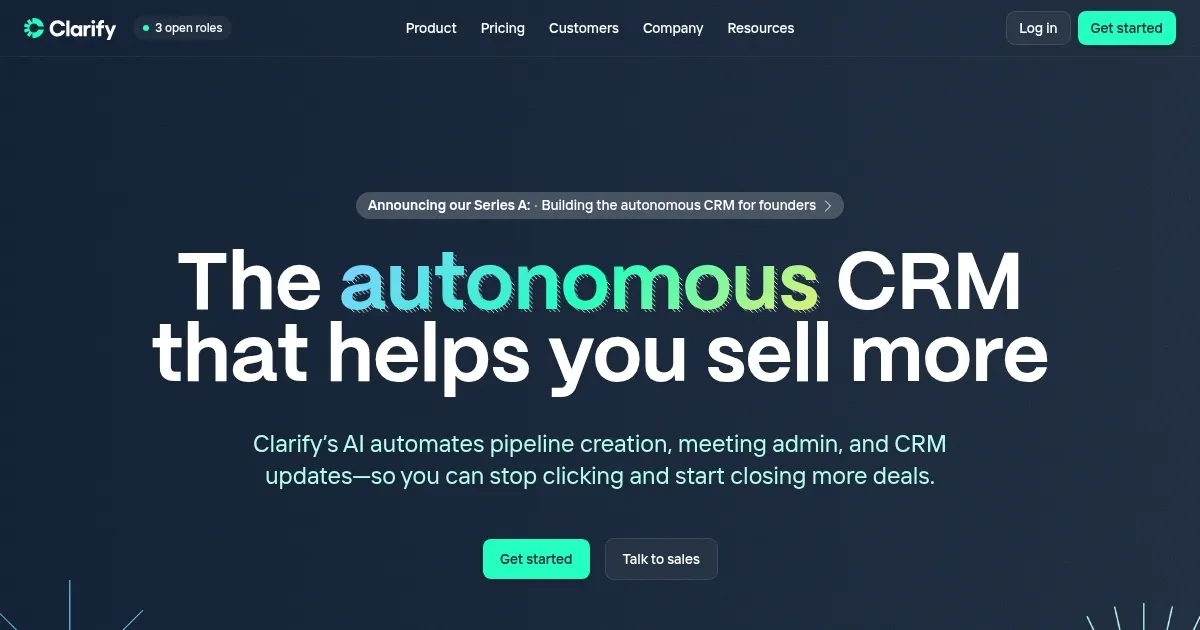
Clarify screenshot

Video Overview 🎬

What are the key features? ✨

  • Data Enrichment: Automatically fills in lead profiles with missing details.
  • Meeting Intelligence: Transcribes calls and generates tasks or follow-up emails.
  • Auto-Nudge: Sends reminders for stagnant deals to keep pipelines active.
  • LinkedIn Integration: Pulls contact and connection data directly into the CRM.
  • Flexible Pipeline Management: Offers customizable lists or drag-and-drop boards.

Who is it for? 🤔

Clarify is designed for small to medium-sized businesses, startup founders, and sales teams who want to streamline customer relationship management without the complexity of traditional CRMs. It suits revenue-focused teams needing automation for tasks like data entry, meeting follow-ups, and pipeline tracking, especially those already using tools like Zoom or Slack.

Examples of what you can use it for 💡

  • Startup Founder: Uses Clarify.ai to automate lead enrichment and focus on closing deals.
  • Sales Rep: Tracks emails and meetings automatically to prioritize client outreach.
  • Revenue Operations Manager: Builds custom workflows to streamline go-to-market strategies.
  • Small Business Owner: Manages pipelines with drag-and-drop boards for easy oversight.
  • Marketing Team Lead: Integrates product analytics to enrich CRM data for campaigns.

Pros & Cons ⚖️

  • Automates tedious CRM tasks.
  • Clean, fast interface.
  • Free plan available.
  • AI suggestions may need tweaks.
  • Setup may take time.

FAQs 💬

What is Clarify's pricing model?
Clarify uses a credit-based system where actions consume credits, with plans suited for different team sizes.
Is there a free plan available?
Yes, Clarify offers a free plan with no sales call required to start.
Does Clarify integrate with other tools?
It connects with tools like Zoom, Slack, and Calendly to streamline workflows.
Can I use Clarify for marketing?
Yes, it supports marketing by integrating product analytics and triggering campaigns.
How does the meeting intelligence feature work?
It transcribes calls, generates tasks, and drafts follow-ups via a desktop app.
Is Clarify suitable for small businesses?
It's ideal for small teams needing automation and a simple CRM experience.
How fast is the support team?
Support typically responds within 24 hours, often faster during US business hours.
Does it require technical skills to set up?
Basic setup is user-friendly, but integrations may need some technical know-how.
Can I customize pipelines in Clarify?
Yes, flexible lists and drag-and-drop boards allow tailored pipeline management.
Does Clarify work with LinkedIn?
Yes, it pulls contact and connection data directly from LinkedIn.

Ready to try Clarify?

Unifies customer data, automates tasks, and provides actionable insights for sales teams

Visit Clarify ↗

Clarify alternatives 🔗

  1. Salesforce Einstein Salesforce Einstein Generative AI for CRM, designed to supercharge your productivity
  2. Zendesk AI Zendesk AI An AI tool built on billions of real customer service interactions that understands customer experience
  3. Zia Zia AI-powered business assistant from Zoho
  4. HubSpot Breeze HubSpot Breeze Streamlines business growth with AI tools for marketing, sales, and service
  5. ZoomInfo ZoomInfo Streamlines B2B sales with data-driven insights and automation
  6. Apollo.io Apollo.io A sales intelligence and engagement platform that leverages AI to enhance B2B sales processes
Share
Clarify screenshot enlarged
Promote Clarify
light badge
Copy Embed Code
dark badge
Copy Embed Code
neutral badge
Copy Embed Code
Best AI Tools

Discover the best AI tools for any use case

About Us | Contact Us | Suggest an AI Tool
Privacy Policy | Terms of Service
Copyright © 2026 Best AI Tools 415 Mission Street, 37th Floor, San Francisco, CA 94105