logo-darklogo-darklogo-darklogo-dark
  • Home
  • Browse
    • Assistant
    • Coding
    • Image
    • Productivity
    • Video
    • Voice
    • Writing
    • All Categories
    • AI Use Cases
  • Events
  • My Favorites
  • Suggest a Tool
✕
Home › Design Generation›
Published by Dusan Belic on August 30, 2023

Collov AI

Collov AI
Collov AI Homepage
Categories Design Generation

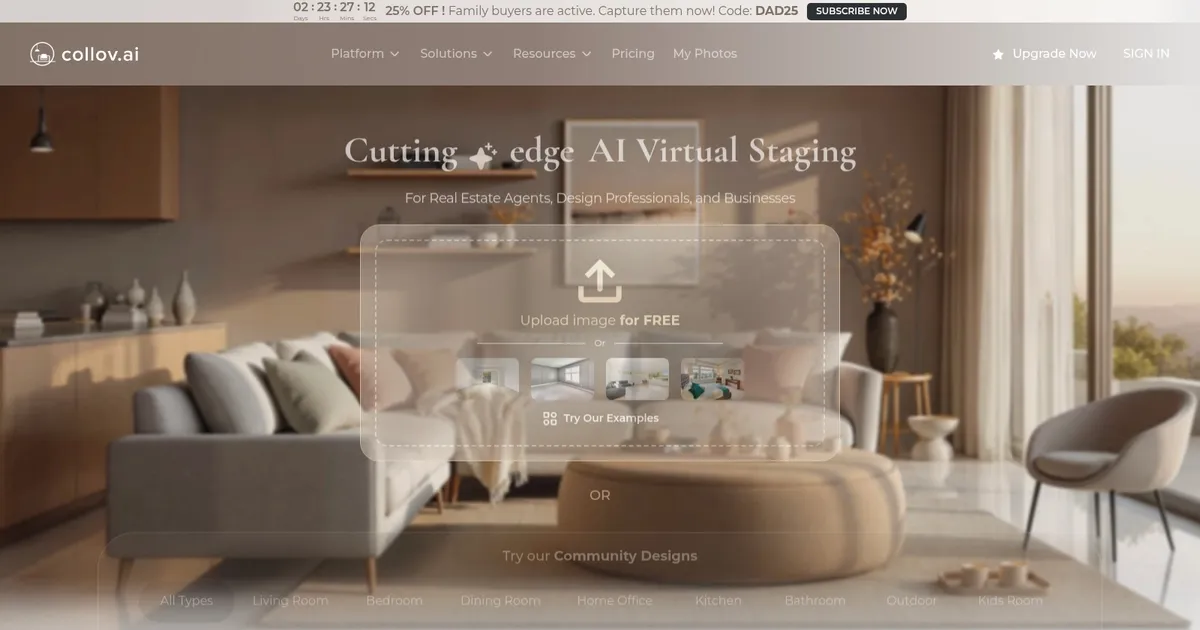
Collov AI - screenshot

Instantly stages rooms, removes or adds furniture, enhances photos for real estate visuals

Collov AI

Collov AI is a fancy tool that aims to change the field of interior design with the integration of artificial intelligence. To that end, it can automate various aspects of interior design — from the conceptualization of spaces to the visualization of finished designs — potentially making the design process more efficient and accessible.

The tool lets users, even those without much design experience, come up with designs for all of their rooms. Heck, even garden designs are supported, making it easier to select the right furniture for your backyard.

To put it differently, Collov AI aims to streamline interior design processes through features such as automatic layout generation, style matching, and 3D previews. Furthermore, it can provide intelligent suggestions for furnishings and decor based on user preferences or spatial constraints.

Ultimately, the goal of Collov AI would be to democratize interior design, making it easier and faster for anyone to personalize their living or working spaces according to their tastes and needs.

Collov AI Homepage
Categories Design Generation

What are the key features? ⭐

  • Add Furniture: Instantly stages rooms with realistic, styled furniture in various design presets.
  • Furniture Eraser: Removes specific selected furniture items seamlessly from photos.
  • Room Declutter: Clears all furniture from a space to create empty-room views.
  • Enhance Photo Quality: Sharpens, brightens, and boosts colors in uploaded images.
  • Material Overlay: Changes floors, walls, countertops, or other surfaces with new materials.

Who is it for? 🤔

Collov AI helps real estate agents, brokers, photographers, and professional stagers who want fast, cost-effective ways to make listings more appealing. It suits anyone dealing with vacant properties, outdated interiors, or the need for quick before-after visuals without physical staging costs. Designers or retailers previewing furniture placements also find value, though the strongest fit remains real estate pros focused on compliant, photorealistic marketing images.

Examples of what you can use it for 💭

  • Real estate agent: Uploads photos of vacant listings to add furniture and stage rooms instantly for MLS postings.
  • Property photographer: Uses declutter and enhancement tools to clean up shots or improve lighting before delivery.
  • Brokerage team: Applies selective furniture removal or style changes across multiple properties to refresh outdated photos.
  • Home seller: Tests virtual redesigns on current interiors to visualize updates before renovations.
  • Interior design consultant: Overlays new materials or adds pieces to client photos for quick concept presentations.

Pros & Cons ⚖️

  • Fast processing times
  • Affordable compared to rivals
  • Photorealistic staging
  • Selective editing tools
  • Results vary with input
  • Occasional billing issues

FAQs 💬

What does Collov AI primarily do?
It provides AI virtual staging, furniture addition/removal, decluttering, and photo enhancements for real estate images.
Is Collov AI compliant with MLS rules?
Yes, it uses a custom model that avoids structural changes to meet NAR and MLS guidelines on AI-generated photos.
How fast are the generations?
Most transformations complete in seconds, often under 10 seconds.
Can I remove only specific furniture?
Yes, the Furniture Eraser tool lets you brush over and remove individual pieces.
Does it offer free revisions?
Many plans include free revisions to refine generated images.
Who is the main target user?
Real estate agents, stagers, photographers, and brokerages needing quick listing visuals.
Can it change materials like countertops?
Yes, Material Overlay allows swaps for floors, walls, cabinets, and more.
How does pricing compare to competitors?
It positions as more affordable, often lower cost per image than tools like REimagineHome.
Does it work on exterior or pool photos?
Yes, features include lawn replacement, pool water addition, and weather enhancements.
Is there a trial or free option?
It offers freemium access with some initial use before requiring credits or plans.
Visit Collov AI

Related tools ↙️

  1. MyArchitectAI MyArchitectAI Transforms architectural designs and sketches into photorealistic renders in seconds using AI
  2. Typeset Typeset Automates design and writing for ebooks, presentations, and social graphics quickly
  3. Flowstep Flowstep Generates user flows, wireframes, and UI designs from simple text prompts
  4. Architect Render Architect Render Generates photorealistic architectural renderings from sketches, photos, or designs in seconds
  5. MenuGen MenuGen Transforms menu photos into AI-generated dish images.
  6. Bugfree.ai Bugfree.ai Prepares users for system design and behavioral interviews with AI mocks and practice
Last update: March 11, 2026
Share
Promote Collov AI
light badge
Copy Embed Code
dark badge
Copy Embed Code
neutral badge
Copy Embed Code
About Us | Contact Us | Suggest an AI Tool | Privacy Policy | Terms of Service

Copyright © 2026 Best AI Tools
415 Mission Street, 37th Floor, San Francisco, CA 94105