logo-darklogo-darklogo-darklogo-dark
  • Tool Categories
    • 🎨Art & Creative Design505
    • 🏢Business Management644
    • 💻Coding & Development515
    • 👮Detection83
    • 🧠General Use727
    • 🏥Health & Wellness55
    • 📷Image & Photo Analysis100
    • 🖼️Image Generation & Editing618
    • 📐Interior & Architectural Design37
    • 🎓Learning & Education483
    • ⚖️Legal & Finance90
    • 🎭Lifestyle & Entertainment236
    • 📢Marketing & Advertising627
    • 🎧Music & Audio138
    • 👔Office & Workplace1,014
    • 🔬Research & Data Analysis372
    • 👥Social Media245
    • 🎥Video Generation & Editing426
    • 👧🏻Virtual Companion135
    • 🎤Voice Generation & Editing381
    • ✍️Writing & Editing808
    • All Categories
    • AI Use Cases
  • News
  • Events
    • Academic Conferences
    • Developer Conferences
    • Expos / Trade Shows
    • Industry Summits
    • Workshops / Training
    • All Events
    • Past Events
  • Saved Tools
  • Suggest a Tool
✕
Home › Coding & Development › Code Assistant› Continue
Continue

Continue

An open-source AI code assistant that enhances software development by integrating into IDEs

Continue is an open-source AI code assistant designed to enhance software development by integrating into popular Integrated Development Environments (IDEs), such as Visual Studio Code and JetBrains. To that end, it enables developers to connect with various AI models and contextual data — facilitating custom autocomplete and chat functionalities within their coding environment. Further, this integration streamlines coding workflows, reduces context switching, and boosts overall productivity.

Continue can connect with multiple AI models, including those from OpenAI, Anthropic, and Mistral. This adaptability allows developers to select models that best suit their project requirements. Moreover, Continue supports integration with diverse data sources such as codebases, documentation, and issue trackers — enabling the AI assistant to provide contextually relevant suggestions and insights.

The offers several key functionalities to assist developers. For instance, the autocomplete feature provides inline code suggestions as developers type, supporting multiple programming languages and enhancing coding efficiency. Then, there’s the chat functionality that allows developers to ask questions about functions, files, or the entire codebase without leaving the IDE.

Also, we have the edit feature, which enables users to highlight code sections and instruct the AI to rewrite or refactor them using natural language commands. In addition, Continue offers actions that provide shortcuts for common tasks to further streamline the development process.

For teams and enterprises, the tool provides features to facilitate collaboration and scalability. It allows organizations to deploy a unified AI code assistant across their development teams to ensure consistent support and guidance.

Finally, Continue offers tools for managing model usage, securing API keys, and collecting metadata on AI interactions — enabling continuous improvement and adherence to best practices. Pretty cool, right?

Visit Continue ↗
Categories
💻 Coding
🤖 Code Assistant ⌨️ Code Generation 👨‍💻 Development 🔍 Code Review ✨ Vibe Coding
👔 Work
🤖 Copilot
🧠 General
🦙 Open Source Model

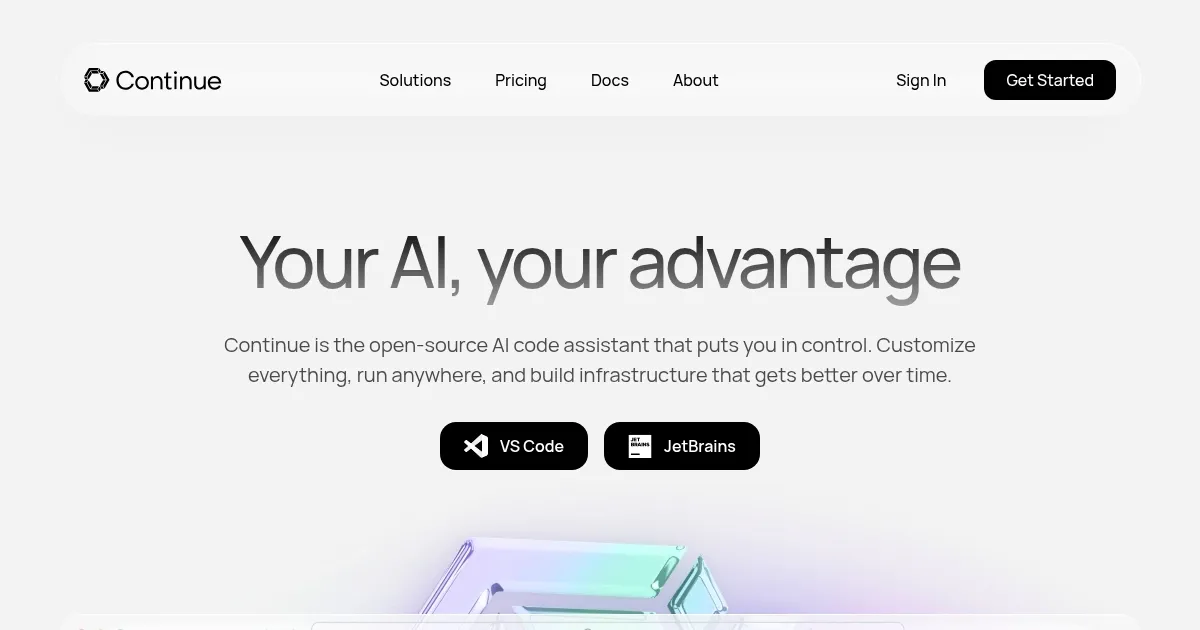
Homepage Screenshot 📸

Continue screenshot

Video Overview 🎬

Continue - Video Overview

What are the key features? ✨

  • Chat integration: Engage directly with Large Language Models (LLMs) within your IDE to ask questions, seek explanations, or discuss code snippets.
  • Autocomplete: Receive inline code suggestions as you type, allowing for faster coding and reducing syntax errors.
  • Code editing: Highlight sections of code and use natural language commands to modify or refactor them.
  • Custom actions: Set up shortcuts for common tasks, enabling quick execution of repetitive actions and enhancing productivity.
  • Support for different models: Connect with various AI models, including OpenAI, Anthropic, and Mistral -- allowing customization based on specific project needs.

Who is it for? 🤔

Continue primarily targets software developers and engineering teams seeking to enhance their coding efficiency and quality. By integrating AI capabilities directly into the development environment, it aims to streamline workflows, reduce context switching, and provide intelligent assistance throughout the coding lifecycle.

Examples of what you can use it for 💡

  • Generate boilerplate code or entire functions by providing brief descriptions
  • Utilize AI to analyze code for potential issues, suggest improvements, and ensure adherence to best practices
  • Interact with the AI to understand codebases, learn programming concepts, and get up to speed more quickly
  • Automatically generate documentation for code functions and modules
  • Identify and resolve bugs by querying the AI for solutions based on error messages or problematic code segments

Pros & Cons ⚖️

  • AI-powered code suggestions and auto-completion
  • Support for multiple AI models
  • Find and resolve bugs in code with the help of AI
  • This is a highly competitive market and many folks prefer GitHub Copilot

FAQs 💬

What is Continue?
Continue is an open-source AI coding assistant that integrates directly into your IDE to help with code generation, editing, chat, and automation through custom agents and workflows.
Which IDEs does Continue support?
It works with VS Code and JetBrains IDEs, offering extensions for autocomplete, chat, and agent features right in your editor.
Is Continue open-source?
Yes, it's fully open-source, so you can customize everything from models and prompts to workflows and integrations.
Can I use my own AI models with Continue?
Absolutely, you can connect any AI model you want, including local ones or providers like OpenAI, Anthropic, or others through compatible APIs.
What are the main features for coding assistance?
Key features include tab autocomplete, inline code editing, chat for explanations or generation, and agent mode for handling complex tasks with tools and context.
Does Continue support local or offline models?
Yes, it excels with local models for privacy and speed, and many users run it with tools like Ollama or LM Studio for completely offline setups.
How does Continue compare to tools like Cursor or GitHub Copilot?
It stands out for its flexibility, open-source nature, and ability to use any model or custom workflows, though some users note it requires more setup than polished commercial alternatives.
Can I automate workflows with Continue?
Yes, it supports cloud agents, CLI agents, and IDE integrations to automate tasks like bug fixes, PR reviews, or alerts from tools like GitHub, Sentry, or Snyk.
Is Continue free to use?
The core tool and extensions are free and open-source, though you might incur costs if using paid AI model APIs.
How easy is it to get started with Continue?
You can install the extension in minutes and start with simple chat or autocomplete, but full customization takes a bit of configuration in YAML files.

Ready to try Continue?

An open-source AI code assistant that enhances software development by integrating into IDEs

Visit Continue ↗

Continue alternatives 🔗

  1. ChatGPT ChatGPT All-round AI assistant generating human-like responses to user queries and tasks
  2. Claude Claude Assists users in reasoning, coding, writing, and analyzing data with advanced AI models
  3. DeepSeek DeepSeek Delivers advanced AI models for coding and reasoning at low costs
  4. Cursor Cursor Supercharges coding with AI agents that build, edit, and review code autonomously.
  5. Windsurf Windsurf Empowers developers with AI-driven code generation and real-time collaboration.
  6. Lovable Lovable Builds apps and websites via AI chat prompts.
Share
Continue screenshot enlarged
Promote Continue
light badge
Copy Embed Code
dark badge
Copy Embed Code
neutral badge
Copy Embed Code
Best AI Tools

Discover the best AI tools for any use case

Explore
  • Tool Categories
  • AI Use Cases
  • AI Events
  • AI News
  • Saved Tools
Company
  • About Us
  • Contact Us
  • Media & Partnerships
  • Suggest a Tool
Legal
  • Privacy Policy
  • Terms of Service
Copyright © 2026 Best AI Tools 415 Mission Street, 37th Floor, San Francisco, CA 94105