Skip to content
logo-darklogo-darklogo-darklogo-dark
  • Tool Categories
    • 🎨Art & Creative Design505
    • 🏢Business Management644
    • 💻Coding & Development514
    • 👮Detection83
    • 🧠General Use728
    • 🏥Health & Wellness55
    • 📷Image & Photo Analysis100
    • 🖼️Image Generation & Editing618
    • 📐Interior & Architectural Design37
    • 🎓Learning & Education483
    • ⚖️Legal & Finance90
    • 🎭Lifestyle & Entertainment236
    • 📢Marketing & Advertising627
    • 🎧Music & Audio138
    • 👔Office & Workplace1,014
    • 🔬Research & Data Analysis373
    • 👥Social Media245
    • 🎥Video Generation & Editing426
    • 👧🏻Virtual Companion135
    • 🎤Voice Generation & Editing381
    • ✍️Writing & Editing808
    • All Categories
    • AI Use Cases
  • News
  • Events
    • Academic Conferences
    • Developer Conferences
    • Expos / Trade Shows
    • Industry Summits
    • Workshops / Training
    • All Events
    • Past Events
  • Saved Tools
  • Suggest a Tool
    ✕
    Home › Image Generation & Editing › Product Photography› CreatorKit
    CreatorKit

    CreatorKit

    Create product images and photos proven to increase sales, in seconds

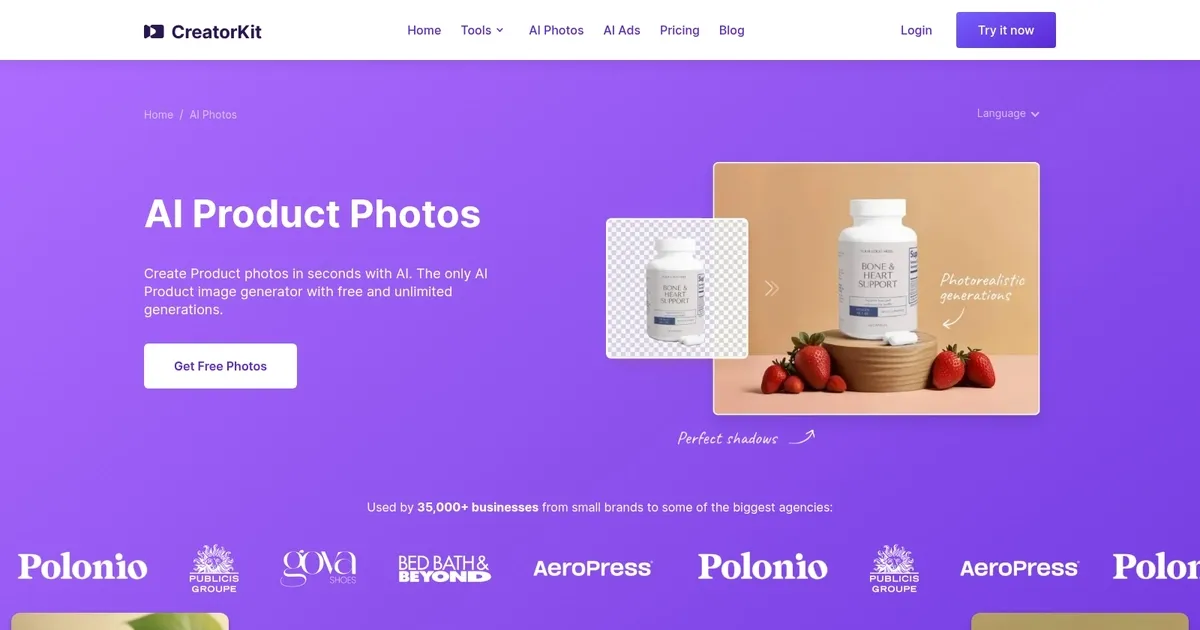
    CreatorKit is designed to revolutionize product photography by generating high-quality product images using artificial intelligence. Specifically, it targets e-commerce stores and brands, allowing users to create professional-looking product photos with AI-generated backgrounds that blend seamlessly with the product image.

    The tool aims to solve the randomness problem identified in its initial launch by offering more refined and category-specific background options.

    With a drag-and-drop editor and various templates optimized for different product categories (e.g., supplements, beauty, beverages, candles, furniture, jewelry, perfumes, skincare, bags, shoes, etc.), CreatorKit simplifies the process of creating engaging product images, making it possible for anyone to produce a photo shoot in seconds.

    In addition, it ensures zero quality loss in the generated images, addressing common issues such as blurred labels or unwanted shape changes that often occur with similar tools.

    CreatorKit is promoted as a cost-effective solution, offering unlimited free photo generations and requiring payment only for the images one decides to use. Plus, it is deeply integrated with Shopify, enabling users to generate and utilize photos directly from their Shopify admin — which is something many e-commerce operators will appreciate. It’s cool that you don’t have to switch between multiple tabs, right?

    Visit CreatorKit ↗
    Categories
    🖼️ Image
    🛍️ Product Photography 🏞️ Background Generation ✂️ Background Removal ✏️ Photo Editing 🖼️ Image Generation
    📢 Advertising
    🎨 Ad Creative 🚀 Marketing 📣 Advertising
    🎨 Art
    📷 Photography

    Homepage Screenshot 📸

    CreatorKit screenshot

    Video Overview 🎬

    CreatorKit - Video Overview

    What are the key features? ✨

    • Unlimited Free Generations: Create as many product photo variations as needed without any upfront cost or credit card required.
    • Category-Specific Templates: Access hundreds of optimized designs tailored for niches like beauty, supplements, jewelry, furniture, and more.
    • Drag-and-Drop Editor: Control AI elements, adjust placements, and refine compositions directly in an intuitive interface.
    • Zero Quality Loss Blending: Blend AI backgrounds with uploaded products while keeping labels sharp and shapes unchanged.
    • Shopify Integration: Generate and apply images directly from the Shopify admin for seamless e-commerce use.

    Who is it for? 🤔

    This tool helps e-commerce store owners, small brands, marketing managers, and agencies that need fast, high-quality product images without hiring photographers or dealing with complex software. It suits anyone selling physical goods online, especially in categories like beauty, supplements, jewelry, or home goods, who wants to create ads, listings, and social content affordably and consistently.

    Examples of what you can use it for 💡

    • Online Store Owners: Quickly generate lifestyle product photos for Shopify listings without a studio setup.
    • Social Media Marketers: Create eye-catching ad creatives for Instagram and Facebook using category-optimized templates.
    • Small Brand Founders: Test multiple visual variations for supplements or beauty products at low cost before scaling.
    • Agency Teams: Produce batch images for client catalogs across niches like furniture or perfumes efficiently.
    • E-commerce Managers: Update product visuals seasonally or for promotions directly in the Shopify dashboard.

    Pros & Cons ⚖️

    • Unlimited free generations
    • Sharp, no-deformation quality
    • Category templates
    • Shopify direct integration
    • Pay per download
    • Prompt tweaks sometimes needed

    FAQs 💬

    What file types can I upload for my product?
    You can upload common image formats like PNG or JPG with transparent backgrounds for best blending results.
    Do I need a credit card to start generating images?
    No, generations are completely free and unlimited without requiring a card; you only pay when downloading.
    How does it compare to Pebblely?
    CreatorKit offers more niche-specific templates and Shopify integration, while Pebblely focuses on quick, simple lifestyle backgrounds with a generous free tier.
    Can I use it for videos too?
    Yes, the broader CreatorKit platform lets you turn generated photos into video ads using templates.
    Is there quality loss on product details?
    No, the tool preserves sharpness, labels, and shapes without blurring or changes.
    What if the background doesn't match my vision?
    Use the drag-and-drop editor or adjust text prompts to regenerate until it fits.
    Does it work outside Shopify?
    Yes, you can use the standalone web tool for any platform or social media needs.

    Ready to try CreatorKit?

    Create product images and photos proven to increase sales, in seconds

    Visit CreatorKit ↗


    CreatorKit alternatives 🔗

    1. PhotoRoom PhotoRoom An AI-powered photo editing tool that removes backgrounds and enhances photos with user-friendly features.
    2. WeShop AI WeShop AI Using AI to offer a fresh approach to product photography
    3. Pixelcut Pixelcut A suite of AI-powered image editing and upscaling tools
    4. Pebblely Pebblely Create Instagram-worthy photos for any product with the click of a button
    5. insMind insMind An AI-powered photo editing tool made to simplify the creation of professional product images
    6. Flair Flair The AI design tool to create product photography and branded content
    Share
    CreatorKit screenshot enlarged
    Best AI Tools

    Discover the best AI tools for any use case

    Explore
    • Tool Categories
    • AI Use Cases
    • AI Events
    • AI News
    • Saved Tools
    Company
    • About Us
    • Contact Us
    • Media & Partnerships
    • Suggest a Tool
    Legal
    • Privacy Policy
    • Terms of Service
    Copyright © 2026 Best AI Tools 415 Mission Street, 37th Floor, San Francisco, CA 94105