Skip to content
logo-darklogo-darklogo-darklogo-dark
  • Tool Categories
    • 🎨Art & Creative Design505
    • 🏢Business Management644
    • 💻Coding & Development514
    • 👮Detection83
    • 🧠General Use728
    • 🏥Health & Wellness55
    • 📷Image & Photo Analysis100
    • 🖼️Image Generation & Editing618
    • 📐Interior & Architectural Design37
    • 🎓Learning & Education483
    • ⚖️Legal & Finance90
    • 🎭Lifestyle & Entertainment236
    • 📢Marketing & Advertising627
    • 🎧Music & Audio138
    • 👔Office & Workplace1,014
    • 🔬Research & Data Analysis373
    • 👥Social Media245
    • 🎥Video Generation & Editing426
    • 👧🏻Virtual Companion135
    • 🎤Voice Generation & Editing381
    • ✍️Writing & Editing808
    • All Categories
    • AI Use Cases
  • News
  • Events
    • Academic Conferences
    • Developer Conferences
    • Expos / Trade Shows
    • Industry Summits
    • Workshops / Training
    • All Events
    • Past Events
  • Saved Tools
  • Suggest a Tool
    ✕
    Home › Image Generation & Editing › Image Generation› DeepAI
    DeepAI

    DeepAI

    Generates images, videos, text, and music from simple text prompts

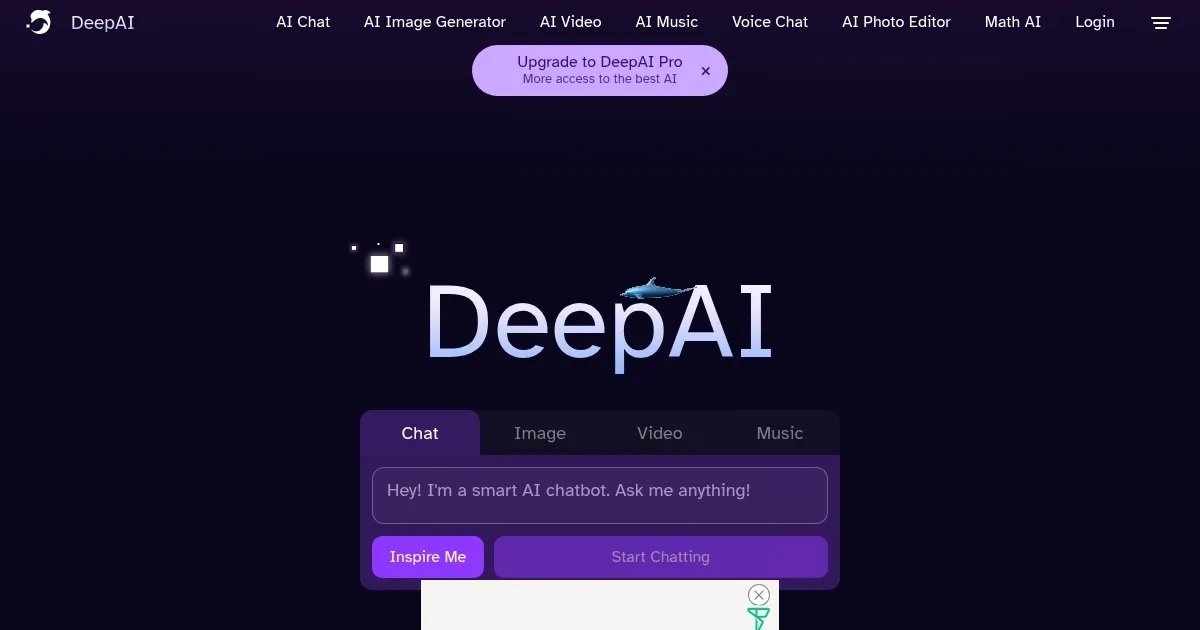
    DeepAI is an AI platform offering tools for generating images, videos, text, and music from text prompts, accessible via a browser or mobile app. Launched in 2016, it targets creators, developers, and casual users with a free plan and a Pro subscription for advanced features. The AI Image Generator creates visuals from text prompts, supporting various art styles, with tools like Background Remover and Colorizer for editing. The AI Chat feature supports text creation and conversations with themed characters, such as celebrities or fictional personas. The Video Generator animates images or builds short clips from prompts, while the Music Generator produces audio tracks. API support allows developers to integrate these tools into applications.

    The platform’s interface is intuitive, requiring no login for basic use. Users enter prompts on the homepage to generate content instantly. The free plan offers limited access, while the Pro plan includes Genius Mode for improved quality and higher usage quotas. Compared to MidJourney, DeepAI’s image quality is less consistent but more affordable. ChatGPT provides stronger text generation, but DeepAI’s character-driven chats add variety. Runway excels in video, though DeepAI’s all-in-one approach suits broader needs.

    User feedback highlights ease of use and affordability. Trustpilot reviews praise the platform’s accessibility but note occasional issues with image and video quality. Reddit users report that complex prompts can yield inconsistent results, particularly for videos. The API is well-documented, supporting developers across industries. Pricing is competitive, with the free plan ideal for testing and the Pro plan offering value for frequent users.

    Notable features include Super Resolution for enhancing image clarity and Text-to-Speech for converting text to lifelike audio. The platform’s simplicity appeals to beginners, while its API attracts developers. However, video and music outputs often lack polish, and peak usage can cause slowdowns, per user reports on X.

    For best results, use clear, simple prompts for images and text. Explore the free plan to test core features before upgrading. Developers should review API documentation for integration options. Focus on image-based tools for the most reliable outcomes.

    Visit DeepAI ↗
    Categories
    🖼️ Image
    🖼️ Image Generation 🪄 Text to Image 💎 Image Enhancing
    🧠 General
    💬 Chatbot 🧠 Large Language Model 🤖 Assistant
    🎨 Art
    🎨 Art Generation
    🎥 Video
    📹 Video Generation
    📷 Image Analysis
    👁️ Image Recognition

    Homepage Screenshot 📸

    DeepAI screenshot

    Video Overview 🎬

    DeepAI - Video Overview

    What are the key features? ✨

    • AI Image Generator: Creates visuals from text prompts in various art styles.
    • AI Chat: Generates text or conversations with themed AI characters.
    • Video Generator: Animates images or builds short videos from prompts.
    • Music Generator: Produces audio tracks from text descriptions.
    • Super Resolution: Enhances image clarity for sharper visuals.

    Who is it for? 🤔

    DeepAI suits a wide range of users, from hobbyist creators to developers integrating AI into projects. Artists and designers benefit from its image and video tools, while writers use its text generation for stories or scripts. Small business owners leverage it for affordable marketing visuals, and developers find value in its API for app integration. Beginners appreciate the free plan’s accessibility, while professionals use the Pro plan for higher output quality.

    Examples of what you can use it for 💡

    • Graphic Designer: Creates unique logos or artwork using AI Image Generator.
    • Content Creator: Produces short social media videos with Video Generator.
    • Writer: Drafts stories or poems using AI Chat’s text generation.
    • Developer: Integrates image generation into apps via DeepAI’s API.
    • Marketer: Enhances product photos with Super Resolution for e-commerce.

    Pros & Cons ⚖️

    • Free plan offers broad access.
    • API supports developer integration.
    • Affordable Pro plan for frequent users.
    • Inconsistent image quality.
    • Basic video output quality.

    FAQs 💬

    What can I create with DeepAI?
    You can generate images, videos, text, and music from text prompts, plus edit images with tools like Background Remover.
    Do I need an account to use DeepAI?
    No, you can use most tools without signing up, but an account saves your creations.
    Is there a free version of DeepAI?
    Yes, the free plan offers limited access to core features like image and text generation.
    How does DeepAI compare to MidJourney?
    DeepAI is more versatile with text, video, and music tools, but MidJourney offers higher-quality images.
    Can I use DeepAI for commercial projects?
    Yes, users own their creations, but check the terms for commercial use specifics.
    Does DeepAI offer API access?
    Yes, developers can integrate DeepAI’s tools into apps via its API.
    What is Genius Mode?
    Genius Mode, available with the Pro plan, enhances output quality for images and videos.
    Can I edit images with DeepAI?
    Yes, tools like Super Resolution and Colorizer let you enhance or modify images.
    Is DeepAI suitable for beginners?
    Absolutely, its simple interface makes it easy for anyone to start creating.

    Ready to try DeepAI?

    Generates images, videos, text, and music from simple text prompts

    Visit DeepAI ↗

    DeepAI alternatives 🔗

    1. Runway Runway Generates and edits AI-powered videos from text prompts
    2. AI Image Generator AI Image Generator An AI-powered platform that generates images from text descriptions in various styles and resolutions.
    3. Adobe Firefly Adobe Firefly Generates images, videos, audio, and vectors using AI.
    4. Freepik AI Freepik AI Creates AI images and videos with fluid motion, detailed textures, and synced audio up to 1080p
    5. Imagine Imagine Enter a prompt, choose a style, and watch an AI art generator bring your ideas to life
    6. blieve.ai blieve.ai Creates stunning AI-generated images and videos from text prompts
    Share
    DeepAI screenshot enlarged
    Best AI Tools

    Discover the best AI tools for any use case

    Explore
    • Tool Categories
    • AI Use Cases
    • AI Events
    • AI News
    • Saved Tools
    Company
    • About Us
    • Contact Us
    • Media & Partnerships
    • Suggest a Tool
    Legal
    • Privacy Policy
    • Terms of Service
    Copyright © 2026 Best AI Tools 415 Mission Street, 37th Floor, San Francisco, CA 94105