logo-darklogo-darklogo-darklogo-dark
  • Tool Categories
    • 🎨Art & Creative Design505
    • 🏢Business Management644
    • 💻Coding & Development515
    • 👮Detection83
    • 🧠General Use727
    • 🏥Health & Wellness55
    • 📷Image & Photo Analysis100
    • 🖼️Image Generation & Editing618
    • 📐Interior & Architectural Design37
    • 🎓Learning & Education483
    • ⚖️Legal & Finance90
    • 🎭Lifestyle & Entertainment236
    • 📢Marketing & Advertising627
    • 🎧Music & Audio138
    • 👔Office & Workplace1,014
    • 🔬Research & Data Analysis372
    • 👥Social Media245
    • 🎥Video Generation & Editing426
    • 👧🏻Virtual Companion135
    • 🎤Voice Generation & Editing381
    • ✍️Writing & Editing808
    • All Categories
    • AI Use Cases
  • News
  • Events
    • Academic Conferences
    • Developer Conferences
    • Expos / Trade Shows
    • Industry Summits
    • Workshops / Training
    • All Events
    • Past Events
  • Saved Tools
  • Suggest a Tool
✕
Home › Image Generation & Editing › Image Generation› Draw Things
Draw Things

Draw Things

Creates stunning AI-generated images from text prompts in minutes, offline

Draw Things is an AI-assisted image generation app for iOS and macOS, leveraging Stable Diffusion models to create and edit images offline. Available on the App Store and official website, it supports text-to-image, image-to-image, inpainting, and video generation, all processed locally to ensure user privacy. The app is free for local use, with an optional Draw Things+ paid tier for cloud compute.

Key features include Text-to-Image, which generates images from prompts like “a futuristic city at dusk” in minutes, and Inpainting Mask, which allows users to edit specific image areas. Infinite Canvas enables endless image expansion, while Scribble-to-Image transforms rough sketches into detailed visuals. Video generation, supported by models like Hunyuan, produces short clips. The app supports community models and LoRAs, such as Waifu Diffusion v1.3 for anime or Stable Diffusion v1.5 for inpainting, and is optimized for Apple Silicon (M1/M2/M3).

Performance depends on device specs. On an M1 Mac, a 1024×1024 image with FLUX.1 dev takes about 3-4 minutes at 20 steps, slower than A1111 Stable Diffusion WEB UI on high-end PCs. Users praise the intuitive interface and offline privacy but note occasional iCloud syncing issues with LoRAs and slower rendering on older devices like iPhone 11. Compared to MidJourney, which requires cloud access, Draw Things prioritizes privacy and ease of use. DiffusionBee is a similar offline option but lacks video support.

The app’s community on Discord and Reddit provides robust support, with guides and model recommendations. Recent updates, like version 1.20250708.0, improve video frame consistency and add TeaCache for faster rendering. Draw Things suits artists and casual users seeking a private, accessible AI art tool.

For best results, use on M1/M2 devices, start with simple prompts, and explore community LoRAs for specialized styles. Check the wiki for setup guides and join Discord for troubleshooting.

Visit Draw Things ↗
Categories
🖼️ Image
🖼️ Image Generation 🪄 Text to Image ✏️ Photo Editing
🎨 Art
🎨 Art Generation ✍️ Drawing

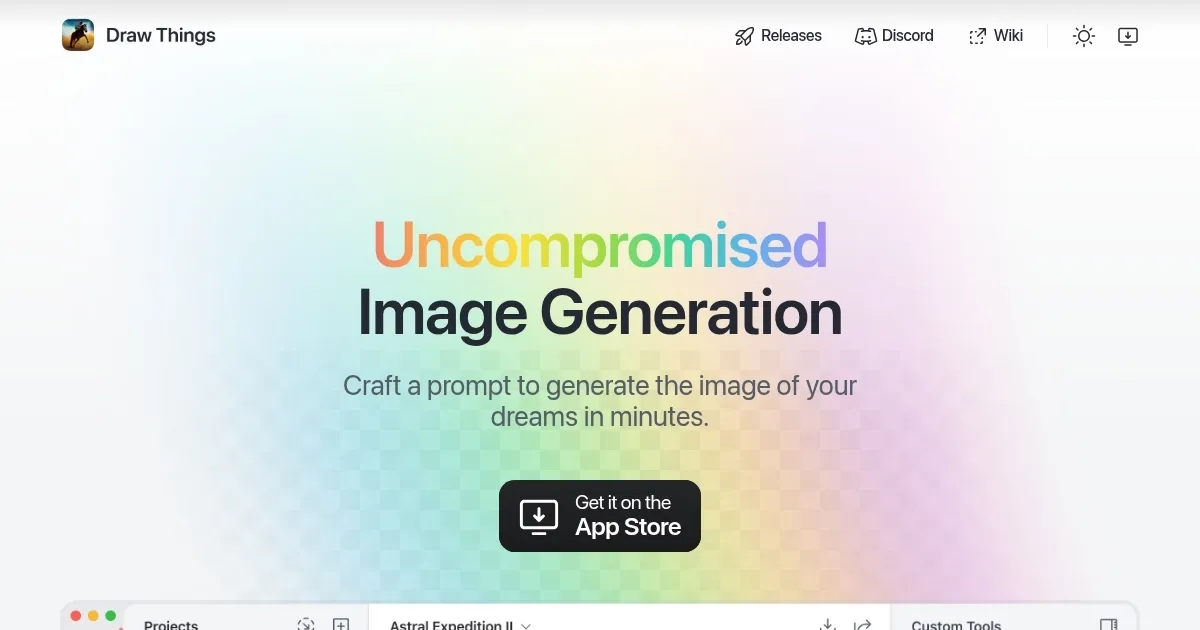
Homepage Screenshot 📸

Draw Things screenshot

What are the key features? ✨

  • Text-to-Image: Generates images from text prompts in minutes.
  • Inpainting Mask: Edits specific image areas with precision.
  • Infinite Canvas: Expands images endlessly for creative flexibility.
  • Scribble-to-Image: Transforms rough sketches into detailed visuals.
  • Video Generation: Creates short clips using models like Hunyuan.

Who is it for? 🤔

Draw Things is ideal for graphic designers, hobbyist artists, architects, and casual creators who use Apple devices and value privacy. Its offline operation and intuitive interface make it accessible for beginners, while support for community models and LoRAs appeals to advanced users experimenting with AI art styles like anime or photorealism.

Examples of what you can use it for 💡

  • Graphic Designer: Creates client mockups quickly using text prompts.
  • Hobbyist Artist: Turns sketches into detailed artwork with Scribble-to-Image.
  • Architect: Visualizes building designs with realistic renders offline.
  • Content Creator: Generates unique social media visuals with custom models.
  • Animator: Produces short video clips for creative projects using Hunyuan.

Pros & Cons ⚖️

  • Free local generation.
  • Offline privacy protection.
  • Optimized for Apple Silicon.
  • Slow on older devices.
  • Limited to Stable Diffusion.

FAQs 💬

Is Draw Things free to use?
Yes, local generation is free with no ads; a paid Draw Things+ tier offers cloud compute.
Does Draw Things require an internet connection?
No, it runs 100% offline, ensuring privacy, though cloud features need internet.
What devices support Draw Things?
It’s available on iOS (iPhone 11+, iOS 15.4+) and macOS (M1/M2/M3 recommended).
Can I use custom models in Draw Things?
Yes, it supports community models and LoRAs like Waifu Diffusion or FLUX.1 dev.
How long does image generation take?
About 3-4 minutes for 1024x1024 images on M1 devices, slower on older hardware.
Does Draw Things support video creation?
Yes, it generates short clips using models like Hunyuan or SkyReels.
Is Draw Things beginner-friendly?
Its intuitive interface and wiki guides make it accessible for beginners.
Can I collaborate with others using Draw Things?
No, it lacks online collaboration, focusing on offline, solo creation.
How does Draw Things ensure privacy?
All data is processed locally, with no internet required for core features.
Where can I find support for Draw Things?
Join the Discord community or check the wiki for guides and troubleshooting.

Ready to try Draw Things?

Creates stunning AI-generated images from text prompts in minutes, offline

Visit Draw Things ↗

Draw Things alternatives 🔗

  1. ChatGPT ChatGPT All-round AI assistant generating human-like responses to user queries and tasks
  2. Grok Grok Delivers witty, real-time AI responses with advanced reasoning and image generation
  3. Imagen Imagen Generates photorealistic images from detailed text prompts
  4. Black Forest Labs Black Forest Labs Generates high-quality images from text prompts with precision and speed
  5. Kling AI Kling AI Generates cinematic videos from text or images with realistic motion
  6. Runway Runway Generates and edits AI-powered videos from text prompts
Share
Draw Things screenshot enlarged
Promote Draw Things
light badge
Copy Embed Code
dark badge
Copy Embed Code
neutral badge
Copy Embed Code
Best AI Tools

Discover the best AI tools for any use case

Explore
  • Tool Categories
  • AI Use Cases
  • AI Events
  • AI News
  • Saved Tools
Company
  • About Us
  • Contact Us
  • Media & Partnerships
  • Suggest a Tool
Legal
  • Privacy Policy
  • Terms of Service
Copyright © 2026 Best AI Tools 415 Mission Street, 37th Floor, San Francisco, CA 94105