logo-darklogo-darklogo-darklogo-dark
  • Tool Categories
    • 🎨Art & Creative Design505
    • 🏢Business Management644
    • 💻Coding & Development515
    • 👮Detection83
    • 🧠General Use727
    • 🏥Health & Wellness55
    • 📷Image & Photo Analysis100
    • 🖼️Image Generation & Editing618
    • 📐Interior & Architectural Design37
    • 🎓Learning & Education483
    • ⚖️Legal & Finance90
    • 🎭Lifestyle & Entertainment236
    • 📢Marketing & Advertising627
    • 🎧Music & Audio138
    • 👔Office & Workplace1,014
    • 🔬Research & Data Analysis372
    • 👥Social Media245
    • 🎥Video Generation & Editing426
    • 👧🏻Virtual Companion135
    • 🎤Voice Generation & Editing381
    • ✍️Writing & Editing808
    • All Categories
    • AI Use Cases
  • News
  • Events
    • Academic Conferences
    • Developer Conferences
    • Expos / Trade Shows
    • Industry Summits
    • Workshops / Training
    • All Events
    • Past Events
  • Saved Tools
  • Suggest a Tool
✕
Home › Image Generation & Editing › Image Generation› DiffusionBee
DiffusionBee

DiffusionBee

Generates and edits AI images locally from text prompts on macOS using Stable Diffusion

DiffusionBee is a cutting-edge app designed to generate AI art on macOS devices using Stable Diffusion. In that sense, it allows users to swiftly create new artwork from text prompts or alter existing images in various ways — including adding or removing objects, changing styles, and enhancing image resolution.

The tool operates entirely offline, ensuring privacy and security by not sending any data to the cloud. Still, DiffusionBee provides a user-friendly platform for both artists and enthusiasts to explore the possibilities of AI-generated art with no associated costs.

The app comes with various features like text-to-image conversion, image-to-image transformation, in-painting, out-painting, upscaling, and custom models. Importantly, DiffusionBee is also very fast, and can do its magic in as little as 30 seconds on an 8GB M1 MacBook Air, with even faster speeds on higher-spec computers. It requires macOS 12.5.1 or higher and is optimized for devices with Apple silicon, though it also supports Intel-based Macs with reduced performance.

In a nutshell, DiffusionBee positions itself as an accessible tool for creating AI art on Macs.

Visit DiffusionBee ↗
Categories
🖼️ Image
🖼️ Image Generation 🪄 Text to Image ⬆️ Image Upscaling ✏️ Photo Editing 💎 Image Enhancing 🏞️ Background Generation
🎨 Art
🎨 Art Generation 🌅 Illustration Generation
🧠 General
🦙 Open Source Model

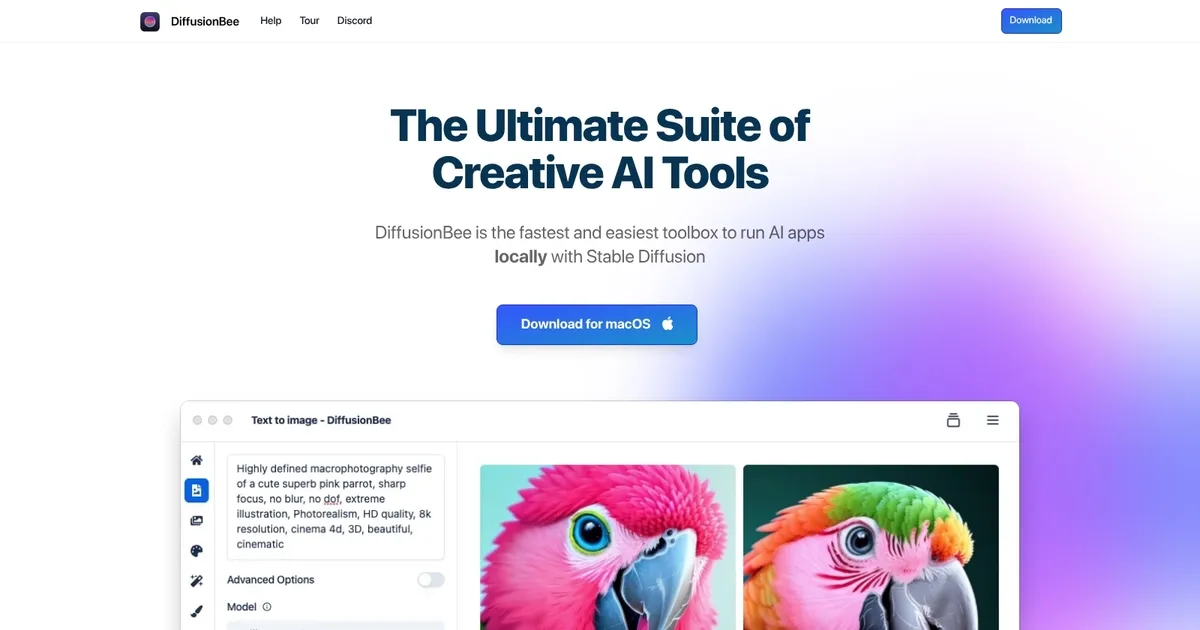
Homepage Screenshot 📸

DiffusionBee screenshot

What are the key features? ✨

  • Text to Image: Create stunning images from text prompts with ease.
  • Generative Fill: Effortlessly add or remove objects in selected regions of your images.
  • Image Upscaler: Enhance image quality by making them sharper and higher resolution with AI.
  • Train Models: Build custom models with just a few clicks, all 100% locally.
  • AI Canvas: Generate and edit images using prompts and human drawing as a collaborative tool.

Who is it for? 🤔

DiffusionBee helps Mac users who want to explore AI art generation without relying on cloud services or dealing with complicated setups. It suits beginners curious about Stable Diffusion, hobbyists creating personal artwork, digital artists experimenting with AI assistance, privacy-conscious creators who prefer offline tools, and anyone with an Apple Silicon Mac looking for fast, free local image generation and editing capabilities.

Examples of what you can use it for 💡

  • Digital artist: Uses text-to-image and AI canvas to brainstorm concepts and refine illustrations quickly.
  • Content creator: Generates custom visuals or thumbnails by transforming existing images with prompts.
  • Hobbyist: Trains a personal model on favorite photos to produce consistent character or style outputs.
  • Designer: Upscales low-res concepts and uses generative fill to remove unwanted elements from mockups.
  • Experimenter: Creates short AI animations with video tools for fun social media clips or prototypes.

Pros & Cons ⚖️

  • Completely free to use
  • Runs 100% offline
  • Fast on Apple Silicon
  • Easy one-click install
  • Mac-only (no native Windows yet)
  • Limited advanced extensions

FAQs 💬

Is DiffusionBee really free?
Yes, the app is completely free with no subscriptions or hidden fees.
Does DiffusionBee require an internet connection after installation?
No, it runs 100% offline once models are downloaded.
What Macs does DiffusionBee work on?
It supports both Apple Silicon (M1, M2, M3 etc.) and Intel-based Macs.
Can I use the latest models like Flux in DiffusionBee?
Yes, by downloading the most recent version from GitHub releases.
How does DiffusionBee compare to cloud-based AI art tools?
It offers complete privacy and no usage limits since everything processes locally.
Is there a Windows version available?
Not natively yet, though a waitlist exists for future Windows support.
Do I need a powerful GPU?
Apple Silicon provides excellent performance; Intel Macs work but generate slower.
Can I train my own models?
Yes, the app includes a straightforward tool to train custom models locally.

Ready to try DiffusionBee?

Generates and edits AI images locally from text prompts on macOS using Stable Diffusion

Visit DiffusionBee ↗

DiffusionBee alternatives 🔗

  1. ChatGPT ChatGPT All-round AI assistant generating human-like responses to user queries and tasks
  2. Grok Grok Delivers witty, real-time AI responses with advanced reasoning and image generation
  3. Imagen Imagen Generates photorealistic images from detailed text prompts
  4. Black Forest Labs Black Forest Labs Generates high-quality images from text prompts with precision and speed
  5. Kling AI Kling AI Generates cinematic videos from text or images with realistic motion
  6. Runway Runway Generates and edits AI-powered videos from text prompts
Share
DiffusionBee screenshot enlarged
Promote DiffusionBee
light badge
Copy Embed Code
dark badge
Copy Embed Code
neutral badge
Copy Embed Code
Best AI Tools

Discover the best AI tools for any use case

Explore
  • Tool Categories
  • AI Use Cases
  • AI Events
  • AI News
  • Saved Tools
Company
  • About Us
  • Contact Us
  • Media & Partnerships
  • Suggest a Tool
Legal
  • Privacy Policy
  • Terms of Service
Copyright © 2026 Best AI Tools 415 Mission Street, 37th Floor, San Francisco, CA 94105