
Facemoji Keyboard
Enhances texting with AI-generated emojis, fonts, and social media content
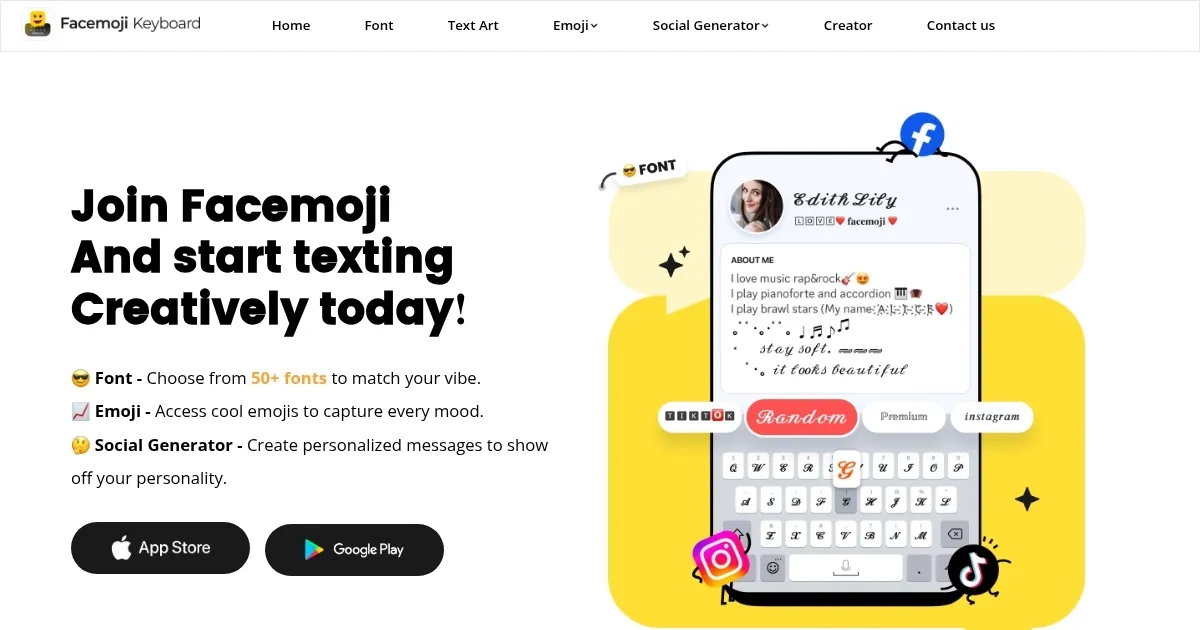
Facemoji Keyboard is an AI-powered tool, which can be accessed through its slick website and Android app — and it feels like a creative spark plug. It’s packed with over 5,000 emojis, a Font Generator that churns out wild styles like “Cave” or “Doodle,” and an AI Writing Assistant that whips up snappy captions faster than I can brainstorm. I typed “sunset vibes” into the Emoji Generator, and it spat out a custom sticker that made my WhatsApp group chat light up with replies. The interface pops with color, making every tap feel like a mini adventure. It’s not just a keyboard — it’s a vibe.
The DIY Avatar Sticker feature was my favorite. I entered “grumpy cat” and got a sticker that had my friends cracking up on Telegram. The 1500+ keyboard themes, from neon glows to K-Pop-inspired designs, let me switch up my keyboard’s look in seconds. I tried a BTS-themed one, and suddenly my typing felt like a fan party. The AI Writing Assistant surprised me with how well it crafted TikTok hashtags — #SummerVibes2025, anyone? It’s intuitive, fast, and supports over 150 languages, which is handy for my bilingual chats. Compared to Gboard, which I’ve used for years, Facemoji’s creative edge is unmatched, though Gboard’s predictive typing feels snappier. SwiftKey offers great language support but lacks Facemoji’s playful customization.
That said, I hit a few snags. The app felt a tad sluggish when I loaded a heavy RGB theme on my mid-range phone. Also, navigating the massive emoji library can be a bit much — sometimes I just wanted a basic smiley, not a deep dive into kaomoji land. The free version is solid, but premium themes and fonts are locked behind a paywall, which feels standard but still stings compared to Gboard’s all-free approach. I also noticed the Auto Paste feature, while cool for spamming fun phrases, could get repetitive if overused.
What caught me off guard was the Text Art collection. I sent a pixelated Minecraft sword to a friend, and they thought I was some ASCII art genius. Another surprise: the keyboard’s sound effects. I picked a piano tap sound, and it made typing weirdly satisfying. If there’s a downside, it’s that the app’s focus on social media flair might not suit folks who just want a no-frills keyboard.
My advice? Mess around with the Emoji Generator first — it’s a blast. Try a few themes to match your mood, but don’t overload your device with heavy ones. Use the AI Writing Assistant for social posts, and you’ll save time while looking effortlessly clever.
Homepage Screenshot 📸
Video Overview 🎬

What are the key features? ✨
- Emoji Generator: Creates custom stickers from text prompts for social apps.
- Font Generator: Offers over 200 unique fonts for personalized messaging.
- AI Writing Assistant: Generates captions, hashtags, and bios for social media.
- Kaomoji Keyboard: Provides text-based emoticons for expressive chats.
- Auto Paste: Stores and sends trending phrases or templates with one tap.
Who is it for? 🤔
Examples of what you can use it for 💡
- Social Media Influencer: Crafts eye-catching captions and hashtags for Instagram posts.
- Teenager: Uses custom emojis to add flair to group chats on WhatsApp.
- Content Creator: Designs unique fonts for TikTok bios to stand out.
- Casual User: Sends playful kaomoji in Messenger for fun conversations.
- Bilingual User: Switches languages seamlessly for multilingual texting.
Pros & Cons ⚖️
- Over 5,000 emojis for variety.
- AI assistant speeds up content creation.
- Supports over 150 languages.
- Free version is feature-rich.
- Interface may feel cluttered.
- Less focus on professional use.
FAQs 💬
Ready to try Facemoji Keyboard?
Enhances texting with AI-generated emojis, fonts, and social media content
Visit Facemoji Keyboard ↗Facemoji Keyboard alternatives 🔗
-
 SwiftKey AI Keyboard
Enhances typing with AI-powered autocorrect and predictions
SwiftKey AI Keyboard
Enhances typing with AI-powered autocorrect and predictions
-
 AI Emojis
An AI-powered platform for creating custom emojis based on text descriptions
AI Emojis
An AI-powered platform for creating custom emojis based on text descriptions
-
 Character.AI
Generates interactive AI-driven chats with fictional characters.
Character.AI
Generates interactive AI-driven chats with fictional characters.
-
 PixAI.Art
Anime AI image generator, available on the web and as a mobile app
PixAI.Art
Anime AI image generator, available on the web and as a mobile app
-
 Funy AI
Swaps faces, generates AI art, and enhances images with easy-to-use tools
Funy AI
Swaps faces, generates AI art, and enhances images with easy-to-use tools
-
 Adobe Firefly
Generates images, videos, audio, and vectors using AI.
Adobe Firefly
Generates images, videos, audio, and vectors using AI.