logo-darklogo-darklogo-darklogo-dark
  • Tool Categories
    • 🎨Art & Creative Design505
    • 🏢Business Management644
    • 💻Coding & Development515
    • 👮Detection83
    • 🧠General Use727
    • 🏥Health & Wellness55
    • 📷Image & Photo Analysis100
    • 🖼️Image Generation & Editing618
    • 📐Interior & Architectural Design37
    • 🎓Learning & Education483
    • ⚖️Legal & Finance90
    • 🎭Lifestyle & Entertainment236
    • 📢Marketing & Advertising627
    • 🎧Music & Audio138
    • 👔Office & Workplace1,014
    • 🔬Research & Data Analysis372
    • 👥Social Media245
    • 🎥Video Generation & Editing426
    • 👧🏻Virtual Companion135
    • 🎤Voice Generation & Editing381
    • ✍️Writing & Editing808
    • All Categories
    • AI Use Cases
  • News
  • Events
    • Academic Conferences
    • Developer Conferences
    • Expos / Trade Shows
    • Industry Summits
    • Workshops / Training
    • All Events
    • Past Events
  • Saved Tools
  • Suggest a Tool
✕
Home › Learning & Education › Flashcard Generation› Flashloop
Flashloop

Flashloop

Generates AI videos from text or images with audio

Flashloop is an AI-powered video generation tool that converts text prompts and images into short videos with synchronized audio, using Google’s Veo 3 and Veo 2 models. It supports creation on web, iOS, and Android platforms, targeting over 150,000 users for viral content like vlogs, ASMR, and ads. Key features include Text to Video with Audio for prompt-based generation, Image to Video with Audio for animating uploads, and a prompts library for idea generation. The tool ensures consistent characters and effects through advanced model training, producing high-quality outputs in seconds.

Flashloop processes inputs via diffusion models that maintain temporal consistency, enabling realistic motion and physics in clips up to 10 seconds long. Users input descriptions specifying subjects, actions, lighting, and audio, with the system generating synchronized elements. It handles diverse styles, from cinematic movie scenes to realistic podcasts, with native sound effects and ambient audio. Compared to Kling AI, which excels in longer sequences, Flashloop prioritizes mobile accessibility and affordability in its subscription model. HeyGen offers similar avatar focus but lacks Flashloop’s broad creative prompts integration.

Outputs feature ultra-realistic visuals, with examples including Yeti & Duck vlogs viewed 17.9 million times and Lava ASMR at 25.5 million. The platform requires internet for cloud processing, limiting offline use. Generation credits operate on a subscription basis, providing unlimited access post-purchase, which aligns with competitors’ credit systems but offers better value for frequent short-form creators. Technical details involve token-based prompting, where descriptive inputs yield higher fidelity, though complex scenes may require iterations.

User adoption spans social media content, marketing videos, and animated stories, with app rankings showing top 100 placements in graphics categories. Limitations include short clip durations and occasional audio desyncs in dynamic scenes. The tool’s Veo integration provides an edge in realism over earlier models, supporting use cases like product demos and business presentations.

For optimal results, use specific prompts detailing scene elements and test audio previews before export. Combine multiple generations for extended videos using external editors.

Visit Flashloop ↗
Categories
🎓 Education
🃏 Flashcard Generation 📝 Quiz Generation 🤔 Question Generation ✏️ Homework Helper 🗂️ Knowledge Management

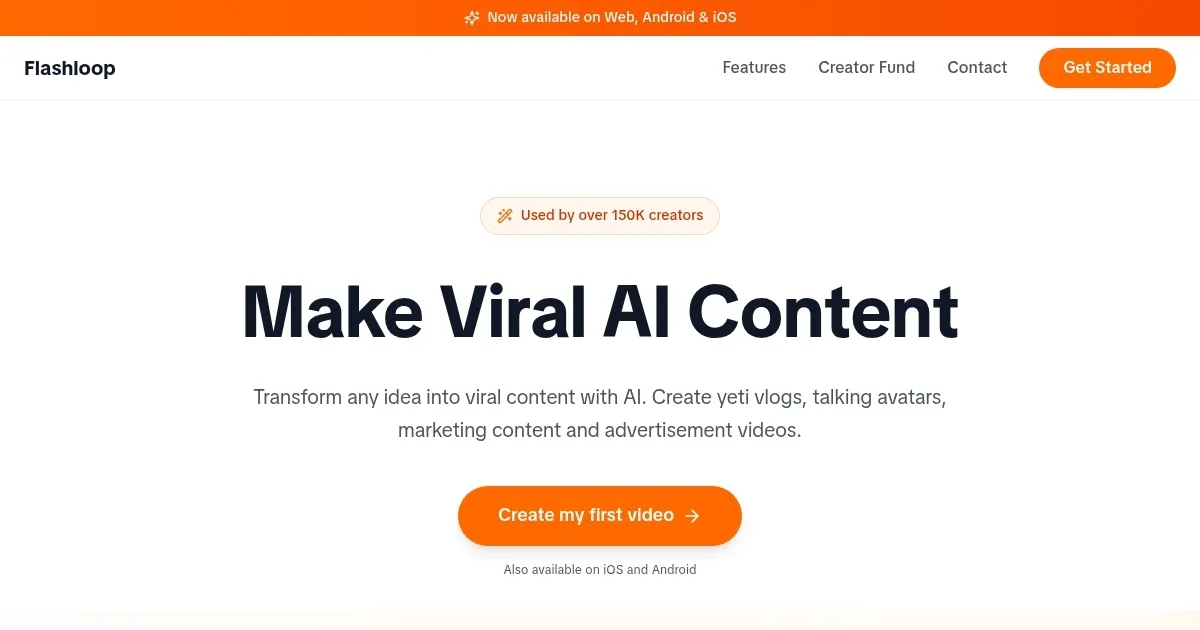
Homepage Screenshot 📸

Flashloop screenshot

What are the key features? ✨

  • Text to Video with Audio: Generates dynamic videos from descriptive prompts, incorporating synchronized sound effects and dialogue using Veo 3 models.
  • Image to Video with Audio: Animates uploaded images into motion clips with added visual effects and ambient audio for quick storytelling.
  • Consistent Characters and Effects: Maintains uniform character appearances and visual styles across multiple video generations for cohesive content.
  • Prompts Library: Offers pre-built creative ideas and templates to inspire users starting viral videos or ads.
  • Cross-Platform Support: Enables seamless video creation and editing on web browsers, iOS apps, and Android devices.

Who is it for? 🤔

Flashloop suits content creators, marketers, and small business owners who need fast, professional-looking videos without advanced skills or equipment. It's ideal for social media influencers crafting TikTok clips or Reels, as the tool's quick generation and mobile access let them produce viral content on the fly. Beginners in video production benefit from its intuitive prompts and audio sync, while educators or presenters can use it for engaging visuals in lessons or pitches. Even hobbyists experimenting with ideas like ASMR or vlogs find value in the affordable, high-quality outputs that rival pricier software.

Examples of what you can use it for 💡

  • Social Media Influencer: Creates short, engaging TikTok videos from text prompts, adding audio effects to boost viewer interaction and shares.
  • Marketer: Generates product advertisement clips from images, incorporating brand-consistent characters for targeted social campaigns.
  • Small Business Owner: Produces business presentation videos with synchronized narration, using prompts to visualize services quickly.
  • Content Creator: Animates story ideas into ASMR sequences, maintaining effects across scenes for immersive YouTube Shorts.
  • Educator: Builds animated explainer videos from educational text, with audio to enhance online course materials.

Pros & Cons ⚖️

  • Mobile friendly
  • Realistic audio
  • Affordable subs
  • Short clips only
  • Audio sync issues

FAQs 💬

What is Flashloop?
Flashloop is a tool that generates videos from text or images using AI models like Veo 3, available on web, iOS, and Android.
How does text-to-video work?
Users enter descriptive prompts, and the tool creates a video with synced audio and effects in seconds, supporting styles like vlogs or ads.
Is there a free version?
Yes, a free trial offers limited credits for testing generations, with full access via subscription.
What platforms does it support?
It works on web browsers without downloads, plus native iOS and Android apps for mobile creation.
Can it handle custom characters?
Yes, the consistent characters feature keeps appearances uniform across videos for branding or storytelling.
How long are the videos?
Outputs are typically 5-10 seconds, suitable for short-form content, with options to combine clips.
Does it require editing skills?
No, the intuitive interface and auto-features make it accessible for beginners without prior experience.
What about audio quality?
It includes native sound effects, dialogue, and ambient audio synced to visuals via Veo models.
Are there prompt examples?
Yes, the prompts library provides templates for ideas like marketing or ASMR to get started.
How does pricing work?
Subscriptions unlock unlimited generations, more affordable than credit-based competitors for regular use.

Ready to try Flashloop?

Generates AI videos from text or images with audio

Visit Flashloop ↗

Flashloop alternatives 🔗

  1. Duolingo Max Duolingo Max An AI-enabled language learning experience from Duolingo powered by GPT-4
  2. Gizmo AI Gizmo AI A learning platform designed to enhance educational experiences through AI-powered tools
  3. Memrise Memrise An AI-powered platform offering efficient and engaging methods for users to learn new languages
  4. StudySmarter StudySmarter Creates AI-powered study tools to boost learning efficiency
  5. Mindgrasp Mindgrasp AI learning assistant that creates notes and answers questions from documents, videos, and more
  6. Quizgecko Quizgecko An AI tool that lets you quickly create online quizzes
Share
Flashloop screenshot enlarged
Promote Flashloop
light badge
Copy Embed Code
dark badge
Copy Embed Code
neutral badge
Copy Embed Code
Best AI Tools

Discover the best AI tools for any use case

Explore
  • Tool Categories
  • AI Use Cases
  • AI Events
  • AI News
  • Saved Tools
Company
  • About Us
  • Contact Us
  • Media & Partnerships
  • Suggest a Tool
Legal
  • Privacy Policy
  • Terms of Service
Copyright © 2026 Best AI Tools 415 Mission Street, 37th Floor, San Francisco, CA 94105