Skip to content
logo-darklogo-darklogo-darklogo-dark
  • Tool Categories
    • 🎨Art & Creative Design505
    • 🏢Business Management644
    • 💻Coding & Development514
    • 👮Detection83
    • 🧠General Use728
    • 🏥Health & Wellness55
    • 📷Image & Photo Analysis100
    • 🖼️Image Generation & Editing618
    • 📐Interior & Architectural Design37
    • 🎓Learning & Education483
    • ⚖️Legal & Finance90
    • 🎭Lifestyle & Entertainment236
    • 📢Marketing & Advertising627
    • 🎧Music & Audio138
    • 👔Office & Workplace1,014
    • 🔬Research & Data Analysis373
    • 👥Social Media245
    • 🎥Video Generation & Editing426
    • 👧🏻Virtual Companion135
    • 🎤Voice Generation & Editing381
    • ✍️Writing & Editing808
    • All Categories
    • AI Use Cases
  • News
  • Events
    • Academic Conferences
    • Developer Conferences
    • Expos / Trade Shows
    • Industry Summits
    • Workshops / Training
    • All Events
    • Past Events
  • Saved Tools
  • Suggest a Tool
    ✕
    Home › Video Generation & Editing › Video Generation› Sora
    Sora

    Sora by OpenAI

    Generates hyperrealistic videos from text prompts with synchronized audio

    Sora is OpenAI’s innovative app that generates short videos from text prompts or images using advanced AI models for hyperrealistic motion and integrated audio. It builds on the Sora 2 engine which enhances physical accuracy and controllability over previous versions. Users access it via iOS initially with plans for broader rollout. The tool supports styles from cinematic to surreal and includes features like automatic sound syncing.

    Key capabilities include creating videos up to 20 seconds at 1080p resolution with consistent characters and environments. The cameo system allows verified users to insert themselves or approved friends into scenes controlling usage permissions tightly. Remixing lets users modify existing videos by swapping elements or extending narratives while maintaining visual coherence. Audio generation covers music effects and dialogue tailored to the prompt.

    In comparison, Sora outperforms rivals in audio video synchronization but faces competition from Runway for editing depth and Google Veo for complex physics simulation. Recent reviews highlight its rapid adoption with over a million downloads in days yet note limitations like generation queues and content filters. When it comes to pricing, Sora integrates with ChatGPT plans starting at $20/month for basic access – offering better value than credit based competitors (though that may change in the future).

    Users appreciate the ease of turning ideas into polished clips without technical skills fostering creativity in social sharing. Challenges include occasional artifacts in motion and strict safety blocks on sensitive prompts. External sources confirm improvements in realism since the 2024 preview with better handling of multi shot stories.

    Safety measures feature watermarks metadata for provenance and opt in likeness verification reducing misuse risks. The app curates a feed for discovery drawing from user activity and engagement. For businesses Azure integration provides API access under preview terms.

    Practical steps involve starting with simple prompts refining for detail and using remixes for iteration. Test in low stakes scenarios to learn model quirks ensuring outputs align with intended narratives.

    Visit Sora ↗
    Categories
    🎥 Video
    📹 Video Generation 📝 Text to Video 🖼️ Image to Video 📲 Short Video Generation 🎞️ Animation Generation 🎬 Movie Generation 📜 Script To Video Generation

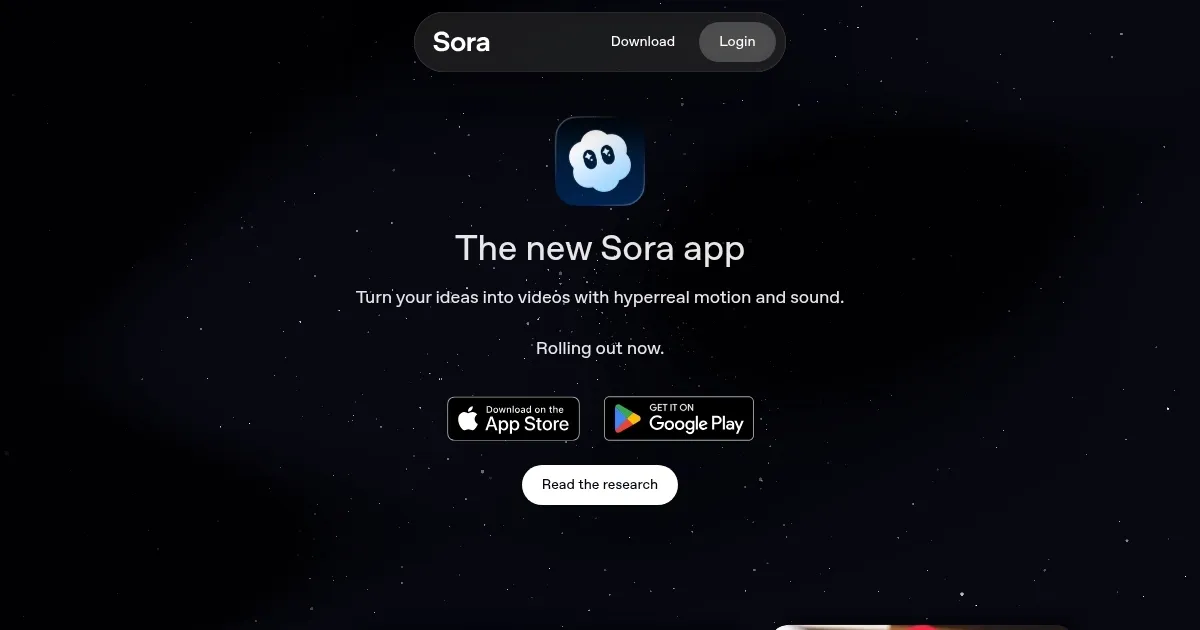
    Homepage Screenshot 📸

    Sora screenshot

    Video Overview 🎬

    Sora - Video Overview

    What are the key features? ✨

    • Text-to-Video Generation: Transforms detailed prompts into realistic videos up to 20 seconds long with consistent scenes.
    • Cameo Feature: Enables opt-in insertion of verified user likenesses into videos for collaborative storytelling.
    • Remixing Tools: Allows modification of existing videos by swapping characters or extending sequences seamlessly.
    • Audio Synchronization: Automatically adds music, dialogue, and effects to match video actions precisely.
    • Style Versatility: Supports cinematic, animated, photorealistic, or surreal outputs based on user specifications.

    Who is it for? 🤔

    Sora suits aspiring creators content marketers and social media enthusiasts who want quick high quality videos without complex editing. Its ideal for educators illustrating concepts vividly or small businesses crafting engaging ads on a budget. Casual users find joy in personal remixes while pros leverage its realism for prototypes though those needing long form might pair it with other tools.

    Examples of what you can use it for 💡

    • Content Creator: Generates short promotional clips from script ideas to boost social media engagement.
    • Educator: Visualizes historical events or scientific processes through animated explainers for classroom use.
    • Marketer: Remixes product demos with custom cameos to personalize campaigns for target audiences.
    • Filmmaker: Prototypes storyboards by extending scenes with surreal elements for pre production scouting.
    • Social User: Creates fun group videos featuring friends as characters for sharing in feeds or events.

    Pros & Cons ⚖️

    • Stunning realism
    • Easy to use
    • Auto audio sync
    • Social remixing
    • Short clip limits

    FAQs 💬

    What is Sora?
    Sora is OpenAIs app for generating short videos from text prompts or images with realistic motion and audio.
    How do I access Sora?
    Download the iOS app and sign in with a ChatGPT account; it's that easy.
    What video lengths does Sora support?
    Videos up to 20 seconds at 1080p resolution in the Pro plan.
    Can I use my likeness in videos?
    Yes via the opt-in cameo feature with verification to control usage.
    How does Sora handle audio?
    It automatically generates synchronized music dialogue and sound effects.
    What are Sora's safety features?
    Includes watermarks metadata and filters to prevent misuse of likenesses or sensitive content.
    Is Sora free to use?
    Access starts with ChatGPT Plus at twenty dollars monthly including generation limits.
    Can I remix other users videos?
    Yes with the remixing tool to swap elements or extend stories collaboratively.
    What styles can Sora create?
    From photorealistic and cinematic to animated or surreal based on prompts.
    How does Sora compare to competitors?
    Excels in audio sync over Runway ML but matches Veo in physics simulation with integrated social features.

    Ready to try Sora?

    Generates hyperrealistic videos from text prompts with synchronized audio

    Visit Sora ↗

    Sora alternatives 🔗

    1. Veo Veo Generates high-quality videos with audio from text or image prompts
    2. Kling AI Kling AI Generates cinematic videos from text or images with realistic motion
    3. Runway Runway Generates and edits AI-powered videos from text prompts
    4. Freepik AI Freepik AI Creates AI images and videos with fluid motion, detailed textures, and synced audio up to 1080p
    5. Videomaker.me Videomaker.me Generates cinematic videos with synchronized audio from text or images
    6. SkyReels SkyReels Transforms text and images into cinematic videos with AI-driven storytelling
    Share
    Sora screenshot enlarged
    Best AI Tools

    Discover the best AI tools for any use case

    Explore
    • Tool Categories
    • AI Use Cases
    • AI Events
    • AI News
    • Saved Tools
    Company
    • About Us
    • Contact Us
    • Media & Partnerships
    • Suggest a Tool
    Legal
    • Privacy Policy
    • Terms of Service
    Copyright © 2026 Best AI Tools 415 Mission Street, 37th Floor, San Francisco, CA 94105