logo-darklogo-darklogo-darklogo-dark
  • Tool Categories
    • 🎨 Art
    • 🏢 Business
    • 💻 Coding
    • 👮 Detection
    • 🧠 General
    • 🏥 Health
    • 📷 Image Analysis
    • 🖼️ Image
    • 📐 Architecture
    • 🎓 Education
    • ⚖️ Legal/Finance
    • 🎭 Lifestyle
    • 📢 Advertising
    • 🎧 Music
    • 👔 Work
    • 🔬 Research
    • 👥 Social
    • 🎥 Video
    • 👧🏻 Companion
    • 🎤 Voice
    • ✍️ Writing
    • All Categories
    • AI Use Cases
  • News
  • Events
    • Academic Conferences
    • Developer Conferences
    • Expos / Trade Shows
    • Industry Summits
    • Online Events
    • Workshops / Training
    • All Events
    • Past Events
  • Saved Tools
  • Suggest a Tool
✕
Home › Voice Generation & Editing › Text-to-Speech› Free TTS
Free TTS

Free TTS

Convert text to speech free online and download it as MP3 in natural voices

Free TTS is a feature-rich online Text-to-speech (TTS) service that allows users to convert written text into spoken words in mp3 format. This service boasts natural-sounding voices and is free for commercial use. Users can input up to 5000 characters per session, with a weekly limit of 2000 characters.

The platform offers a wide selection of languages and voices, including both male and female options, along with unique voices such as child, neutral, and various AI-generated ones. There are also handy features such as inserting pauses, adjusting playback speed, and accessing different voice options.

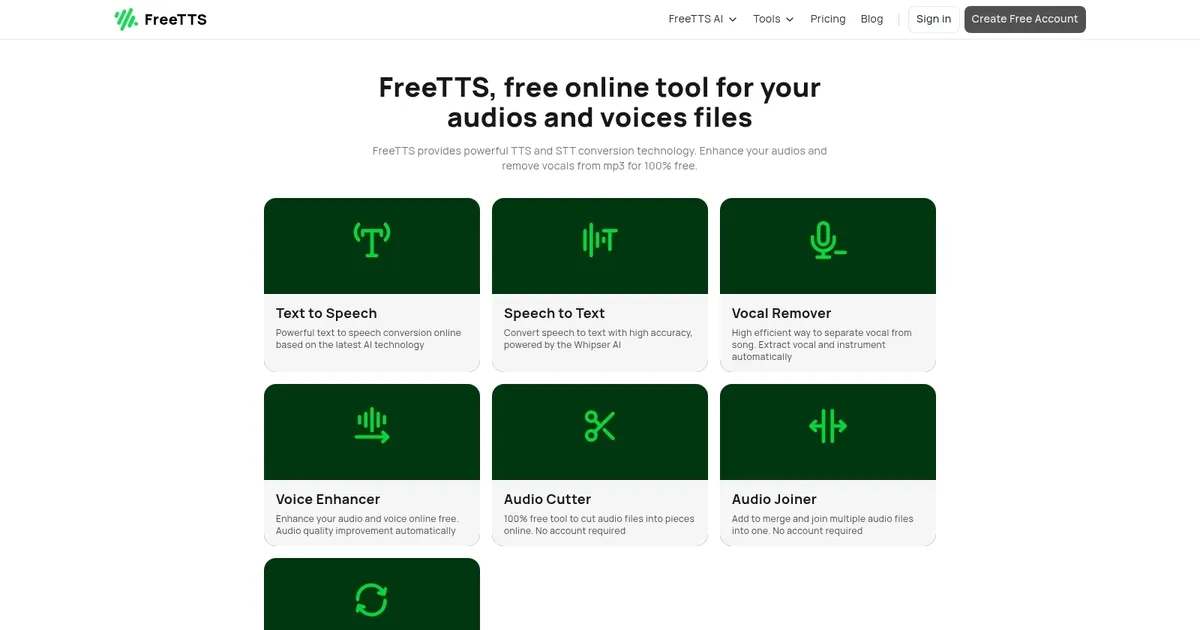
Free TTS consists of several tools, including Speech to Text (for transcribing spoken words into text), Vocal Remover (for isolating vocals from music tracks), Voice Enhancer (for improving voice quality in audio), and tools for cutting and joining audio files. These functionalities make for a comprehensive suite for manipulating and managing audio and text content effectively.

So, if you’re looking to add or modify voice with AI, Free TTS is a solid option to try out.

Visit Free TTS ↗

Categories

🎤 Voice

📢 Text-to-Speech 🗨️ Voice Generation 🔊 Speech Synthesis 📣 Voice Over

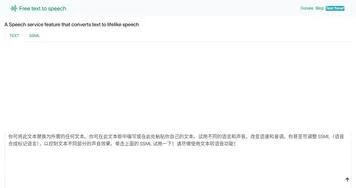
Screenshot 📸

Free TTS screenshot

What are the key features? ✨

  • Text to Speech: Converts written text into natural, human-like audio using advanced AI voices, downloadable as MP3.
  • Speech to Text: Transcribes audio files into editable text with high accuracy via Whisper AI, even with background noise.
  • Vocal Remover: Separates vocals from instrumentals in songs automatically for karaoke, remixing, or practice.
  • Voice Enhancer: Improves audio clarity by reducing noise and enhancing voice quality automatically.
  • Audio Tools Suite: Includes cutter, joiner, and batch converter supporting MP3, WAV, FLAC, OGG, M4A formats.

Who is it for? 🤔

FreeTTS suits content creators who need quick voiceovers or narration without budget, students and educators turning notes or articles into audio for better retention, podcasters requiring basic editing like noise reduction or clip merging, musicians experimenting with karaoke tracks or remixes through vocal isolation, and anyone handling transcription of meetings, lectures, or interviews on a zero-cost basis. Its all-in-one free approach benefits beginners and casual users who want functional AI audio tools without subscriptions or complex setups.

Examples of what you can use it for 💡

  • Content Creator: Generates natural voiceovers for YouTube videos, social media posts, or presentations from scripts.
  • Student or Educator: Converts study materials, articles, or lecture notes into spoken audio for hands-free review and accessibility.
  • Podcaster: Cleans up recordings with voice enhancement, trims silences using the cutter, or merges segments with the joiner.
  • Musician or Karaoke Fan: Removes vocals from favorite songs to create instrumental tracks or practice singing along.
  • Professional or Remote Worker: Transcribes Zoom calls, interviews, or voice memos into searchable text quickly.

Pros & Cons ⚖️

  • Completely free with no subscriptions
  • Natural-sounding AI voices
  • Multiple audio editing tools included
  • Strong privacy and in-browser processing
  • TTS requires free account
  • Occasional separation artifacts in vocal remover

FAQs 💬

Is FreeTTS really 100% free?
Yes, all tools on FreeTTS are free to use with no hidden fees, subscriptions, or payment required.
Do I need an account to use the text-to-speech feature?
A free account is required to access all voices and full settings for text-to-speech, but most other audio tools work without signup.
What audio formats does FreeTTS support?
It handles MP3, WAV, FLAC, OGG, M4A, and several others for conversion, cutting, joining, and enhancement.
How private is my data when using FreeTTS?
Processing happens in the browser, files are cleared after about 12 hours, and no data is collected or stored.
Can I use FreeTTS for commercial projects?
Yes, the generated audio can be used commercially since the service is free and imposes no usage restrictions.
How good is the vocal remover at separating tracks?
It performs well on most songs but may leave minor artifacts in complex or layered mixes.
Does speech-to-text handle accents or noisy audio?
Yes, Whisper AI provides good accuracy even with moderate background noise or varied accents.
Are there character limits for text-to-speech?
Session limits exist, but signing up for a free account increases the amount you can convert at once.
Can I batch convert audio files?
Yes, the audio converter supports batch processing for multiple files at the same time.
How does FreeTTS compare to paid TTS services?
It delivers solid natural voices and extra editing tools for free, though premium services may offer more advanced customization or unlimited usage.

Ready to try Free TTS?

Convert text to speech free online and download it as MP3 in natural voices

Visit Free TTS ↗

Free TTS alternatives 🔗

  1. ElevenLabs ElevenLabs Generates lifelike, expressive AI voices for diverse applications
  2. CapCut Creative Suite CapCut Creative Suite Online creative suite for everyone to create stunning images and videos
  3. VEED VEED Creates pro-level videos with AI-powered editing and collaboration tools
  4. Clipchamp Clipchamp Edit videos effortlessly with AI-powered tools and templates
  5. HeyGen HeyGen Generative AI video creation platform
  6. Speechify Speechify Transforms text into natural-sounding speech for effortless listening
Share
Free TTS screenshot enlarged
Promote Free TTS
light badge
Copy Embed Code
dark badge
Copy Embed Code
neutral badge
Copy Embed Code
Best AI Tools

Discover the best AI tools for any use case

About Us | Contact Us | Suggest an AI Tool
Privacy Policy | Terms of Service
Copyright © 2026 Best AI Tools 415 Mission Street, 37th Floor, San Francisco, CA 94105