Skip to content
logo-darklogo-darklogo-darklogo-dark
  • Tool Categories
    • 🎨Art & Creative Design505
    • 🏢Business Management644
    • 💻Coding & Development514
    • 👮Detection83
    • 🧠General Use728
    • 🏥Health & Wellness55
    • 📷Image & Photo Analysis100
    • 🖼️Image Generation & Editing618
    • 📐Interior & Architectural Design37
    • 🎓Learning & Education483
    • ⚖️Legal & Finance90
    • 🎭Lifestyle & Entertainment236
    • 📢Marketing & Advertising627
    • 🎧Music & Audio138
    • 👔Office & Workplace1,014
    • 🔬Research & Data Analysis373
    • 👥Social Media245
    • 🎥Video Generation & Editing426
    • 👧🏻Virtual Companion135
    • 🎤Voice Generation & Editing381
    • ✍️Writing & Editing808
    • All Categories
    • AI Use Cases
  • News
  • Events
    • Academic Conferences
    • Developer Conferences
    • Expos / Trade Shows
    • Industry Summits
    • Workshops / Training
    • All Events
    • Past Events
  • Saved Tools
  • Suggest a Tool
    ✕
    Home › Voice Generation & Editing › Text-to-Speech› AI Speaker
    AI Speaker

    AI Speaker

    Converts text to lifelike speech in 100+ languages with 600+ AI voices.

    AI Speaker is a free online text-to-speech tool that converts text into natural-sounding audio, supporting over 100 languages and 600+ AI voices. Users can input text, select a voice, adjust settings like pitch and speed, and download the output as an MP3. The platform’s interface is user-friendly, with a clean design that simplifies navigation. It offers extensive customization, allowing users to fine-tune voice tone and pacing for projects like audiobooks, videos, or e-learning content. The tool leverages advanced neural networks to produce lifelike audio, making it versatile for personal and professional use.

    Compared to competitors like NaturalReader and Speechelo, AI Speaker stands out for its free access and vast voice library. NaturalReader provides similar multilingual support but requires premium subscriptions for advanced features. Speechelo offers a one-time purchase model but has fewer voice options. AI Speaker’s processing speed is notable, rendering audio in seconds, even for longer scripts. Users may enjoy the extensive language support and customization options, ideal for global projects. However, the large voice catalog can be overwhelming, and some niche language voices may lack the polish of major languages. A surprising strength is the tool’s ability to handle diverse use cases, from casual to professional.

    To maximize value, select voices in widely supported languages for optimal quality. Experiment with settings to match project needs. Save frequently used voices to streamline future tasks.

    Visit AI Speaker ↗
    Categories
    🎤 Voice
    📢 Text-to-Speech 🗨️ Voice Generation 🔊 Speech Synthesis 📣 Voice Over 👯 Voice Cloning
    🎧 Music
    🎚️ Audio Editing

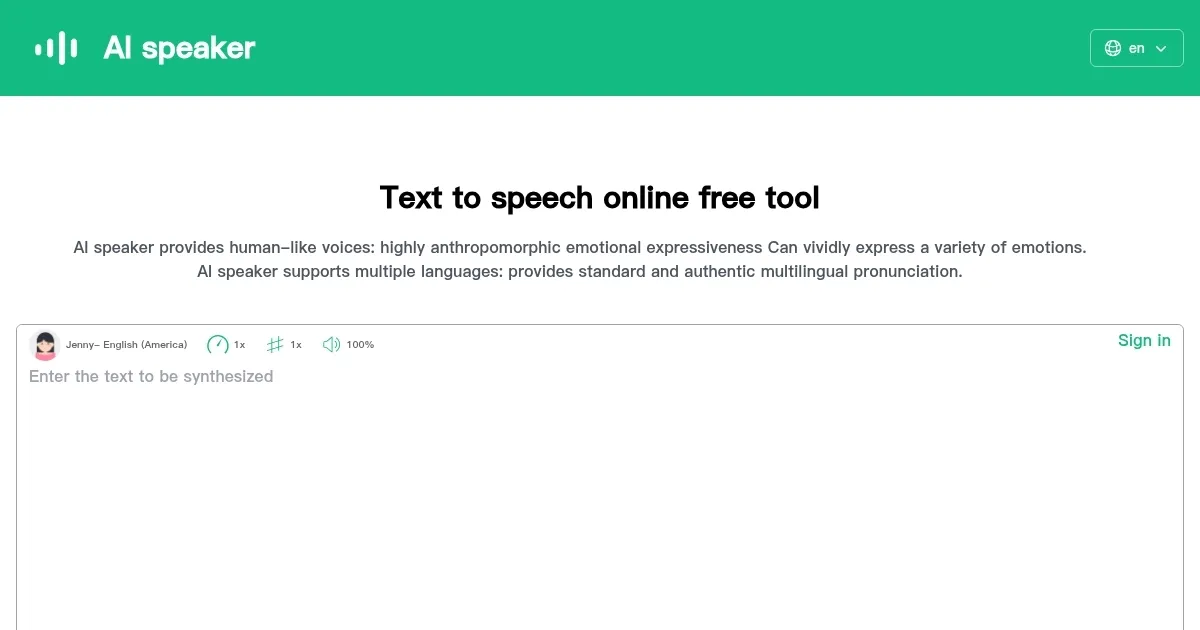
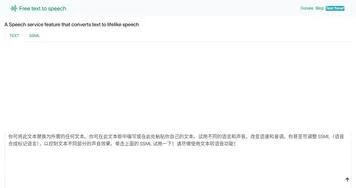
    Homepage Screenshot 📸

    AI Speaker screenshot

    What are the key features? ✨

    • Multilingual Support: Converts text to speech in over 100 languages.
    • Extensive Voice Library: Offers 600+ AI-generated voices for diverse tones.
    • Customization Options: Adjusts pitch, speed, and emotional tone.
    • MP3 Download: Exports audio files in MP3 format for easy use.
    • Free Access: Provides core features without requiring payment.

    Who is it for? 🤔

    AI Speaker is fantastic for content creators, educators, small business owners, and developers needing quick, high-quality text-to-speech solutions. Its free access and vast voice library make it ideal for those on tight budgets or working on multilingual projects, from YouTubers crafting voiceovers to teachers creating accessible learning materials.

    Examples of what you can use it for 💡

    • YouTuber: Creates engaging voiceovers for video intros in multiple languages.
    • Educator: Produces audio for e-learning modules to aid diverse students.
    • Small Business Owner: Generates professional ads for local radio campaigns.
    • Podcaster: Records narration for episodes without hiring voice actors.
    • App Developer: Integrates lifelike speech into apps for accessibility.

    Pros & Cons ⚖️

    • Free access to robust features.
    • Supports 100+ languages.
    • 600+ customizable AI voices.
    • Fast audio processing speed.
    • Niche language voices less polished.
    • Voice catalog can overwhelm.

    FAQs 💬

    Is AI Speaker free to use?
    Yes, AI Speaker offers core text-to-speech features for free, with optional premium voices available.
    What languages does AI Speaker support?
    It supports over 100 languages, including English, Spanish, Mandarin, and more.
    Can I download audio files from AI Speaker?
    Yes, you can export audio as MP3 files for easy use in projects.
    How many voices are available?
    AI Speaker provides over 600 AI-generated voices with various tones and accents.
    Is the tool suitable for professional projects?
    Yes, its lifelike voices and customization make it ideal for professional use like audiobooks or ads.
    Does AI Speaker require software installation?
    No, it’s a web-based tool, accessible directly through your browser.
    Can I adjust voice settings?
    Yes, you can tweak pitch, speed, and emotional tone for personalized output.
    How does AI Speaker compare to competitors?
    It offers more free features than [NaturalReader](https://www.naturalreaders.com/) and a larger voice library than [Speechelo](https://speechelo.com/).
    Is it beginner-friendly?
    Yes, its intuitive interface makes it easy for beginners to use.
    What file formats are supported for output?
    AI Speaker exports audio exclusively in MP3 format.

    Ready to try AI Speaker?

    Converts text to lifelike speech in 100+ languages with 600+ AI voices.

    Visit AI Speaker ↗

    AI Speaker alternatives 🔗

    1. ElevenLabs ElevenLabs Generates lifelike, expressive AI voices for diverse applications
    2. TTSMaker TTSMaker Transforms text into natural-sounding audio in multiple languages
    3. SpeechGen SpeechGen Insert any text to generate speech and download audio MP3 or WAV for any purpose
    4. Speaktor Speaktor Converts text to natural-sounding audio in multiple languages for diverse applications
    5. TTSMP3 TTSMP3 An AI tool that can convert written text into natural-sounding speech in 28+ languages
    6. Text to Speech Online Text to Speech Online Converts text into natural, expressive speech using advanced neural voices across many languages
    Share
    AI Speaker screenshot enlarged
    Best AI Tools

    Discover the best AI tools for any use case

    Explore
    • Tool Categories
    • AI Use Cases
    • AI Events
    • AI News
    • Saved Tools
    Company
    • About Us
    • Contact Us
    • Media & Partnerships
    • Suggest a Tool
    Legal
    • Privacy Policy
    • Terms of Service
    Copyright © 2026 Best AI Tools 415 Mission Street, 37th Floor, San Francisco, CA 94105