logo-darklogo-darklogo-darklogo-dark
  • Tool Categories
    • 🎨Art & Creative Design505
    • 🏢Business Management644
    • 💻Coding & Development515
    • 👮Detection83
    • 🧠General Use727
    • 🏥Health & Wellness55
    • 📷Image & Photo Analysis100
    • 🖼️Image Generation & Editing618
    • 📐Interior & Architectural Design37
    • 🎓Learning & Education483
    • ⚖️Legal & Finance90
    • 🎭Lifestyle & Entertainment236
    • 📢Marketing & Advertising627
    • 🎧Music & Audio138
    • 👔Office & Workplace1,014
    • 🔬Research & Data Analysis372
    • 👥Social Media245
    • 🎥Video Generation & Editing426
    • 👧🏻Virtual Companion135
    • 🎤Voice Generation & Editing381
    • ✍️Writing & Editing808
    • All Categories
    • AI Use Cases
  • News
  • Events
    • Academic Conferences
    • Developer Conferences
    • Expos / Trade Shows
    • Industry Summits
    • Workshops / Training
    • All Events
    • Past Events
  • Saved Tools
  • Suggest a Tool
✕
Home › Image Generation & Editing › Image Generation› Imagine Anything
Imagine Anything

Imagine Anything

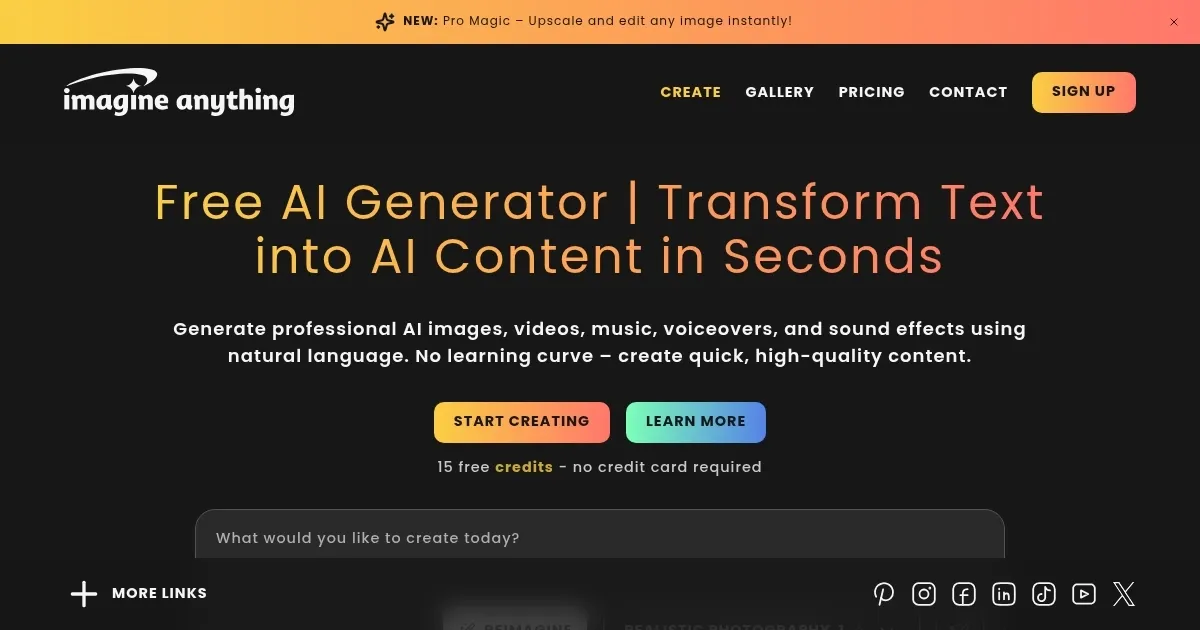
Generate stunning AI images, videos, and audio from text prompts instantly

Imagine Anything is an AI-powered platform that generates images, videos, music, and voiceovers from text prompts, offering a free tier and a premium plan for enhanced features. It uses models like Flux, SDXL, and Ideogram to produce visuals ranging from photorealistic portraits to abstract art. The platform supports text-to-image, image-to-image, and audio generation, with a user-friendly interface requiring no sign-up for basic use. It caters to content creators, marketers, and designers needing quick, customizable visuals.

The Smart Chat Context feature allows users to refine images using natural language, such as adjusting colors or adding elements. The Flux model improves text rendering and detail accuracy, like realistic hands or intricate backgrounds. Users can explore a community gallery for inspiration, covering categories like cartoons, retro designs, and wildlife. The free plan offers 10 image generations, while the premium plan unlocks higher-resolution outputs and additional models. The platform processes images rapidly, often in seconds, and supports batch generation for larger projects.

Compared to Midjourney, Imagine Anything has fewer advanced editing tools, such as inpainting or controlnet. DALL·E offers similar text-to-image capabilities but integrates better with other OpenAI tools. Canva’s Magic Design emphasizes templates, while Imagine Anything prioritizes open-ended creativity. The free tier is more generous than some competitors, but the premium plan’s cost is comparable to industry standards.

Limitations include occasional prompt misinterpretation, requiring specific descriptions for best results. The platform lacks advanced video editing or detailed image manipulation tools, which may frustrate professional users. Some Trustpilot reviews note the premium plan’s limited feature set compared to competitors. The community gallery, while inspiring, can be overwhelming without clear navigation.

For optimal use, provide detailed prompts to minimize errors. Experiment with different AI models to match your desired style. Use the free tier to test the platform before committing to premium. Check the community gallery for ideas, and combine with external editing tools for complex projects.

Visit Imagine Anything ↗
Categories
🖼️ Image
🖼️ Image Generation 🪄 Text to Image
🎨 Art
🎨 Art Generation 🌅 Illustration Generation 🖼️ Design Generation

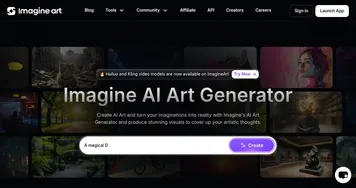
Homepage Screenshot 📸

Imagine Anything screenshot

Video Overview 🎬

What are the key features? ✨

  • Smart Chat Context: Refines images using natural language for easy adjustments.
  • Text-to-Image Generation: Converts text prompts into high-quality visuals instantly.
  • Community Gallery: Showcases user creations for inspiration across various styles.
  • Multiple AI Models: Uses Flux, SDXL, and Ideogram for diverse image outputs.
  • Audio Generation: Creates voiceovers and sound effects from text prompts.

Who is it for? 🤔

Imagine Anything is designed for content creators, social media managers, marketers, educators, and graphic designers who need quick, high-quality visuals or audio without advanced technical skills. Its free tier suits hobbyists experimenting with AI art, while the premium plan supports professionals crafting branding materials or campaign graphics.

Examples of what you can use it for 💡

  • Social Media Manager: Crafts eye-catching posts with AI-generated visuals.
  • Marketer: Produces campaign graphics from text prompts quickly.
  • Educator: Creates illustrations for teaching materials effortlessly.
  • Graphic Designer: Generates draft visuals for client projects.
  • Blogger: Designs unique images to enhance blog content.

Pros & Cons ⚖️

  • Free tier offers 10 image generations.
  • User-friendly interface, no sign-up.
  • Supports audio and video generation.
  • Limited advanced editing tools.
  • Premium plan lacks some features.

FAQs 💬

Is Imagine Anything free to use?
Yes, it offers a free tier with 10 image generations, with premium plans for more features.
Do I need to sign up to use it?
No, basic features are accessible without signing up, though premium requires an account.
What types of content can I create?
You can generate images, videos, music, and voiceovers from text prompts.
Which AI models does it use?
It uses Flux, SDXL, and Ideogram for varied image outputs.
Can I use generated images commercially?
Yes, images come with a commercial license for use in projects.
How fast is the image generation?
Images are typically generated in seconds, depending on complexity.
Is there a community for inspiration?
Yes, the community gallery showcases user creations across styles.
Can I edit generated images?
Basic edits are possible via Smart Chat Context, but advanced tools are limited.
How does it compare to Midjourney?
It’s more accessible for beginners but lacks Midjourney’s advanced editing options.
What if my prompt doesn’t work well?
Use specific, detailed prompts to improve accuracy and results.

Ready to try Imagine Anything?

Generate stunning AI images, videos, and audio from text prompts instantly

Visit Imagine Anything ↗

Imagine Anything alternatives 🔗

  1. ChatGPT ChatGPT All-round AI assistant generating human-like responses to user queries and tasks
  2. Grok Grok Delivers witty, real-time AI responses with advanced reasoning and image generation
  3. Imagen Imagen Generates photorealistic images from detailed text prompts
  4. Black Forest Labs Black Forest Labs Generates high-quality images from text prompts with precision and speed
  5. Kling AI Kling AI Generates cinematic videos from text or images with realistic motion
  6. Runway Runway Generates and edits AI-powered videos from text prompts
Share
Imagine Anything screenshot enlarged
Promote Imagine Anything
light badge
Copy Embed Code
dark badge
Copy Embed Code
neutral badge
Copy Embed Code
Best AI Tools

Discover the best AI tools for any use case

Explore
  • Tool Categories
  • AI Use Cases
  • AI Events
  • AI News
  • Saved Tools
Company
  • About Us
  • Contact Us
  • Media & Partnerships
  • Suggest a Tool
Legal
  • Privacy Policy
  • Terms of Service
Copyright © 2026 Best AI Tools 415 Mission Street, 37th Floor, San Francisco, CA 94105