Skip to content
logo-darklogo-darklogo-darklogo-dark
  • Tool Categories
    • 🎨Art & Creative Design505
    • 🏢Business Management644
    • 💻Coding & Development514
    • 👮Detection83
    • 🧠General Use728
    • 🏥Health & Wellness55
    • 📷Image & Photo Analysis100
    • 🖼️Image Generation & Editing618
    • 📐Interior & Architectural Design37
    • 🎓Learning & Education483
    • ⚖️Legal & Finance90
    • 🎭Lifestyle & Entertainment236
    • 📢Marketing & Advertising627
    • 🎧Music & Audio138
    • 👔Office & Workplace1,014
    • 🔬Research & Data Analysis373
    • 👥Social Media245
    • 🎥Video Generation & Editing426
    • 👧🏻Virtual Companion135
    • 🎤Voice Generation & Editing381
    • ✍️Writing & Editing808
    • All Categories
    • AI Use Cases
  • News
  • Events
    • Academic Conferences
    • Developer Conferences
    • Expos / Trade Shows
    • Industry Summits
    • Workshops / Training
    • All Events
    • Past Events
  • Saved Tools
  • Suggest a Tool
    ✕
    Home › Coding & Development › Development› Jam AI
    Jam AI

    Jam AI

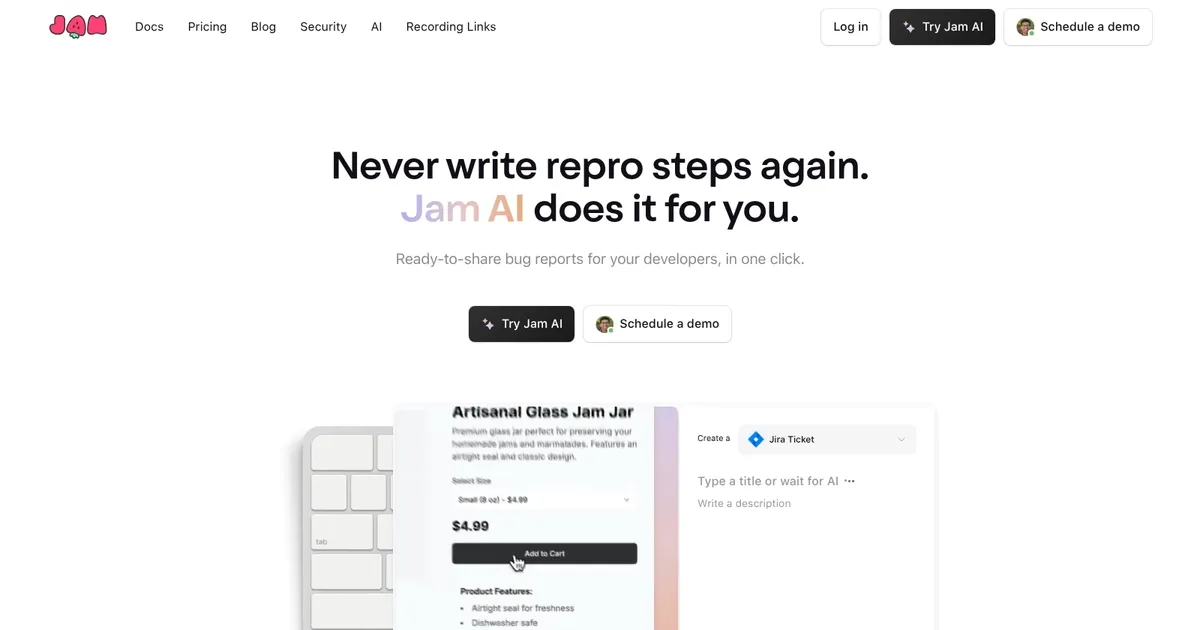
    Automates bug report generation from screen captures and logs, creating titles, descriptions, and repro steps instantly

    Jam AI is a debugging assistant designed to streamline the debugging process for developers by integrating an AI-driven approach to identifying and solving coding issues directly within one’s workflow.

    In that sense, by installing the Jam extension – users can report bugs in their code as they normally would. At this point, Jam analyzes the bug report in detail, incorporating a range of data such as browser and OS information, console logs, user actions, network logs, and linked services like GitHub repositories. The solution then leverages AI to quickly correlate this information, pinpoint the root cause of the issue, and even suggest relevant fixes. This process is intended to save developers time and effort by automating the initial analysis and diagnosis phase of debugging, enabling them to address issues more efficiently.

    Beyond AI-driven bug diagnosis, Jam offers several other features aimed at enhancing the debugging workflow. It provides code fix suggestions tailored to the user’s specific codebase and infrastructure, which can be directly implemented to resolve issues.

    Finally, we should mention that Jam AI emphasizes the importance of security, ensuring that codebase privacy and security are maintained throughout the debugging process.

    Visit Jam AI ↗
    Categories
    💻 Coding
    👨‍💻 Development ✅ Testing 🤖 Code Assistant 🌐 Browser 🔍 Code Review
    👔 Work
    📊 Report Generation 📡 Monitoring
    🏢 Business
    📋 Project Management

    Homepage Screenshot 📸

    Jam AI screenshot

    Video Overview 🎬

    Jam AI - Video Overview

    What are the key features? ✨

    • AI Auto-Title: generates precise, detailed titles summarizing the bug from the capture content
    • AI Repro Steps: automatically writes accurate, numbered reproduction steps based on recorded actions
    • One-Click Ticket Creation: pushes complete bug reports including video, logs, and AI content to Jira, Linear, or Notion
    • Automatic Technical Capture: records screen along with console logs, network requests, and browser environment details
    • AI Debugger: analyzes captured data to suggest potential causes, fixes, and code improvements

    Who is it for? 🤔

    Jam.dev AI helps software development teams, QA testers, product managers, designers, and customer support staff who regularly report bugs in web applications. Its especially useful for non-technical team members who need to file clear, actionable issues without deep debugging knowledge, as well as developers who want faster, more complete tickets to reduce reproduction time and miscommunication.

    Examples of what you can use it for 💡

    • QA Tester: records UI bugs during testing and generates ready-to-assign tickets with repro steps and logs automatically
    • Product Manager: reports customer-reported issues with full context so developers can fix them without follow-up questions
    • Support Agent: captures user-described problems in the browser and creates detailed bug tickets for the engineering team
    • Designer: files visual or interaction glitches with screen recordings and AI descriptions for quick handoff
    • Developer: uses instant replay to report flaky issues right after they occur without reproducing them manually

    Pros & Cons ⚖️

    • cuts manual writing time dramatically
    • captures essential dev logs automatically
    • seamless ticket integrations
    • usable by non-technical team members
    • AI may need occasional edits
    • limited free AI uses

    FAQs 💬

    What does Jam.dev AI actually do?
    It records browser sessions and uses AI to generate bug report titles, descriptions, and reproduction steps automatically.
    Is Jam.dev AI a browser extension?
    Yes, it installs as a Chrome extension (and works in compatible browsers) for easy capture during normal browsing.
    Which ticketing tools does it integrate with?
    It supports one-click ticket creation in Jira, Linear, and Notion.
    Do I need technical skills to use it?
    No, it's designed so anyone on a team can create developer-ready bug reports without knowing console logs or repro steps.
    How accurate is the AI-generated repro steps?
    Generally very accurate for clear captures, though short or complex bugs might need minor tweaks.
    Is there a free version?
    Yes, the free plan includes limited AI uses, with paid plans offering more or unlimited access.
    Does it work for open-source projects?
    Yes, Jam remains free for open-source projects with an application for team access.
    What about data privacy?
    Data is de-identified, shared only for processing with Google's Gemini, and opted out of model training.

    Ready to try Jam AI?

    Automates bug report generation from screen captures and logs, creating titles, descriptions, and repro steps instantly

    Visit Jam AI ↗

    Jam AI alternatives 🔗

    1. GitHub Copilot GitHub Copilot Enhances coding with AI-driven completions and chat assistance
    2. Replit AI Replit AI Transforms natural language prompts into fully deployable apps using AI agents
    3. Cursor Cursor Supercharges coding with AI agents that build, edit, and review code autonomously.
    4. Windsurf Windsurf Empowers developers with AI-driven code generation and real-time collaboration.
    5. BlackBox AI BlackBox AI Generates code snippets and assists developers with AI-powered tools
    6. Jules Jules An AI coding assistant that helps developers handle tasks such as fixing bugs and updating code
    Share
    Jam AI screenshot enlarged
    Best AI Tools

    Discover the best AI tools for any use case

    Explore
    • Tool Categories
    • AI Use Cases
    • AI Events
    • AI News
    • Saved Tools
    Company
    • About Us
    • Contact Us
    • Media & Partnerships
    • Suggest a Tool
    Legal
    • Privacy Policy
    • Terms of Service
    Copyright © 2026 Best AI Tools 415 Mission Street, 37th Floor, San Francisco, CA 94105