logo-darklogo-darklogo-darklogo-dark
  • Tool Categories
    • 🎨 Art
    • 🏢 Business
    • 💻 Coding
    • 👮 Detection
    • 🧠 General
    • 🏥 Health
    • 📷 Image Analysis
    • 🖼️ Image
    • 📐 Architecture
    • 🎓 Education
    • ⚖️ Legal/Finance
    • 🎭 Lifestyle
    • 📢 Advertising
    • 🎧 Music
    • 👔 Work
    • 🔬 Research
    • 👥 Social
    • 🎥 Video
    • 👧🏻 Companion
    • 🎤 Voice
    • ✍️ Writing
    • All Categories
    • AI Use Cases
  • News
  • Events
    • Academic Conferences
    • Developer Conferences
    • Expos / Trade Shows
    • Industry Summits
    • Online Events
    • Workshops / Training
    • All Events
    • Past Events
  • Saved Tools
  • Suggest a Tool
✕
Home › Writing & Editing › Email Writing› Lavender
Lavender

Lavender

Helping sellers write better emails faster, getting them more positive replies in less time

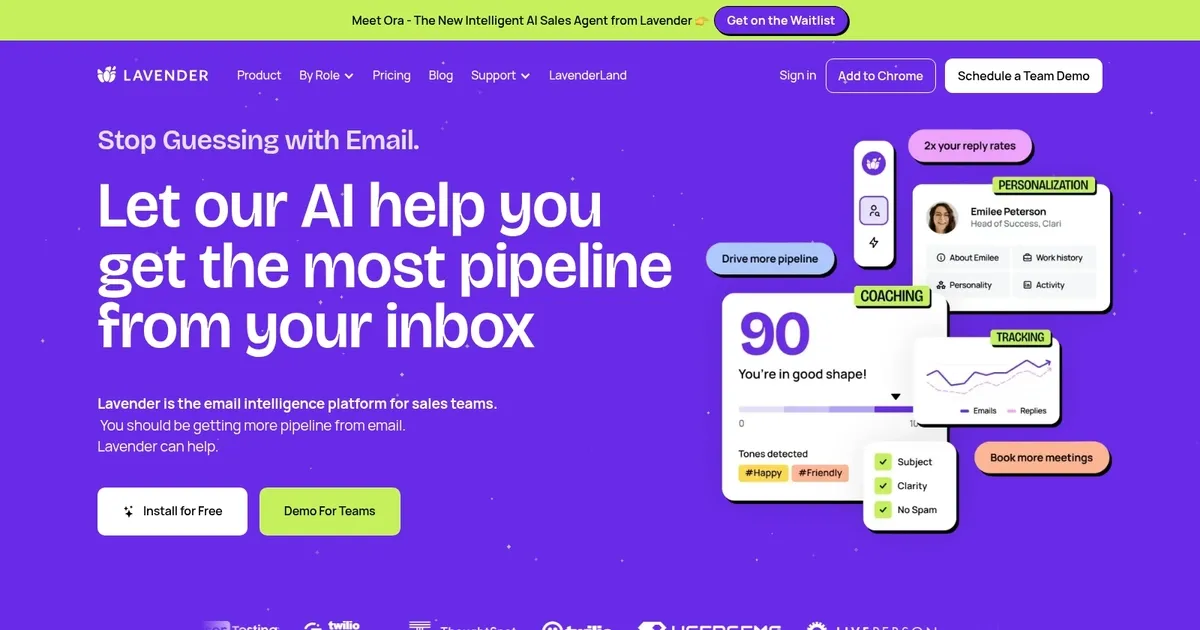
Lavender is an innovative AI-powered email assistant designed to empower users to craft more effective and engaging emails. It uses generative AI and data from millions of emails to provide real-time feedback, suggestions for improvement, and personalization tips.

Specifically, Lavender helps increase email reply rates by analyzing the quality of drafted emails, recommending changes for clarity and impact, and offering insights on how to tailor messages for recipients. This makes it useful for professionals seeking to enhance their email communication skills and ensure their messages stand out in the recipient’s inbox.

Furthermore, Lavender integrates with popular email platforms and sales tools such as Gmail, Outlook, Outreach, Salesloft, HubSpot, Apollo, and Groove, among others. This ensures that users can incorporate Lavender’s suggestions directly into their workflow, irrespective of the software they use for email correspondence.

Lavender’s AI also adapts to evolving email communication patterns, ensuring users benefit from contemporary best practices. Additionally, its security features, like SOC2 certification and GDPR compliance, ensure user data privacy and security — making it suitable for individuals and teams across various industries looking to improve their email engagement and efficiency.

Visit Lavender ↗

Categories

✍️ Writing

✉️ Email Writing

👔 Work

✉️ Email Assistant 📨 Email Response

📢 Advertising

🛍️ Sales Assistant 💼 Sales 📧 Email Generation 📨 Email Marketing

Screenshot 📸

Lavender screenshot

Video Overview 🎬

Lavender - Video Overview

What are the key features? ✨

  • Email Coach: Provides real-time scoring and actionable suggestions on clarity, tone, personalization, length, and mobile-friendliness as you write.
  • Ora AI Agent: Generative tool that drafts complete sales emails mimicking top performers, backed by billions of email data points.
  • Personalization Assistant: Pulls prospect insights from social data and suggests tailored intros or topics.
  • Analytics & Insights: Tracks team or individual email performance, highlights winning templates, and offers data-driven coaching.
  • Integrations: Works as a Chrome extension in Gmail/Outlook with easy setup and SOC2/GDPR compliance.

Who is it for? 🤔

This tool proves especially helpful for sales development representatives, account executives, business development professionals, and sales leaders who rely heavily on outbound cold email outreach and want to improve reply rates, shorten writing time, and build consistent team messaging without generic AI output.

Examples of what you can use it for 💡

  • SDRs: Use the real-time coach and Ora to craft personalized cold emails quickly and increase reply rates while learning best practices.
  • Account Executives: Refine follow-up sequences with scoring feedback and analytics to book more meetings and advance pipeline.
  • Sales Managers: Leverage team insights, template rankings, and aggregated coaching to reinforce standards and scale high-performing email habits.
  • Business Development Reps: Generate thoughtful, data-backed outreach that stands out and drives more opportunities from scratch.
  • Individual Sellers: Halve email writing time with AI suggestions while gaining confidence in structure, tone, and personalization.

Pros & Cons ⚖️

  • Real-time coaching boosts reply rates
  • Fast email drafting with Ora
  • Data-driven personalization insights
  • Affordable compared to full sales platforms
  • AI suggestions sometimes feel generic
  • Limited to email focus only

FAQs 💬

What does Lavender actually do?
Lavender acts as an AI sales email coach that scores your drafts, gives instant improvement tips, and uses Ora to generate full emails optimized for responses based on billions of analyzed messages.
How much does Lavender cost?
It offers a free tier with limited emails per month, then paid plans generally start around the low $30s per month for core features, with higher tiers for advanced analytics and teams, though exact pricing varies and often includes annual discounts.
Does Lavender work with Gmail and Outlook?
Yes, it installs as a Chrome extension and integrates directly into Gmail and Outlook for real-time coaching while you compose emails.
Is there a free trial or free version?
A free plan exists with basic access like 5 emails per month, plus free trials of pro features, and options for students, job seekers, or entrepreneurs to use it at no cost.
What makes Ora different from other AI writers?
Ora draws from Lavender's massive email dataset and fine-tuned models to write like a top sales performer rather than generic AI, aiming to avoid the "cold AI feel" buyers dislike.
Can teams use Lavender for coaching?
Yes, higher plans include team analytics, shared templates, performance insights, and ways to scale winning email strategies across reps.
How does Lavender improve reply rates?
It focuses on proven factors like personalization, brevity, strong CTAs, tone, and mobile optimization, with users often reporting 2x replies or better through consistent coaching.
Is Lavender secure for business use?
It holds SOC2 certification and GDPR compliance, with encrypted data and privacy-focused design suitable for sales teams.
Who competes with Lavender?
Similar tools include Regie.ai for AI email generation, Autobound for signal-based outreach, and broader platforms like Outreach or Apollo.io that include email features.
Is Lavender worth it for solo reps?
Many individual sellers find value in the time savings and reply improvements, especially if cold email forms a big part of their outreach strategy.

Ready to try Lavender?

Helping sellers write better emails faster, getting them more positive replies in less time

Visit Lavender ↗

Lavender alternatives 🔗

  1. SwiftKey AI Keyboard SwiftKey AI Keyboard Enhances typing with AI-powered autocorrect and predictions
  2. Grammarly Grammarly Enhances writing with grammar, tone, and style suggestions.
  3. Notion Mail Notion Mail Organizes emails automatically with AI while drafting replies and scheduling meetings
  4. Superhuman Mail Superhuman Mail AI-powered, premium email client designed to make email management easier and improve productivity
  5. Instantly Instantly A sales automation SaaS tool for B2B companies to help them scale their outreach campaigns
  6. Hix.ai Hix.ai An AI-powered tool that aims to revolutionize how businesses handle customer interactions and support
Share
Lavender screenshot enlarged
Promote Lavender
light badge
Copy Embed Code
dark badge
Copy Embed Code
neutral badge
Copy Embed Code
Best AI Tools

Discover the best AI tools for any use case

About Us | Contact Us | Suggest an AI Tool
Privacy Policy | Terms of Service
Copyright © 2026 Best AI Tools 415 Mission Street, 37th Floor, San Francisco, CA 94105