Skip to content
logo-darklogo-darklogo-darklogo-dark
  • Tool Categories
    • 🎨Art & Creative Design505
    • 🏢Business Management644
    • 💻Coding & Development514
    • 👮Detection83
    • 🧠General Use728
    • 🏥Health & Wellness55
    • 📷Image & Photo Analysis100
    • 🖼️Image Generation & Editing618
    • 📐Interior & Architectural Design37
    • 🎓Learning & Education483
    • ⚖️Legal & Finance90
    • 🎭Lifestyle & Entertainment236
    • 📢Marketing & Advertising627
    • 🎧Music & Audio138
    • 👔Office & Workplace1,014
    • 🔬Research & Data Analysis373
    • 👥Social Media245
    • 🎥Video Generation & Editing426
    • 👧🏻Virtual Companion135
    • 🎤Voice Generation & Editing381
    • ✍️Writing & Editing808
    • All Categories
    • AI Use Cases
  • News
  • Events
    • Academic Conferences
    • Developer Conferences
    • Expos / Trade Shows
    • Industry Summits
    • Workshops / Training
    • All Events
    • Past Events
  • Saved Tools
  • Suggest a Tool
    ✕
    Home › General Use › Chatbot› Lunabot
    Lunabot

    Lunabot

    Browser extension that adds ChatGPT on any webpage; also available for Telegram and Siri

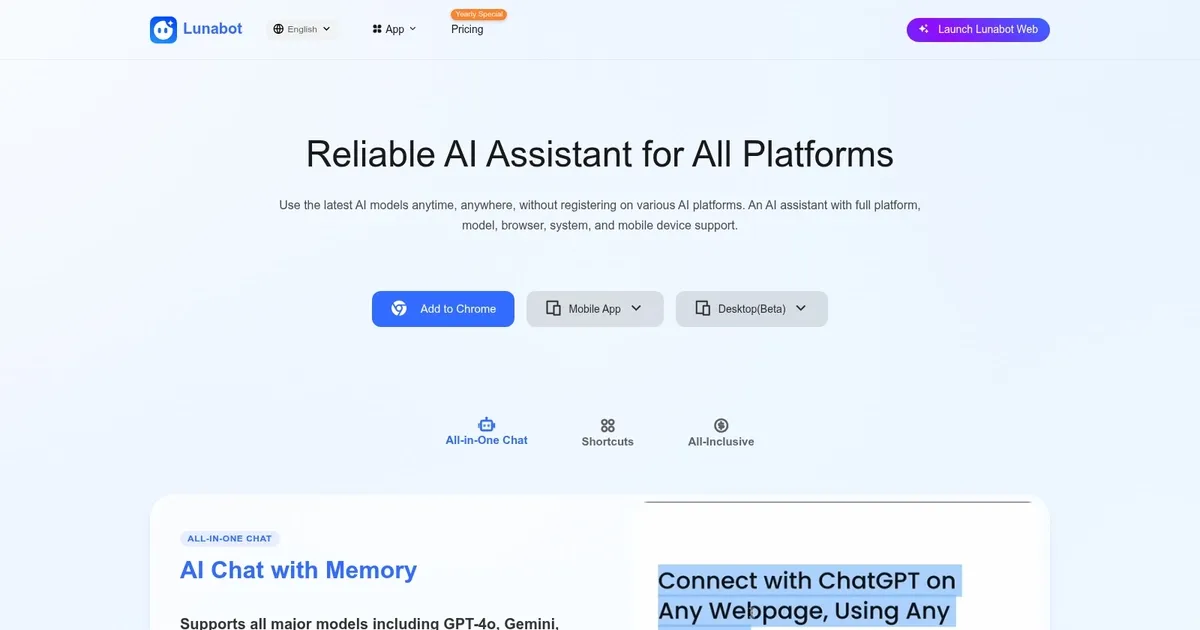
    Lunabot is a ChatGPT connector tool that lets you access the popular service right inside the apps and from the platforms you use the most.

    It offers web and desktop apps; browser extensions for Chrome, Edge, and Firefox; as well as a Telegram Bot and a Siri shortcut.

    Once enabled, Lunabot will let you use ChatGPT shortcuts to translate, summarize, explain, fix grammar, compose, and more with customized commands — and use the ChatGPT sidebar on any website.

    Once you install the tool (web or mobile app), all you have to do is select the text, start Lunabot and then select what you want to do with it. Or you can fire up the AI writer while reading some text – that is also possible with Lunabot.

    In Telegram, Lunabot works like a bot, while on Siri-enabled devices – it can be installed as a shortcut and then ignited with “Hey Siri.”

    In all cases, you get access to the full power of ChatGPT. And we love that.

    Visit Lunabot ↗
    Categories
    🧠 General
    💬 Chatbot 🤖 Assistant 🧠 Large Language Model ✅ Productivity
    ✍️ Writing
    🤖 Writing Assistant
    🎓 Education
    ❓ Answer
    💻 Coding
    🌐 Browser

    Homepage Screenshot 📸

    Lunabot screenshot

    Pros & Cons ⚖️

    • Makes ChatGPT easily accessible across platforms and devices
    • Works with most popular web browsers
    • Also integrates with Telegram and Siri
    • Free plan is rather limited

    Ready to try Lunabot?

    Browser extension that adds ChatGPT on any webpage; also available for Telegram and Siri

    Visit Lunabot ↗

    Lunabot alternatives 🔗

    1. ChatGPT ChatGPT All-round AI assistant generating human-like responses to user queries and tasks
    2. Sider Sider Quick access to ChatGPT from a sidebar of your web browser
    3. Monica Monica A browser extension powered by ChatGPT that acts as a chatbot assistant
    4. GPTPLUS GPTPLUS Integrates sidebar AI chat for writing, translation, code help and Q&A on any webpage
    5. Brave Leo Brave Leo Assists with web queries, content creation, and document analysis in-browser
    6. Merlin Merlin A ChatGPT browser plugin for productivity tools such as content or video summarizing
    Share
    Lunabot screenshot enlarged
    Best AI Tools

    Discover the best AI tools for any use case

    Explore
    • Tool Categories
    • AI Use Cases
    • AI Events
    • AI News
    • Saved Tools
    Company
    • About Us
    • Contact Us
    • Media & Partnerships
    • Suggest a Tool
    Legal
    • Privacy Policy
    • Terms of Service
    Copyright © 2026 Best AI Tools 415 Mission Street, 37th Floor, San Francisco, CA 94105