MagickPen
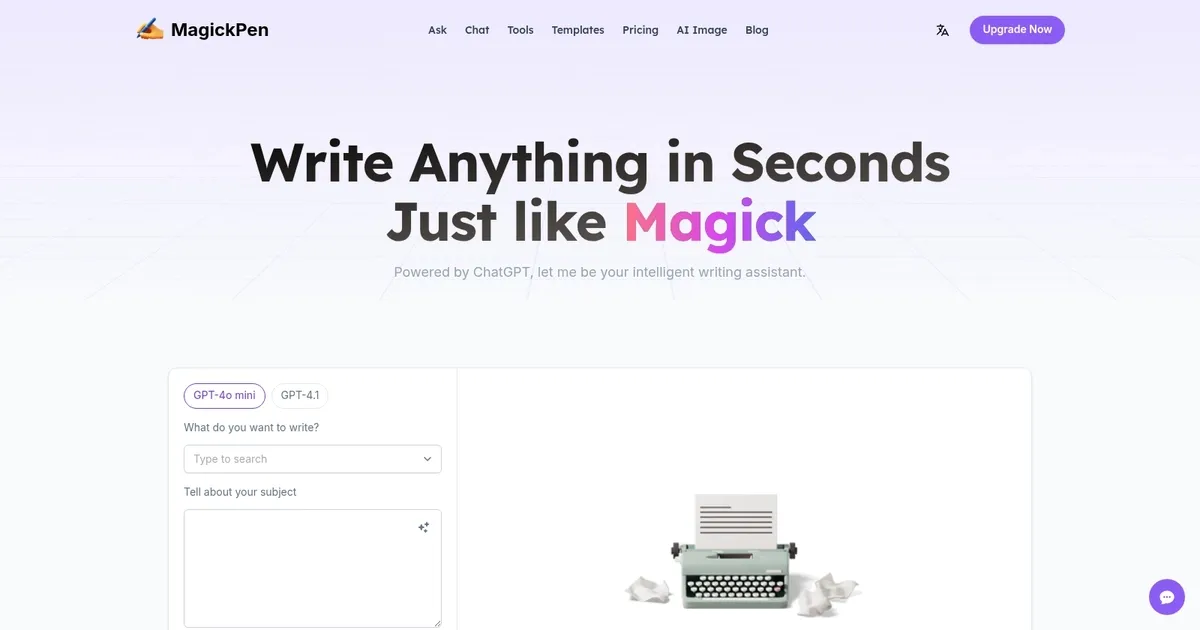
Write anything in seconds, just like Magick - powered by ChatGPT
MagickPen is an AI-powered writing assistant designed to help users generate a variety of written content quickly and efficiently. Leveraging the capabilities of OpenAI’s GPT tech, it lets users produce professional, precise, and creative text across many domains — including article writing, educational materials, personal planning, coding, email drafting, business documentation, and marketing content.
With over 90 templates, MagickPen caters to various writing needs, from crafting compelling articles, research papers, and educational games to generating social media posts, business plans, and even coding snippets. The tool is designed to streamline the content creation process, making writing accessible and easier for professionals, students, freelancers, and anyone needing quality written content.
MagickPen users can customize their writing projects according to language, tone, length, and format — ensuring that the output closely aligns with their requirements. The platform offers both free and premium plans, with the latter including additional features and a higher word generation limit.
For those needing specialized or high-volume content, MagickPen provides options for monthly subscriptions or pay-as-you-go credits. All this makes MagickPen an attractive tool for anyone looking to enhance their writing efficiency and quality with the help of artificial intelligence.
Homepage Screenshot 📸
What are the key features? ✨
- AI Engines: Offers Fast mode for quick efficient generation and Advanced mode for precise creative output.
- Templates: Provides over 90 customizable templates across writing, education, lifestyle, and creativity categories.
- Customization: Allows setting roles, languages, tones, lengths, formats, and publishing options for tailored results.
- Web Search: Integrates real-time web search to include current information in generated content.
- Multi-Platform: Works seamlessly on web, Chrome extension, Windows, and Mac devices.
Who is it for? 🤔
Examples of what you can use it for 💡
- Student: Generates essay outlines, paragraphs, or full drafts with proper tone and length for assignments.
- Blogger: Creates engaging articles or posts quickly using templates and web search for fresh details.
- Marketer: Produces ad copy, email campaigns, or product descriptions with customized persuasive tones.
- Creative Writer: Brainstorms story ideas, extends scenes, or generates dialogue using continuous generation.
- Professional: Polishes grammar in reports, translates business text, or repairs simple code snippets efficiently.
Pros & Cons ⚖️
- Fast content generation
- Highly customizable
- Multi-platform access
- Affordable paid plans
- Limited free credits
- Advanced mode rationed
FAQs 💬
Ready to try MagickPen?
Write anything in seconds, just like Magick - powered by ChatGPT
Visit MagickPenMagickPen alternatives 🔗