logo-darklogo-darklogo-darklogo-dark
  • Tool Categories
    • ๐ŸŽจArt & Creative Design505
    • ๐ŸขBusiness Management644
    • ๐Ÿ’ปCoding & Development515
    • ๐Ÿ‘ฎDetection83
    • ๐Ÿง General Use727
    • ๐ŸฅHealth & Wellness55
    • ๐Ÿ“ทImage & Photo Analysis100
    • ๐Ÿ–ผ๏ธImage Generation & Editing618
    • ๐Ÿ“Interior & Architectural Design37
    • ๐ŸŽ“Learning & Education483
    • โš–๏ธLegal & Finance90
    • ๐ŸŽญLifestyle & Entertainment236
    • ๐Ÿ“ขMarketing & Advertising627
    • ๐ŸŽงMusic & Audio138
    • ๐Ÿ‘”Office & Workplace1,014
    • ๐Ÿ”ฌResearch & Data Analysis372
    • ๐Ÿ‘ฅSocial Media245
    • ๐ŸŽฅVideo Generation & Editing426
    • ๐Ÿ‘ง๐ŸปVirtual Companion135
    • ๐ŸŽคVoice Generation & Editing381
    • โœ๏ธWriting & Editing808
    • All Categories
    • AI Use Cases
  • News
  • Events
    • Academic Conferences
    • Developer Conferences
    • Expos / Trade Shows
    • Industry Summits
    • Workshops / Training
    • All Events
    • Past Events
  • Saved Tools
  • Suggest a Tool
โœ•
Home › Writing & Editing › Writing Assistant› HyperWrite
HyperWrite

HyperWrite by OthersideAI

A writing assistant that learns your unique writing style and preferences

HyperWrite is an AI-powered writing assistant designed to transform the way individuals and professionals create content, manage communication, and conduct research. It is actually a suite of tools offering a wide array of functionalities to enhance productivity and creativity in writing tasks.

One of HyperWrite’s most popular tools is the Flexible AutoWrite tool, which assists users in crafting content on any subject or format. Additionally, the platform offers specific tools for summarizing texts, simplifying complex information (Explain Like I’m 5), rewriting content while preserving its original meaning, and crafting well-composed email responses.

Then there’s the Magic Editor, which can enhance documents’ clarity, tone, and style — thereby ensuring high-quality writing outputs. This helps a wide range of users, including marketers, bloggers, and businesses of all sizes.

Or you can use HyperWrite’s AI Writer and create written content from a single sentence, with AI figuring out what’s important on your behalf. There is also Story Generator, which will take a different narrative to come up with, guess, stories.

We should also mention HyperWrite’s Personal Assistant, which extends the utility of AI beyond writing — offering an AI-powered solution for managing a wide range of online tasks. These would include things like organizing Gmail inboxes and drafting responses to booking flights and conducting web-based research.

Finally, there’s HyperChat, which offers users the ability to interact with an advanced AI in a conversational manner. Pretty cool.

Visit HyperWrite ↗
Categories
โœ๏ธ Writing
๐Ÿค– Writing Assistant ๐Ÿ…ฐ๏ธ Text Generation โœ‰๏ธ Email Writing ๐Ÿ” Rewriting ๐Ÿ“ Summarizer
๐Ÿ‘” Work
๐Ÿ”— Agent โœ‰๏ธ Email Assistant ๐Ÿค– Copilot โšก Work Productivity
๐Ÿง  General
โœ… Productivity ๐Ÿค– Assistant

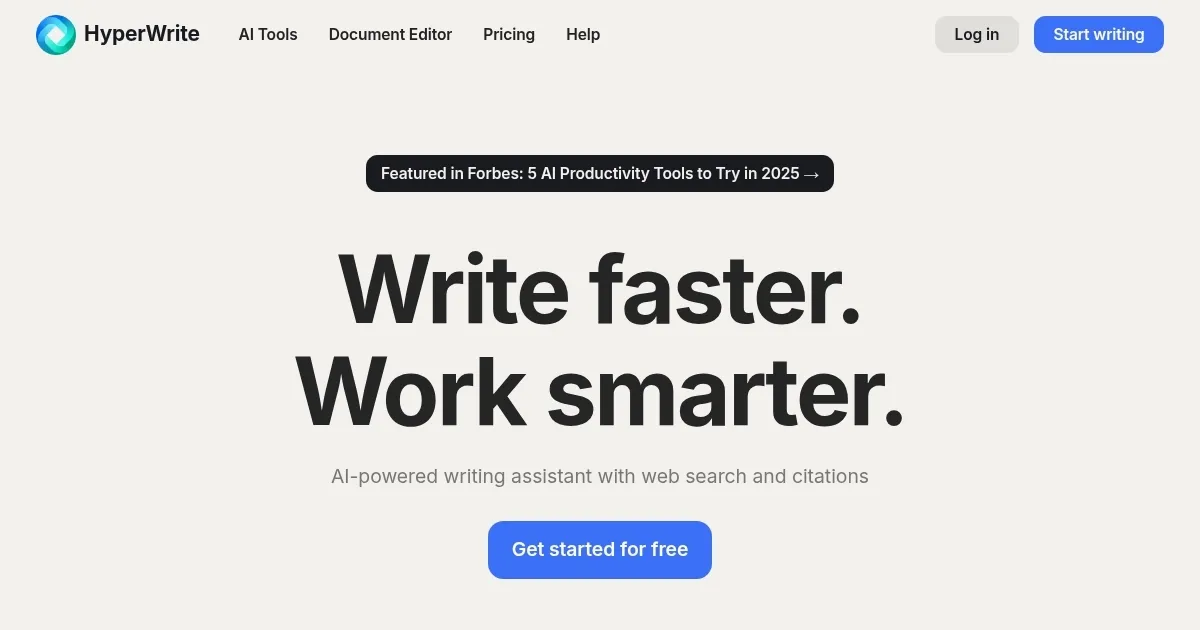
Homepage Screenshot 📸

HyperWrite screenshot

Video Overview 🎬

What are the key features? ✨

  • AutoWrite: This tool uses AI to assist users in writing or creating content across various formats and styles.
  • Summarizer: Condense information and quickly get the key points and essential details without having to read through the entire text, saving you time and effortโ€‹โ€‹.
  • Explain Like I'm 5: This feature is designed to simplify complex topics into easy-to-understand explanations so that anyone can grasp them.
  • Email Responder: Drafting emails doesn't have to be time-consuming, with Email Responder helping you by creating well-written replies based on the original email and a short response from you.
  • AI Writer: A versatile content creation tool that generates high-quality, engaging text on any topic and in any format.

Who is it for? 🤔

HyperWrite is made for a diverse audience that includes content creators, marketers, bloggers, businesses, and educators. It is also beneficial for anyone looking for assistance in generating written content quickly and efficiently, simplifying complex information, or enhancing productivity through automation in writing and communication tasks. Additionally, the platform caters to individuals who want to leverage AI to save time, improve the quality of their work, or overcome creative blocks, making it a versatile tool for a wide range of users across different industries and professions.

Examples of what you can use it for 💡

  • Create content for blogs and social media
  • Improve and streamline your email communication
  • Understand complex information with the "Explain Like I'm 5" tool
  • Research and gather information on different topics
  • Get help with creative writing and storytelling

Pros & Cons ⚖️

  • One tool that can cover all your writing needs
  • Great for social media managers and marketers
  • Also useful for general use in any organization
  • The auto-write feature could be annoying at times

FAQs 💬

What is HyperWrite mainly used for?
HyperWrite assists with drafting, editing, rewriting, and researching text across emails, articles, essays, and more using advanced AI tools.
Does HyperWrite work with a browser extension?
Yes, its Chrome extension provides real-time TypeAhead suggestions and AI assistance directly in tools like Gmail and Google Docs.
Can HyperWrite handle academic research?
Scholar AI searches millions of peer-reviewed articles to provide accurate, citation-backed insights for research and writing.
How does HyperWrite personalize writing?
It uses custom personas and learns from user refinements to match tone, style, and phrasing preferences over time.
Is HyperWrite suitable for beginners?
It offers an intuitive interface with hundreds of pre-made tools and a free tier, making it accessible for new users while scaling for advanced needs.
What kinds of content can HyperWrite generate?
It creates blog posts, emails, social media copy, speeches, summaries, rewrites, and original content from simple prompts.
Does HyperWrite support real-time suggestions?
TypeAhead delivers intelligent, context-aware completions as you type, which users accept with a simple key press.
Can users create their own AI tools in HyperWrite?
Yes, the platform allows building custom AI tools tailored to specific workflows or tasks.
How does HyperWrite compare to general chatbots?
It focuses on specialized writing tools, document editing, and research integration rather than broad conversation alone.
Is HyperWrite good for email writing?
The Email Responder crafts quick, effective replies from brief inputs, integrating smoothly in Gmail for professional communication.

Ready to try HyperWrite?

A writing assistant that learns your unique writing style and preferences

Visit HyperWrite ↗

HyperWrite alternatives 🔗

  1. ChatGPT ChatGPT All-round AI assistant generating human-like responses to user queries and tasks
  2. Gemini Gemini Generates responses from text, images, audio, and video inputs using advanced multimodal AI
  3. Claude Claude Assists users in reasoning, coding, writing, and analyzing data with advanced AI models
  4. Poe Poe Aggregates top AI models for seamless chatting and bot creation
  5. SwiftKey AI Keyboard SwiftKey AI Keyboard Enhances typing with AI-powered autocorrect and predictions
  6. Brave Leo Brave Leo Assists with web queries, content creation, and document analysis in-browser
Share
HyperWrite screenshot enlarged
Promote HyperWrite
light badge
Copy Embed Code
dark badge
Copy Embed Code
neutral badge
Copy Embed Code
Best AI Tools

Discover the best AI tools for any use case

Explore
  • Tool Categories
  • AI Use Cases
  • AI Events
  • AI News
  • Saved Tools
Company
  • About Us
  • Contact Us
  • Media & Partnerships
  • Suggest a Tool
Legal
  • Privacy Policy
  • Terms of Service
Copyright © 2026 Best AI Tools 415 Mission Street, 37th Floor, San Francisco, CA 94105