NMKD Stable Diffusion GUI
Generates AI images from text prompts locally using Stable Diffusion models on your hardware
The NMKD Stable Diffusion GUI – AI Image Generator is a specialized tool designed to facilitate the generation of images from text inputs, translating descriptive language into visual content. The application operates locally on the user’s hardware, ensuring privacy and control over the content creation process.
Leveraging the capabilities of the Stable Diffusion machine learning model, it can produce uncensored and unfiltered images based on user prompts.
NMKD Stable Diffusion GUI supports a range of features, such as supporting text-to-image and image-to-image transformations, inclusion of dependencies for hassle-free operation, and the ability to run multiple prompts simultaneously. It also offers advanced functionalities like instruction-based image editing, custom model support, built-in upscaling and face restoration, prompt queue and history, and the generation of seamless images suitable for textures.
Aside from its core functionalities, NMKD Stable Diffusion GUI provides an integrated image viewer, support for loading custom and LoRA concepts, and various user experience enhancements. It promises impressive performance metrics, capable of rendering images in less than a second on high-end GPUs.
Finally, we should mention that the tool is under active development, with ongoing updates to introduce new features and improvements. If you want to support its further development, you can support NMKD through a Patreon page.
Homepage Screenshot 📸
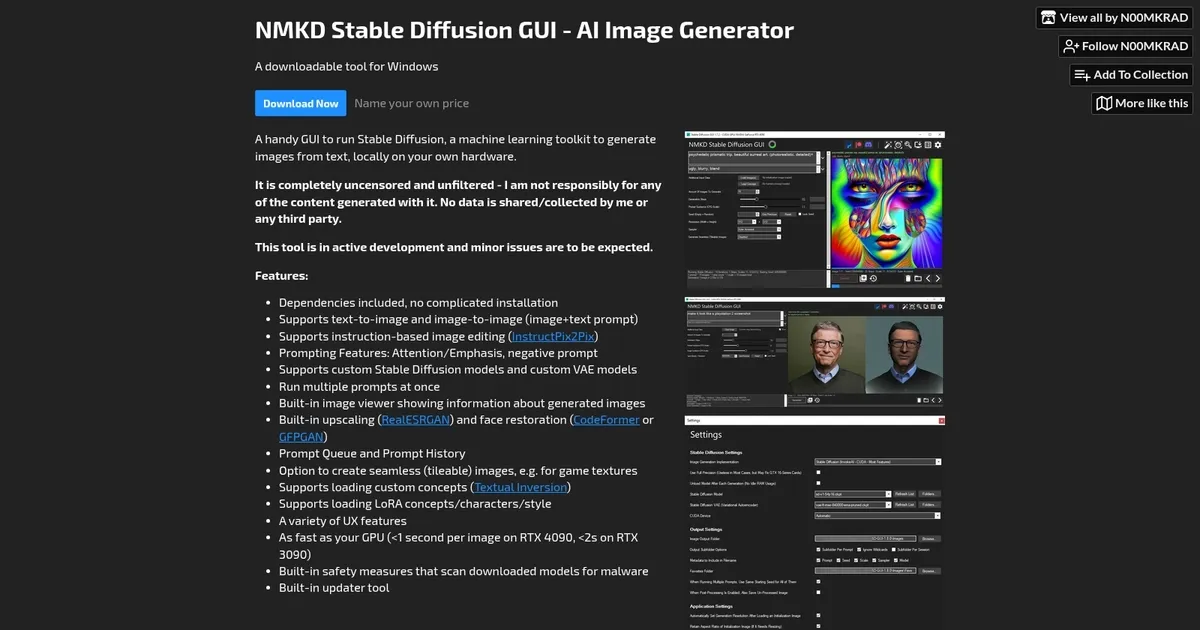
What are the key features? ✨
- Text-to-Image Generation: Creates original images from detailed text prompts using Stable Diffusion models.
- Image-to-Image & InstructPix2Pix: Transforms uploaded images with text guidance or natural-language editing instructions.
- Built-in Upscaling & Face Restoration: Applies RealESRGAN for higher resolution and CodeFormer/GFPGAN for facial detail fixes.
- LoRA Support & Training: Loads and trains LoRA models for custom styles, characters, or concepts directly in the app.
- Prompt Queue & History: Runs multiple prompts in sequence and saves generations with metadata for easy reuse.
Who is it for? 🤔
Examples of what you can use it for 💡
- Beginner AI artist: Generates quick concept art from descriptive prompts without installation hassles.
- Digital texture creator: Produces seamless tileable images for game assets or backgrounds using the dedicated mode.
- Photo editor enthusiast: Edits existing pictures with InstructPix2Pix by describing changes like add rain or change outfit.
- Character designer: Fine-tunes custom LoRAs to consistently produce specific styles or faces across batches.
- Hobbyist upscaler: Takes low-res sketches, generates variations, upscales them, and restores faces for polished results.
Pros & Cons ⚖️
- Easy one-click setup
- Completely offline & private
- Fast on good GPUs
- Includes upscaling & fixes
- Windows-only
- Limited recent updates
FAQs 💬
Ready to try NMKD Stable Diffusion GUI?
Generates AI images from text prompts locally using Stable Diffusion models on your hardware
Visit NMKD Stable Diffusion GUINMKD Stable Diffusion GUI alternatives 🔗