logo-darklogo-darklogo-darklogo-dark
  • Tool Categories
    • 🎨Art & Creative Design505
    • 🏢Business Management644
    • 💻Coding & Development515
    • 👮Detection83
    • 🧠General Use727
    • 🏥Health & Wellness55
    • 📷Image & Photo Analysis100
    • 🖼️Image Generation & Editing618
    • 📐Interior & Architectural Design37
    • 🎓Learning & Education483
    • ⚖️Legal & Finance90
    • 🎭Lifestyle & Entertainment236
    • 📢Marketing & Advertising627
    • 🎧Music & Audio138
    • 👔Office & Workplace1,014
    • 🔬Research & Data Analysis372
    • 👥Social Media245
    • 🎥Video Generation & Editing426
    • 👧🏻Virtual Companion135
    • 🎤Voice Generation & Editing381
    • ✍️Writing & Editing808
    • All Categories
    • AI Use Cases
  • News
  • Events
    • Academic Conferences
    • Developer Conferences
    • Expos / Trade Shows
    • Industry Summits
    • Workshops / Training
    • All Events
    • Past Events
  • Saved Tools
  • Suggest a Tool
✕
Home › Office & Workplace › Meeting Assistant› Poised
Poised

Poised

Delivers private, real-time AI coaching on speech clarity, pace, confidence, and energy during virtual calls

Poised is an AI-powered communication coach designed to enhance the performance of professionals during online meetings and presentations. It provides real-time feedback on various aspects of verbal communication, such as the use of filler words, pacing, clarity, confidence, and energy levels.

The tool sings along popular communication platforms like Zoom, Google Meet, Slack, and Microsoft Teams — offering insights without being visible to other meeting participants. It also assists users in refining their speaking abilities by highlighting areas for improvement based on specific meeting goals, making follow-ups easier with auto-generated summaries and action items.

Targeted at a wide range of users — including sales teams, leaders, product managers, marketers, and more — Poised aims to foster clear, confident communication that can lead to better outcomes in professional settings. It is praised for its non-intrusive, user-friendly interface that makes it easy to incorporate into daily routines.

Ultimately, Poised wants to be a valuable asset for anyone looking to enhance their communication skills by providing personalized feedback and suggesting actionable steps for improvement after each interaction.

Visit Poised ↗
Categories
👔 Work
🤝 Meeting Assistant 💼 Workplace Assistant 🗒️ Note Taking
🎓 Education
🏋️ Coaching
🎤 Voice
💬 Speech-to-Text
🏢 Business
🤝 Consulting

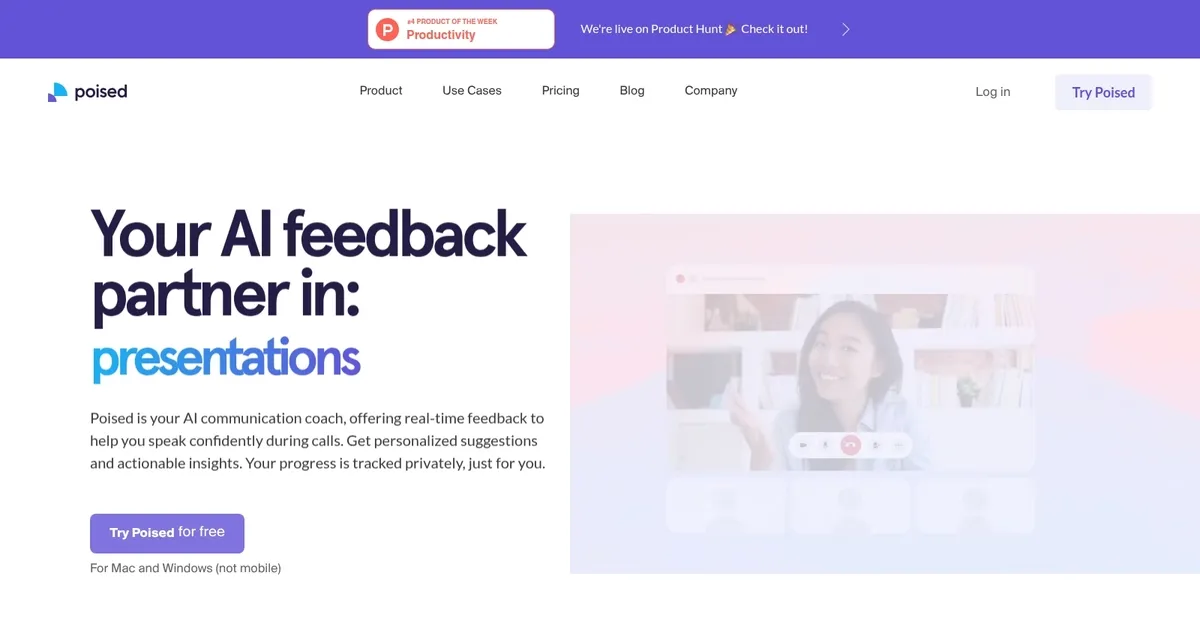
Homepage Screenshot 📸

Poised screenshot

What are the key features? ✨

  • Real-time feedback: Provides instant, private suggestions on speech patterns, filler words, pace, confidence, energy, and more during meetings.
  • Post-meeting summaries: Automatically generates concise recaps, action items, and key points after calls without requiring manual note-taking.
  • Progress tracking: Analyzes trends over time with scores, benchmarks, and personalized challenges to show communication improvement.
  • Privacy-focused integration: Works discreetly with 800+ tools like Zoom, Google Meet, Teams, and Slack, with no bot joining or others aware.
  • Visual analysis (Mac): Monitors facial expressions, eye contact, and delivery cues through camera for additional coaching insights.

Who is it for? 🤔

Poised helps professionals who rely on virtual meetings and calls, such as product managers, executives, founders, salespeople, job candidates, and anyone who wants to sound more polished and confident without formal coaching or public practice. Its especially useful for people who notice they use too many fillers, rush their points, or lose energy in long discussions, and who value private, real-time guidance that fits into their existing workflow rather than separate training sessions.

Examples of what you can use it for 💡

  • Product manager: Uses Poised during sprint reviews and stakeholder calls to reduce hedging and improve clarity when explaining technical updates.
  • Sales professional: Gets real-time nudges on energy and persuasiveness during customer demos to close deals more effectively.
  • Job candidate: Practices interview responses with feedback on pace, confidence, and filler words to perform better in virtual interviews.
  • Executive: Tracks empathy and conciseness in leadership meetings to communicate vision more impactfully to teams.
  • Remote team member: Improves overall delivery and reduces interruptions in daily standups and cross-functional discussions.

Pros & Cons ⚖️

  • Real-time private coaching
  • Seamless platform integration
  • Helpful post-meeting summaries
  • Clear progress tracking
  • Limited to desktop only
  • Free plan has meeting caps

FAQs 💬

What platforms does Poised work with?
Poised integrates with over 800 communication tools, including Zoom, Google Meet, Microsoft Teams, Slack, and many others for seamless use during calls and meetings.
Is Poised noticeable to other meeting participants?
No, Poised operates privately with feedback visible only to you, and no bot joins the call or shares anything with others.
Does Poised record my meetings?
Poised does not record unless you explicitly choose to save snippets, and all data remains secure and under your control.
What kind of feedback does Poised give in real time?
It provides instant tips on filler words, hedging, pace, confidence, energy, empathy, conciseness, interruptions, and on Mac, facial expressions and eye contact.
Is there a free version of Poised?
Yes, the Starter plan is free forever with limited meetings per week and basic real-time feedback features.
Can Poised help with job interviews?
Yes, many users apply it during practice or actual virtual interviews to improve clarity, reduce fillers, and boost confidence scores.
Does Poised work on mobile devices?
No, Poised currently supports MacOS and Windows desktops only, not mobile or tablet platforms.
How does Poised compare to hiring a human coach?
Poised offers always-available, real-time feedback in your actual meetings at a lower cost, though it lacks the nuanced personal interaction of a live coach.
What post-meeting features does Poised include?
It auto-generates summaries, action items, analytics reports, and trend tracking to review performance and plan improvements.
Is my data safe with Poised?
Yes, Poised emphasizes strong privacy and security, with no data selling and user control over any recordings or storage.

Ready to try Poised?

Delivers private, real-time AI coaching on speech clarity, pace, confidence, and energy during virtual calls

Visit Poised ↗

Poised alternatives 🔗

  1. Slack AI Slack AI Search smarter, summarize conversations instantly, and be at your most productive
  2. FigJam AI FigJam AI Instantly visualize ideas, suggest best practices, and automate tedious tasks
  3. ClickUp Brain ClickUp Brain Automates workflows with contextual AI for tasks, meetings, and content creation
  4. Miro AI Miro AI Visual collaboration platform that lets you build the next big thing with a prompt and a chat
  5. Zoom AI Companion Zoom AI Companion Get high-quality results when drafting emails and chat messages, summarizing meetings and chat threads
  6. TurboScribe TurboScribe Transcribes audio and video files to accurate text instantly
Share
Poised screenshot enlarged
Promote Poised
light badge
Copy Embed Code
dark badge
Copy Embed Code
neutral badge
Copy Embed Code
Best AI Tools

Discover the best AI tools for any use case

Explore
  • Tool Categories
  • AI Use Cases
  • AI Events
  • AI News
  • Saved Tools
Company
  • About Us
  • Contact Us
  • Media & Partnerships
  • Suggest a Tool
Legal
  • Privacy Policy
  • Terms of Service
Copyright © 2026 Best AI Tools 415 Mission Street, 37th Floor, San Francisco, CA 94105